10
5. Hybrid QoS
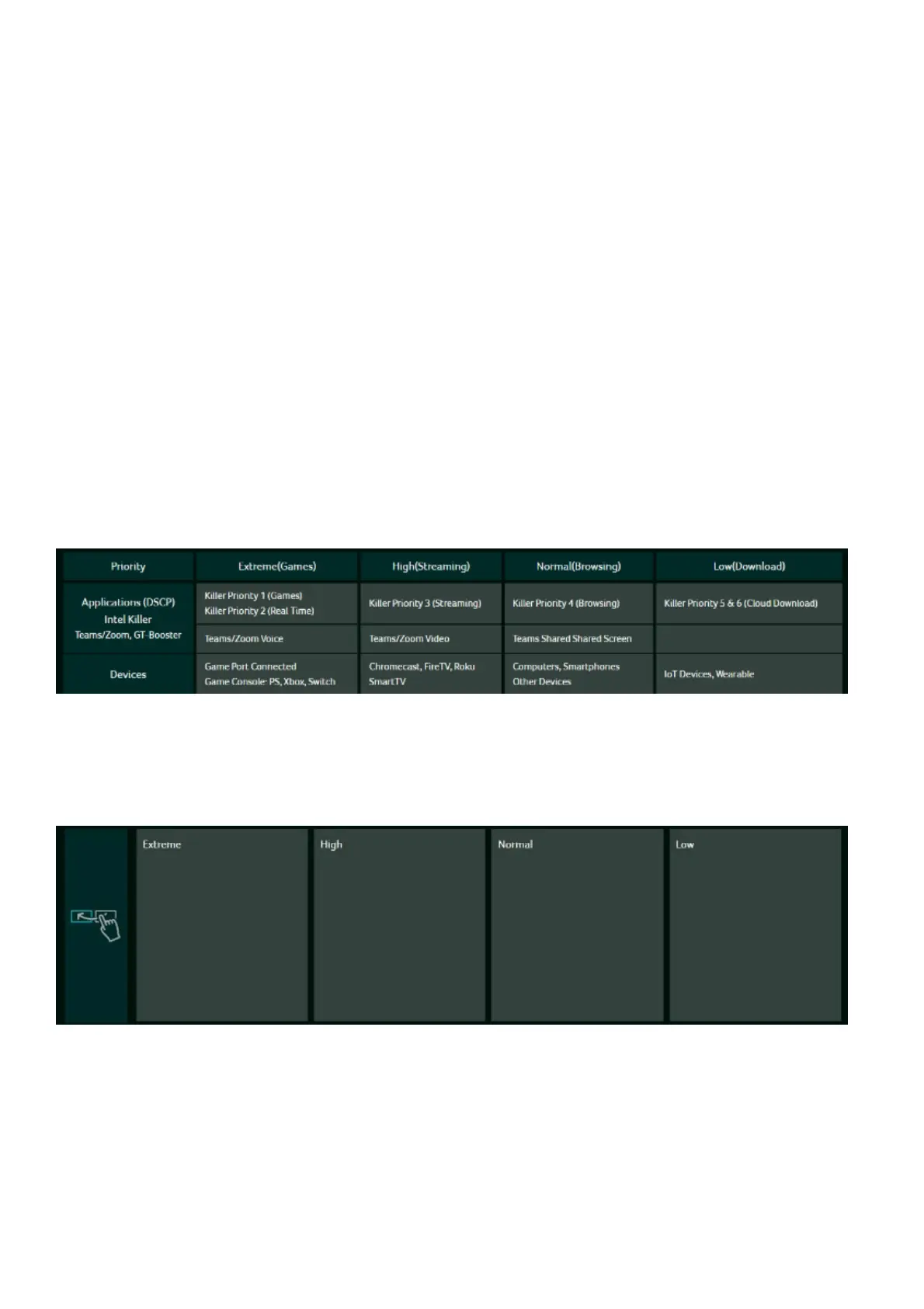
Hybrid QoS integrates both application and device prioritization. A Killer-
Enabled PC can assign priority to applications and send packets with DSCP
values to the Acer Wave 7 router. The router will then classify these packets and
prioritize different applications according to the definitions below.
For devices without Killer support, the Acer Wave 7 can recognize game consoles,
streaming devices, computers, smartphones, and IoT devices on the network. It
will allocate priority groups based on default settings, or users can manually
adjust the priority for connected devices.
*Note: Device identification requires the network security engine to be enabled.
Application-Based QoS Priority: (Enabled by default)
*Note: Application Priority uses the DSCP value in the IP header for packet
classification. Laptops and desktops with Killer™ technology categorize traffic
into four priority levels: Extreme (Games), High (Streaming), Normal (Browsing),
and Low (Download).
Device priority:
Note 1: A Killer-Enabled PC is automatically set to extreme priority, whether
connected via wired Ethernet or wireless.
Note 2: You can drag and drop connected clients into the desired priority level,
and the changes will take effect immediately.



 To Next Page