4
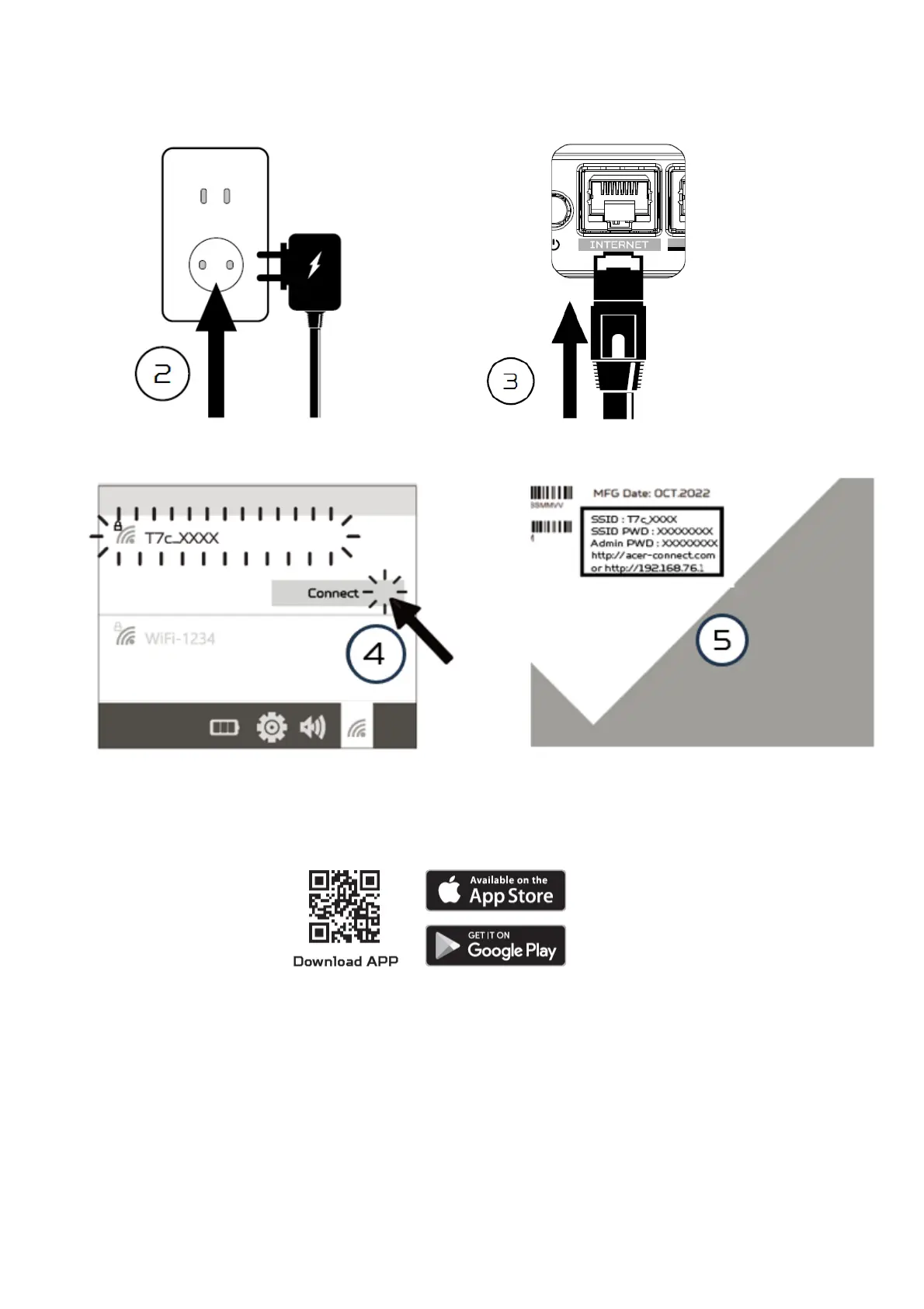
2.2. Plug into an outlet. 2.3 Plug-in Internet cable.
2.4 Connect to Acer WAVE 7 Wi-Fi. 2.5 Important info is at the back of the
device
2.6 The device can be either setup via Predator Connect mobile App or the browser web admin.
How to setup the router via Predator Connect Mobile App:
• Use a mobile device camera to scan the QR code below. Download the Predator Connect mobile
App via Play Store or App Store.
• Open the Predator Connect Mobile App and follow the steps for registering an account. Go to
your email inbox, review the registration email, and input the 4-digit registration code onto the
mobile App. When the whole process is completed, you will be automatically signed in.
• Enable the mobile Wi-Fi function and scan the device QR-code printed on the back label. The
default admin and Wi-Fi password will be automatically exported into the mobile app.
(SSID: T7c_YYYY)
• Device setup completed.



 To Next Page