ACTpro 1500 and 1520 Operating and Installation Manual
Page 15
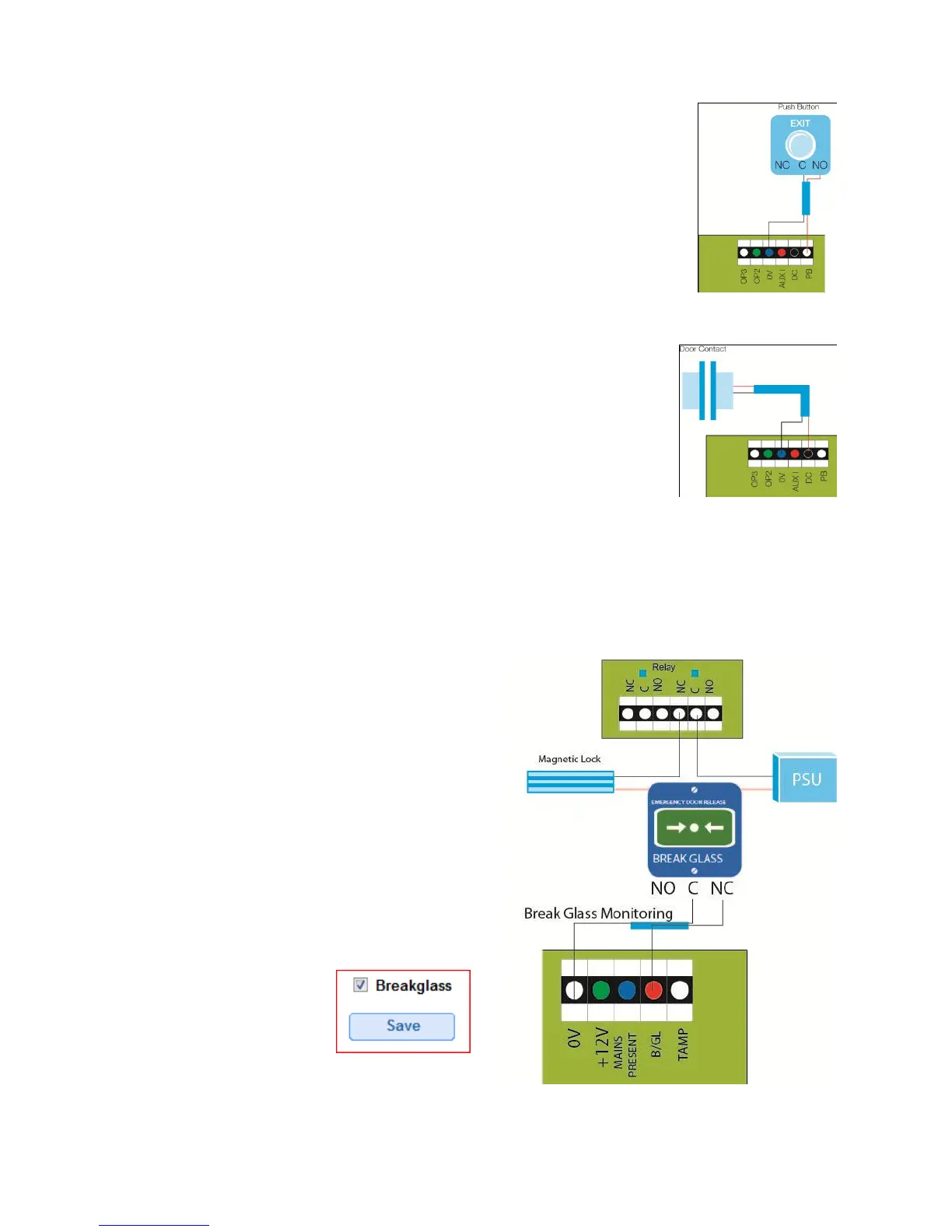
6.2 Push Button (PB)
Push button is connected between PB input and 0 Volts. When push
button is pressed the main relay is be activated for the configured time.
Diagram 8
Push button is also referred to as Exit Button, Egress Button, Request
To Exit.
6.3 Door Contact (DC)
Connect door contact between DC input and 0Volts. Diagram 9
6.4 Break Glass Monitoring only
Connect the normally closed output from one pole of the break glass to the B/GL input
monitoring terminal on the controller. Apply power to the lock via the second pole on the
break glass unit.
Note: refer to the break glass installation
instructions for details on how to wire the
break glass unit.
Enable break glass reporting
Login to the Controller as Installer.
Select “Door Config” menu option
Select door for which break glass monitoring
is required.
Under “Operation” tab
select Breakglass
Save.



 To Next Page