ACTpro 1500 and 1520 Operating and Installation Manual
Page 26
13.0 Backup, Restore and Export database
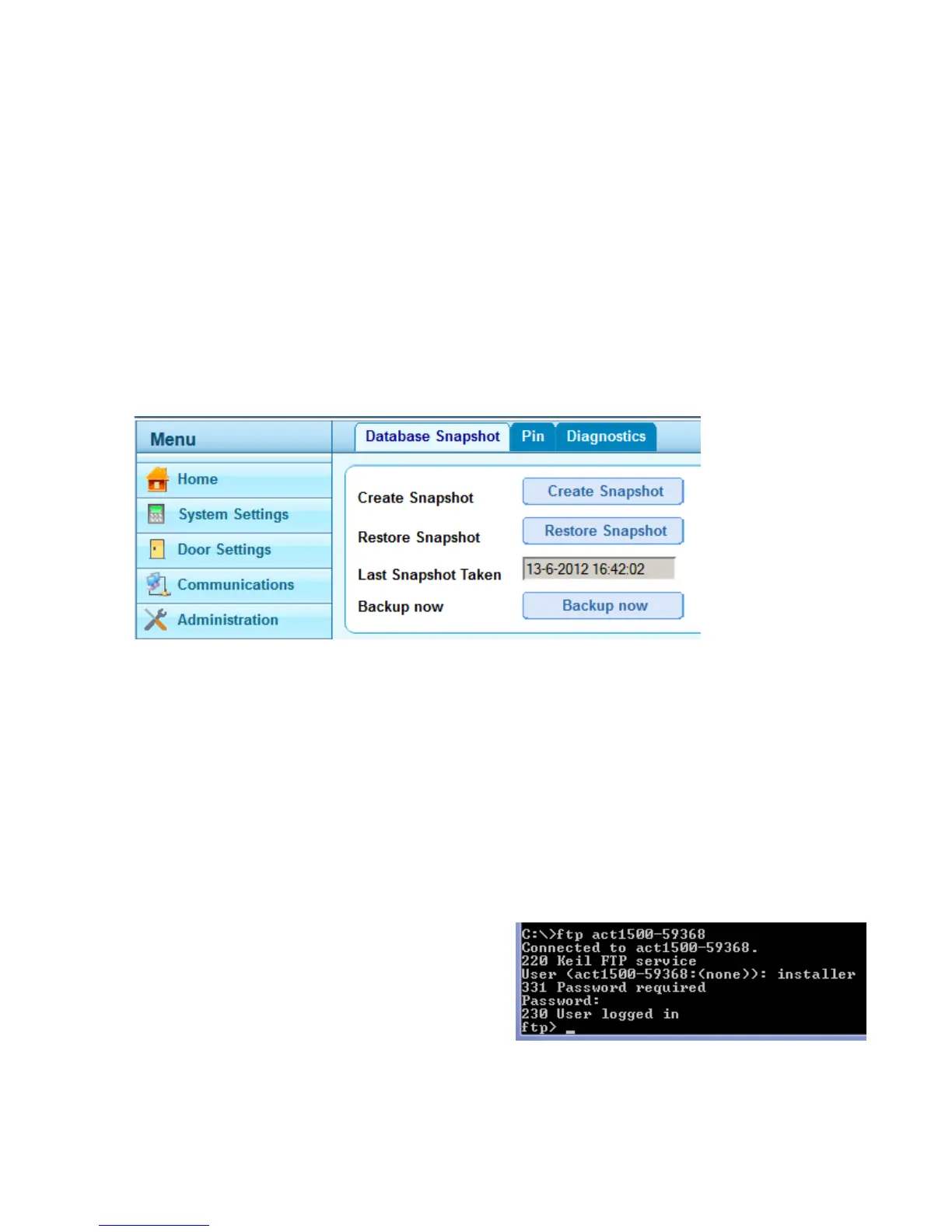
The installer can take a backup of the ACTpro 1500 database and restore at a later date.
The installer must login as installer and select the Administration menu. There are two
options when taking a backup.
13.1 Backup database
Option1: Create Snapshot takes a snapshot of the current controller database; the
snapshot is stored in the controller.
Option2: Backup now allows the installer to make a backup which is stored on the PC.
The backup file is called act1500_snapshot.dbo. When generating a backup image the
controller generates a local snapshot overwriting the previous snapshot.
13.2 Restore database
The installer can restore an existing snapshot by pressing the Restore Snapshot button.
To restore the backup from the PC the installer must use an FTP client. The FTP client
can be run from the command line (assuming appropriate user security permission) or use
an FTP client such as filezilla.
Restore using the command line FTP
1. From the command line, enter ftp followed by either the NETBios name or IP
address of the controller.
NETBios: ftp act1500-59368
IP address: ftp 172.27.72.240
2. Enter the username and password
Username: installer



 To Next Page