GNR-3000 System Administrator’s Manual
36
Reactivate the Volume
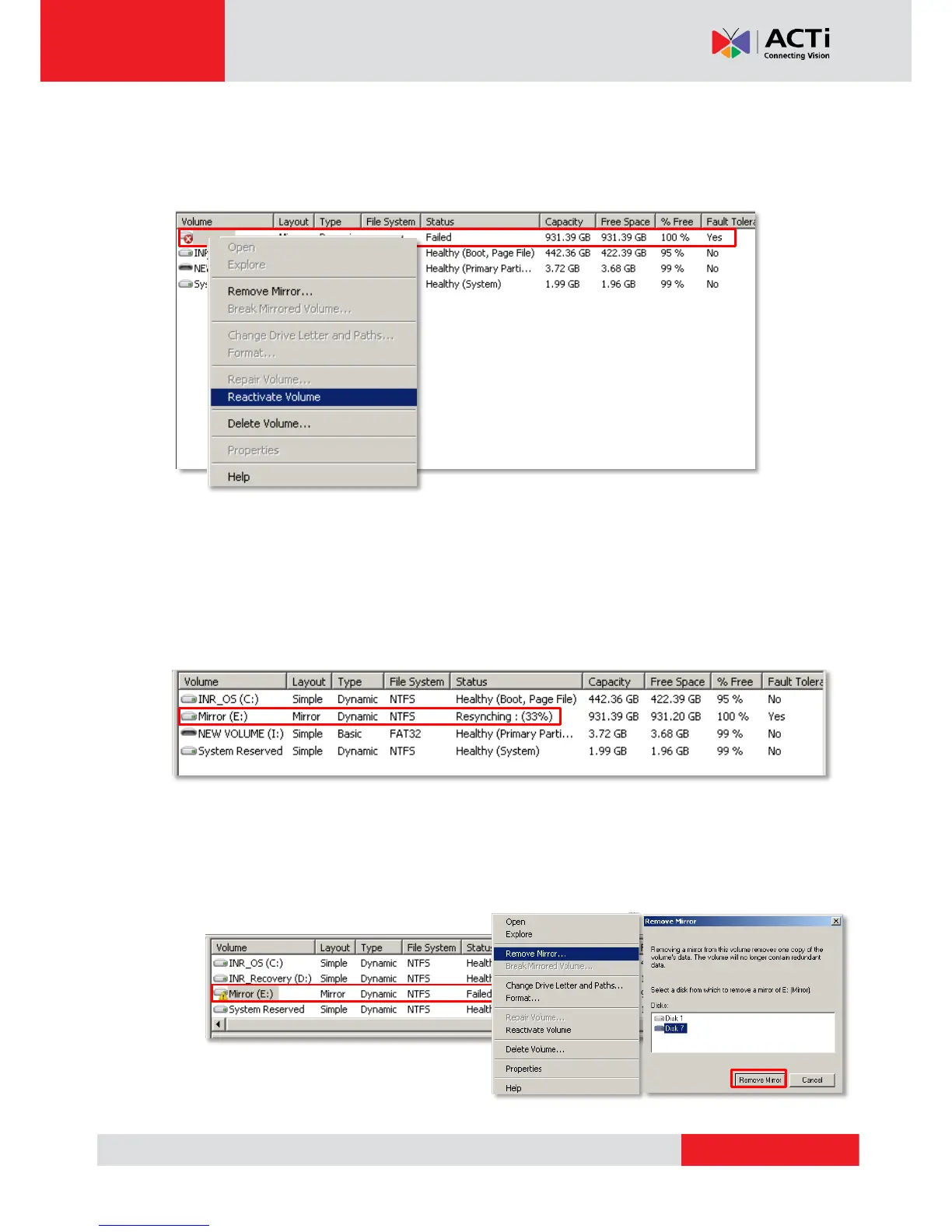
If the volume remains in Failed status even though all the underlying disks are Online, you
may try manually reactivate this volume. On Volume list, right-click the volume and select
“Reactivate Volume”.
Volume Resynchronization
A mirrored volume will automatically start resynchronizing to ensure that two mirrors have the
identical data. The mirrored volume's status will return to Healthy after the resynchronization
is done. When the volume appears in Resynching status, please avoid making any change to
this mirror and the disks.
Repair the Mirrored Volume
To repair a mirrored volume, replace the failed disk with a new one.
1. On Volume list, right-click the volume and click “Remove Mirror…,” select the disk to be
replaced, and then click “Remove Mirror”.


 To Next Page