GNR-3000 System Administrator’s Manual
74
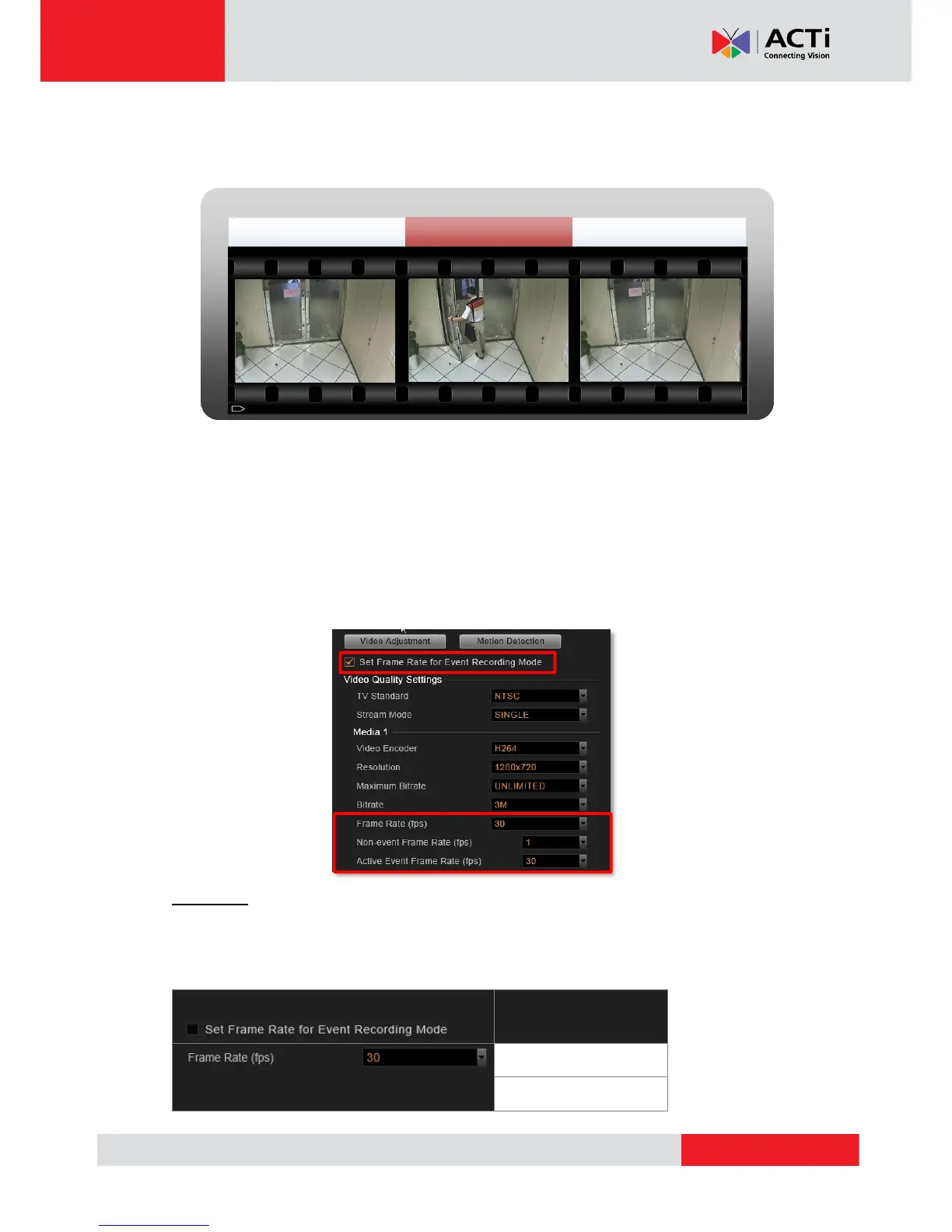
Event Recording with Frame Rate Adjustment
Keeps recording all the way without losing any single moment; lower frame rate can be set for
non-event recording, which consumes only a little storage.
How to Make Use of Event Recording with Frame Rate Adjustment
To make use of Event recording with Frame Rate Adjustment function, you may configure
the Frame Rate settings on Setup page Device tabVideo tab. The Frame Rate (fps) you
set will always be applied to live view and schedule recording. Once Set Frame Rate for
Event Recording Mode is checked, you may configure advanced settings for event recording.
If the device is in Dual stream mode, you will only need to configure these settings of the
Recording Stream.
Scenario A:
Suppose you want all the videos recorded at very high frame rate. With sufficient storage, you
may not need this function. Set the video Frame Rate that will apply to all the recordings. In
this way, NVR 3.0 will not record non-event during event recording period.


 To Next Page