25
2.7 RS232 communication function
2.7.1 Set RS232 serial port
2.7.2 Submit data automatically
2.7.3 Communication instructions
RS232 communication parameter is below:
① Address range is (1~112), factory default is 1;
② Baud rate is (1200, 2400, 4800, 9600), factory default is 9600;
③ The data length default is 8 2 stop bits no calibration bit no data flow control.
④ Hardware port: Standard DB9 socket (2 feet is TXD, 3 RXD, 5 GND)
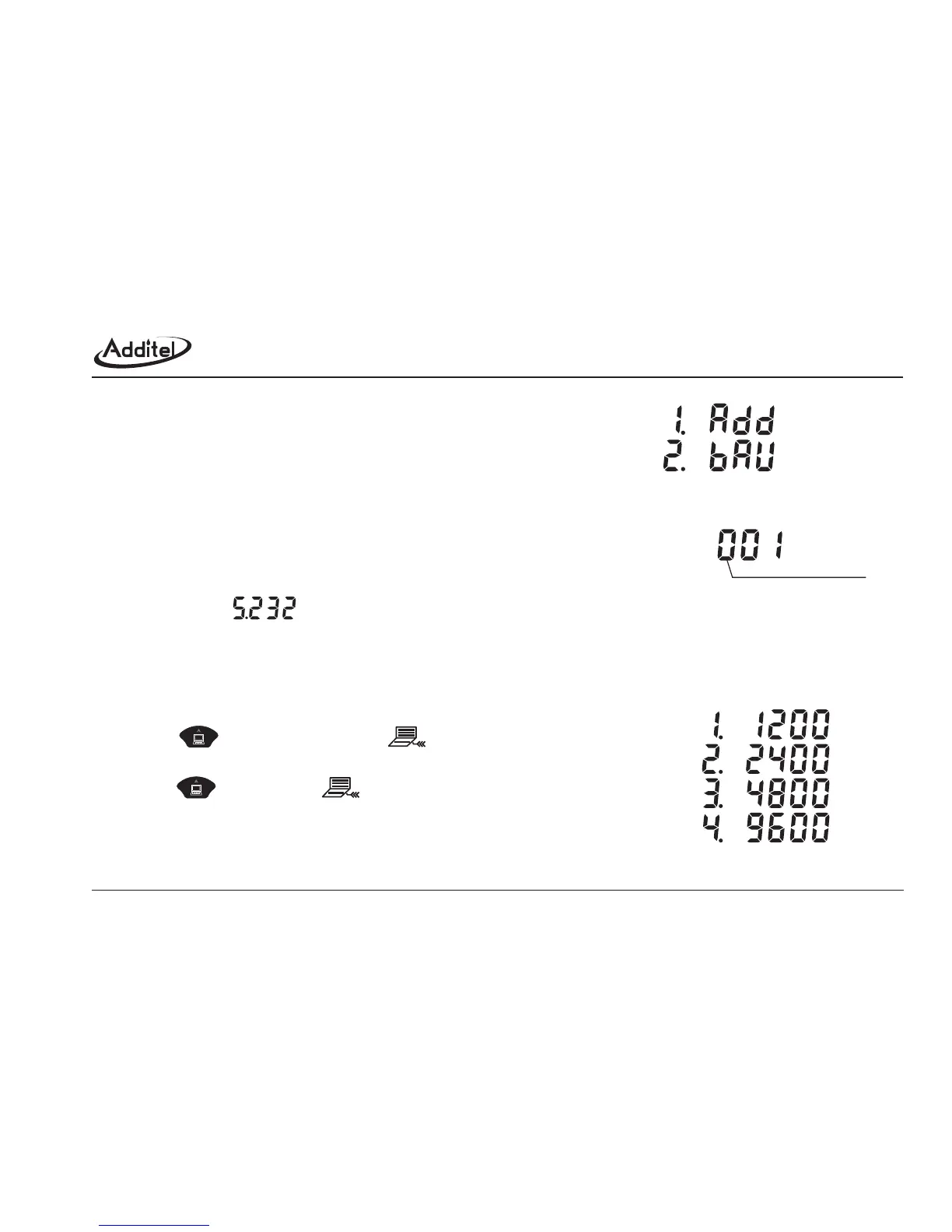
The setup method for address and baud rate is below:
a. Select the option (RS232) in the main menu.
b. Figure 2-7-1-1 displays the setup menu. User can select the communication address or baud rate.
c. Figure 2-7-1-2 shows the current address and allows for correction.
d. The cursor position is displayed in the current option of baud rate if the baud rate is selected.
By pressing , the communication icon appears and the ADT672
is sending the measuring data via RS232 port, meanwhile, 3 bars rolls in turn;
by pressing again, the icon disappears and the sending is stopped.
Please refer the data sending format in appendix【communication protocols】.
Please refer the APPENDIX II【communication protocols】for more information.
;; ;
feet is feet is
Figure 2-7-1-2: adjust address
Figure 2-7-1-1: Serial port setup
cursor begining position
(ADDRESS)
(BAUD RATE)
Figure 2-7-1-3: Baud rate option



 To Next Page