Advanced RF Technologies, Inc.
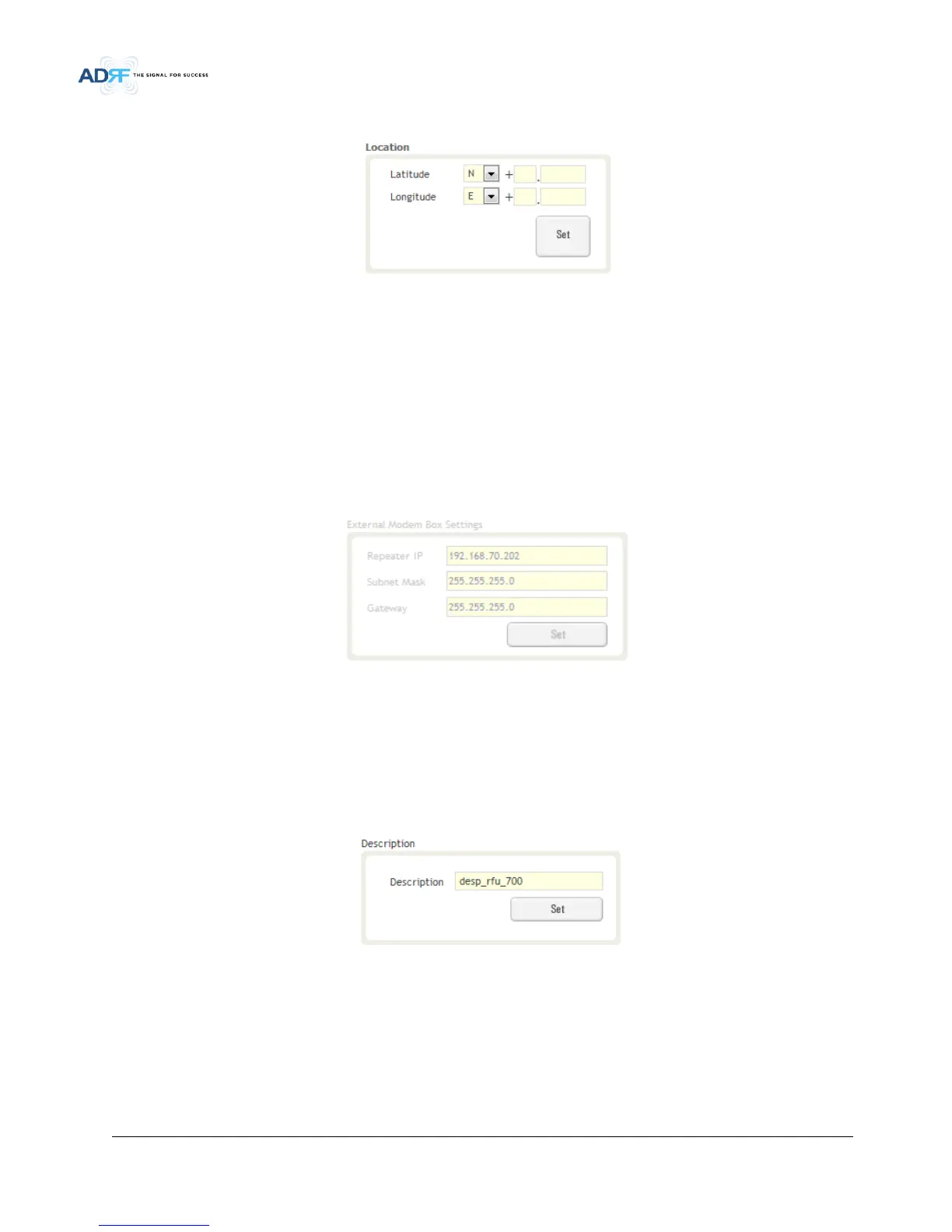
This section allows the user to input the latitude and the longitude of the repeater.
Figure 7-4 Location Setting (Install – NMS)
• Select N or S from the dropdown menu for Latitude
• Select E or W from the dropdown menu for Longitude
• Input the first 3 numbers of the latitude/longitude in the text area after the “+” and before the “.”
• Input the last 6 numbers of the latitude/longitude in the text area after the “.”
7.2.2.1.7 External Modem Box Settings
This section allows the user to specify an alternative IP, Subnet Mask, and Gateway settings. These settings are
enabled when the Host/Remote switch is set to the Remote position.
Figure 7-5 External Modem Box Setting (Install – NMS)
7.2.2.1.8 Description
This section allows the user to save the description of NMS.
Figure 7-6 Description (Install – NMS)
7.2.2.1.9 SNMP Agent False Alarm Test
This section allows the user to generate both soft and hard fail alarms. After alarms are generated, the NOC can
poll the ADXV to see if alarms are present. All alarms generated during this test are false alarms.


 To Next Page