WISE-4610(P) User Manual 40
Configuration
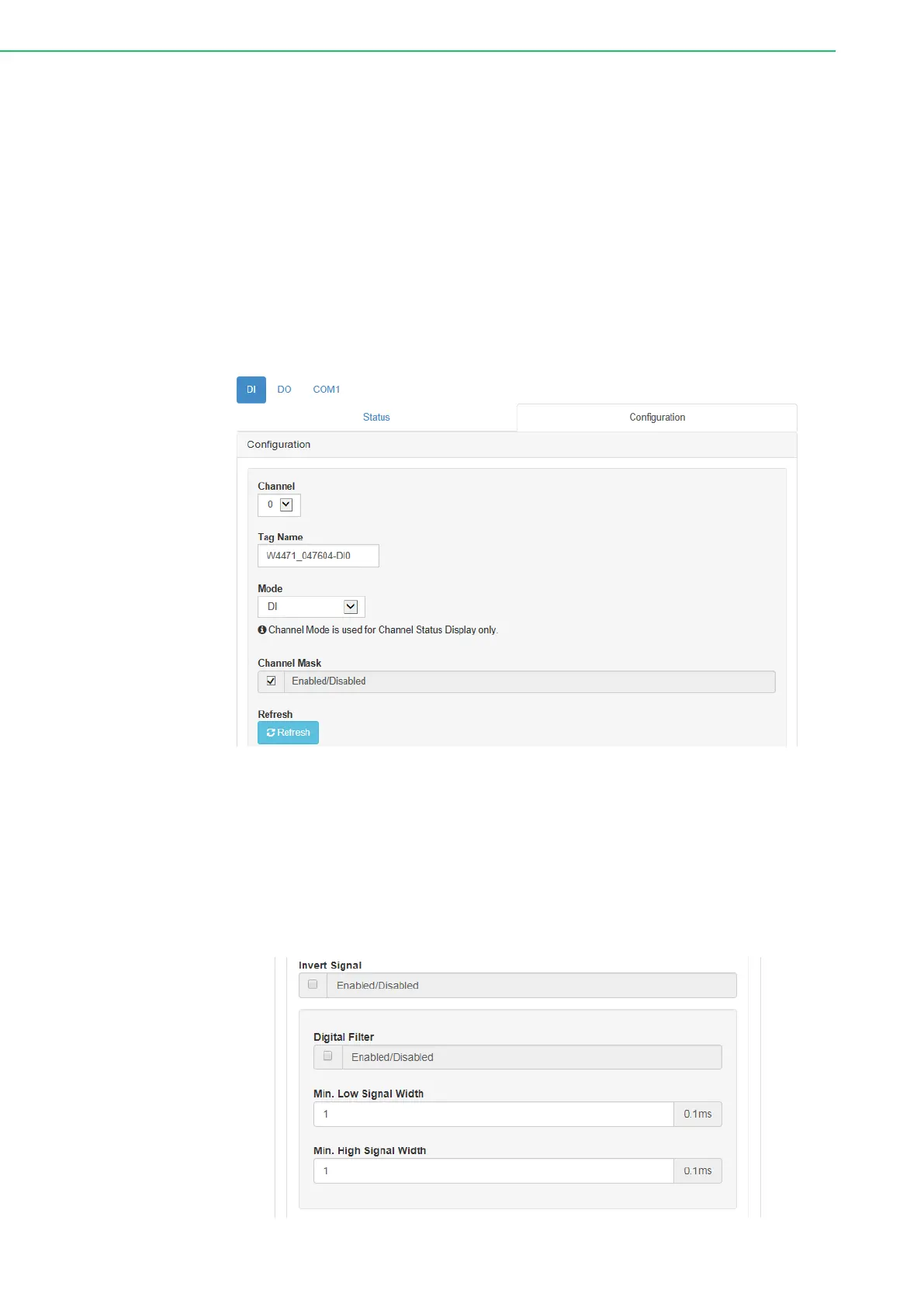
The digital input channels support several operation modes and can be configured
from this page.
Channel: Select the channel to be configured.
Tag Name: Each channel can be given a name for identification.
Mode: This item allows users to configure the operating mode for each channel.
Channels can also be disabled/enabled to improve the overall performance.
After a channel has been configured, click Submit at the bottom of this page to
implement the changes.
Channel Mask: Each channel can be disabled individually to reduce data com-
munication traffic.
Refresh: This item allows users to refresh the system configuration settings.
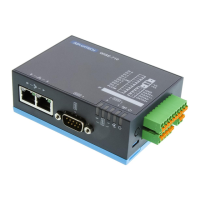
Invert Signal: WISE digital input channels support inverted digital input status.
To enable/disable this function, click the Invert Signal check box on the Config-
uration page.
Digital Filter: Digital input channels have a digital filter that can remove high-
frequency noise. The filter can be enabled/disabled by clicking the Digital Filter
check box. When the filter is enabled, the minimum acceptable signal width can
be defined in the Min. Low Signal Width and Min. High Signal Width fields
(increment: 0.1 ms).



 To Next Page