APPENDIX A
ERROR CODES
J
d
‘\,
When the MICRO 84 system detects an error, the letter E and the
corresponding error code (00-99) appear in the data display.
The system
detects errors in both the controller and the programmer. Controller errors
(e.g., communications, logic, etc.) require that the controller- be restarted.
This is accomplished using the SHIFT and RESET keys on the~$ogrammer.
Programmer errors (e.g., an illegal sequence of keystrokes is entered)
require using the RESET key only.
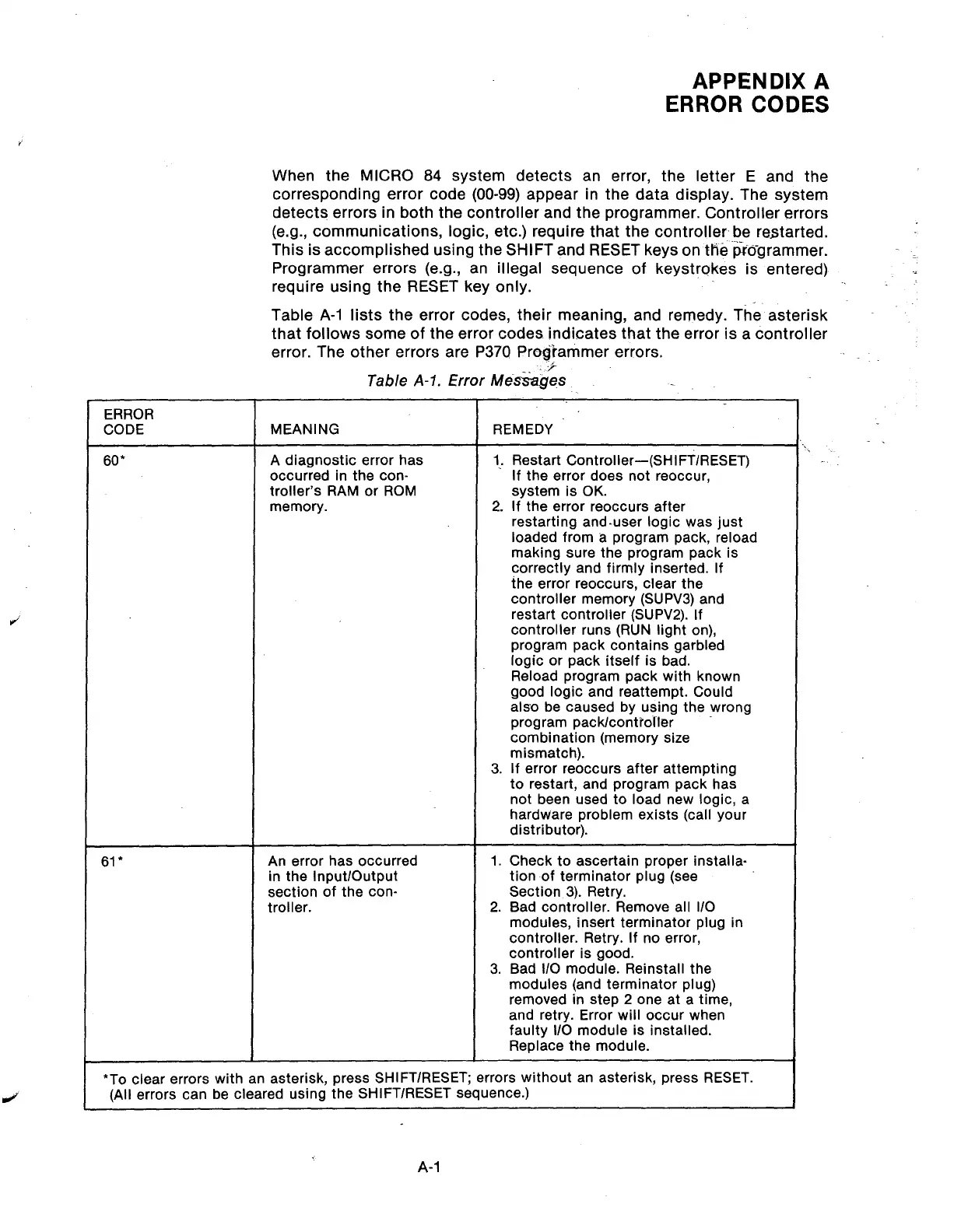
Table A-l lists the error codes, their meaning, and remedy. The asterisk
that follows some of the error codes indicates that the error is a controller
error. The other errors are P370 Programmer errors.
i
Table A-l. Error Mk?ages
ERROR
CODE
60*
MEANING
A diagnostic error has
occurred in the con-
troller’s RAM or ROM
memory.
REMEDY
1, Restart Controller-(SHIFT/RESET)
If the error does not reoccur,
system is OK.
2. If the error reoccurs after
restarting and-user logic was just
loaded from a program pack, reload
making sure the program pack is
correctly and firmly inserted. If
the error reoccurs, clear the
controller memory (SUPV3) and
restart controller (SUPV2). If
controller runs (RUN light on),
program pack contains garbled
logic or pack itself is bad.
Reload program pack with known
good logic and reattempt. Could
also be caused by using the wrong
program pack/controller
combination (memory size
mismatch).
3. If error reoccurs after attempting
to restart, and program pack has
not been used to load new logic, a
hardware problem exists (call your
distributor).
61*
An error has occurred
in the Input/Output
section of the con-
troller.
1. Check to ascertain proper installa-
tion of terminator plug (see
Section 3). Retry.
2. Bad controller. Remove all l/O
modules, insert terminator plug in
controller. Retry. If no error,
controller is good.
3. Bad l/O module. Reinstall the
modules (and terminator plug)
removed in step 2 one at a time,
and retry. Error will occur when
faulty I/O module is installed.
Replace the module.
*To clear errors with an asterisk, press SHIFT/RESET; errors without an asterisk, press RESET.
(All errors can be cleared using the SHIFT/RESET sequence.)
A-l
Artisan Technology Group - Quality Instrumentation ... Guaranteed | (888) 88-SOURCE | www.artisantg.com



 To Next Page