TYPICAL USER PROGRAMS
Network No. I
-
Simple Thumbwheel
Entry for Timer, Counter, Sequencer
Preset
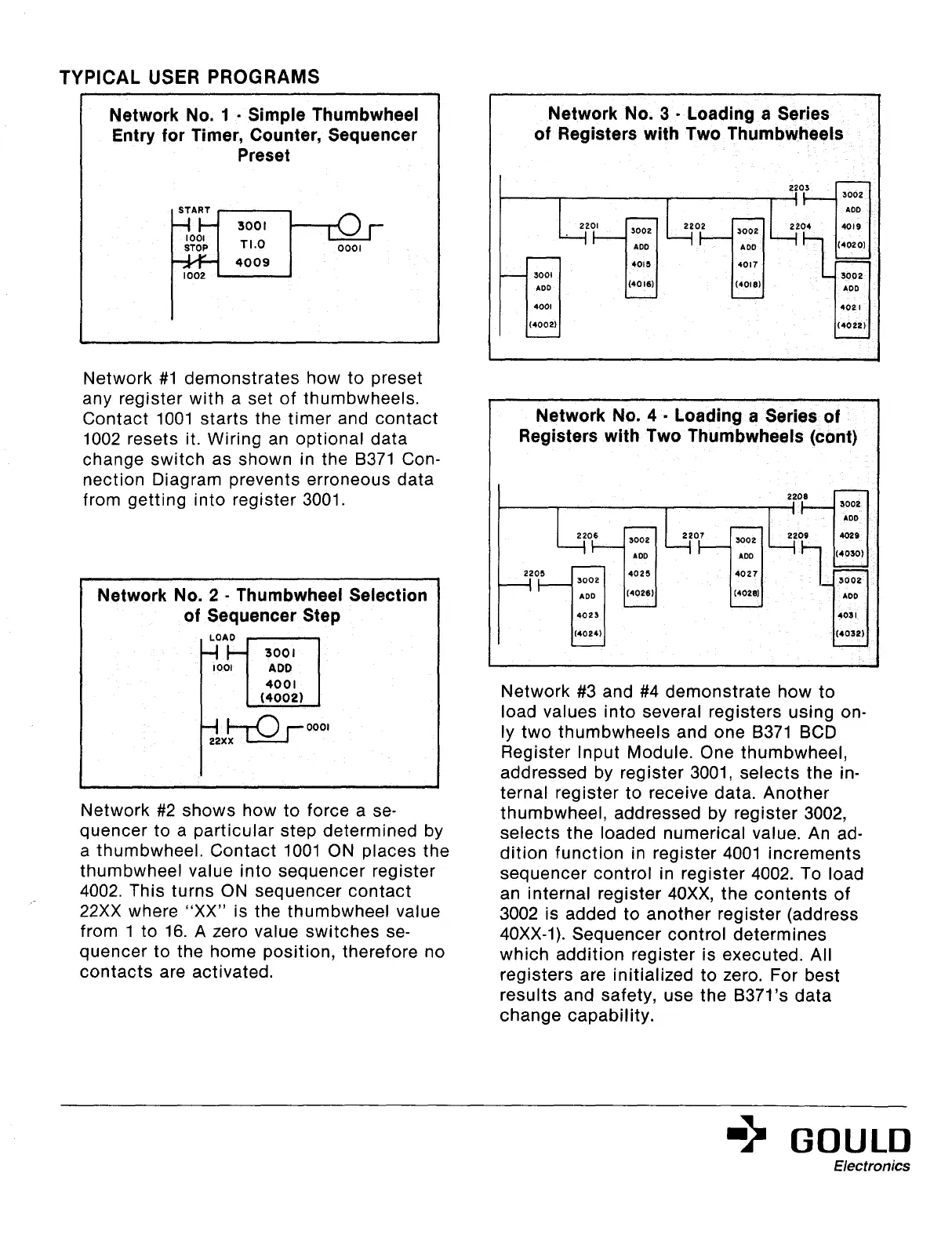
Network #I demonstrates how to preset
any register with a set of thumbwheels.
Contact 1001 starts the timer and contact
1002 resets it. Wiring an optional data
change switch as shown in the 8371 Con-
nection Diagram prevents erroneous data
from getting into register 3001.
Network No. 2
-
Thumbwheel Selection
of Sequencer Step
I-’
22*b”-Qr Oooi
I
Network #2 shows how to force a se-
quencer to a particular step determined by
a thumbwheel. Contact 1001 ON places the
thumbwheel value into sequencer register
4002. This turns ON sequencer contact
22XX where “XX” is the thumbwheel value
from 1 to 16. A zero value switches se-
quencer to the home position, therefore no
contacts are activated.
Network No. 3
-
Loading a Series
of Registers with Two Thumbwheels
Network No. 4
-
Loading a Series of
Registers with Two Thumbwheels (cant)
2208
“0” ~~~0~~~
4023
403 I
(4024
(4032)
Network #3 and #4 demonstrate how to
load values into several registers using on-
ly two thumbwheels and one 8371 BCD
Register Input Module. One thumbwheel,
addressed by register 3001, selects the in-
ternal register to receive data. Another
thumbwheel, addressed by register 3002,
selects the loaded numerical value. An ad-
dition function in register 4001 increments
sequencer control in register 4002. To load
an internal register 40Xx, the contents of
3002 is added to another register (address
40Xx-l). Sequencer control determines
which addition register is executed. All
registers are initialized to zero. For best
results and safety, use the B37l’s data
change capability.
=” GOULD
Artisan Technology Group - Quality Instrumentation ... Guaranteed | (888) 88-SOURCE | www.artisantg.com



 To Next Page