AENO™ Toothbrush Operation Manual
Document version: 1.0.0, aeno.com © ASBISC Enterprises PLC. All rights reserved
Page 20 of 42
2 Assembly and Operation
You should attentively read and understand this User Manual before using the device
for the first time.
ATTENTION!
When connecting to a power supply, using and storing the AENO
TM
Toothbrush,
follow the safe use rules of the device (see the “Limitations and Warnings”
section).
2.1 Unpacking and Preparing for Operation
1. Carefully open the packaging and remove the device and accessories. Remove
all packing materials from them.
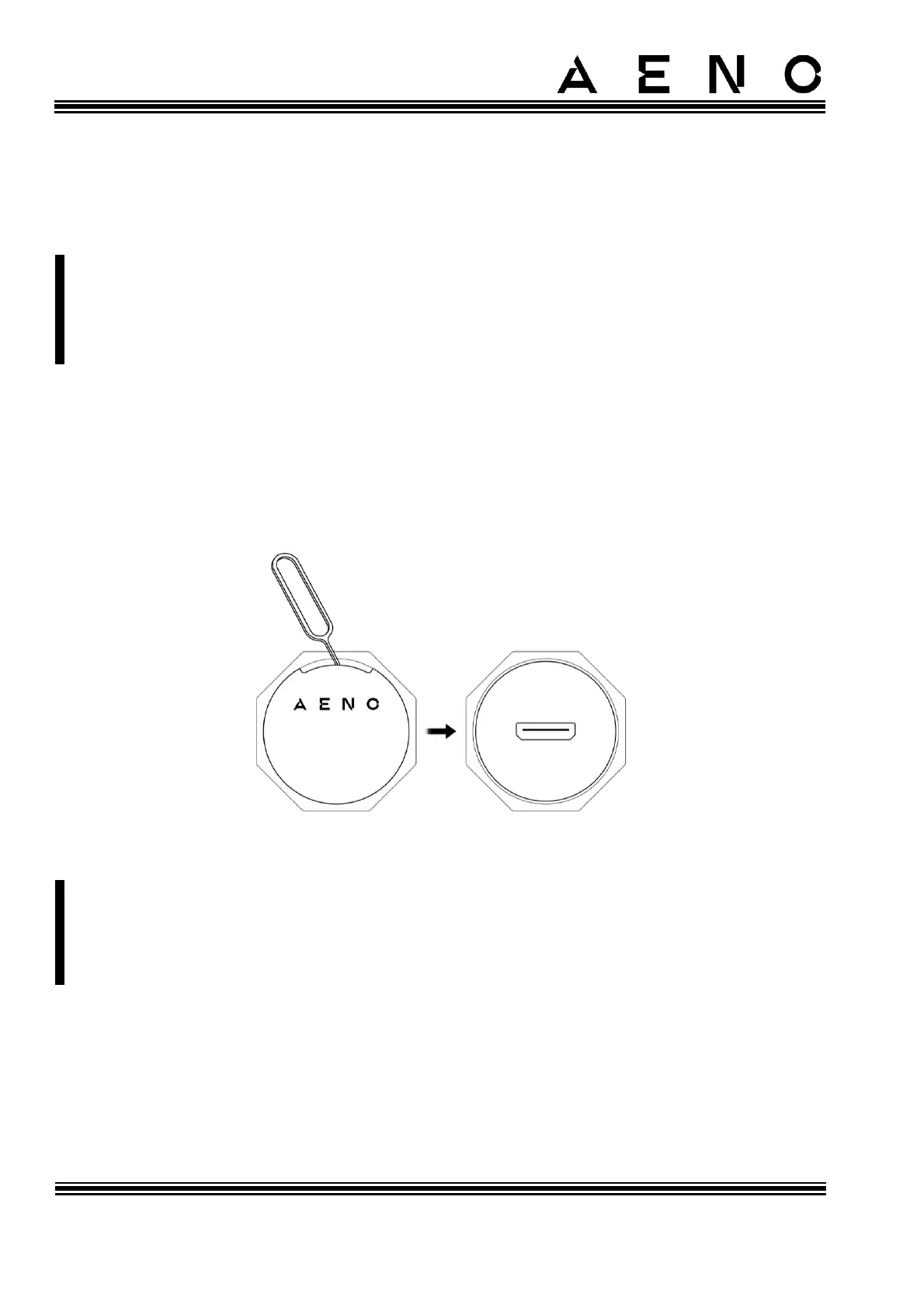
2. Remove the protective cover from the toothbrush handle (see Figure below).
Figure 5 – Removing the Protective Cover
NOTE
The protective cover can be removed with a SIM card tray eject tool or an ordinary
paper clip (not included). Insert the eject tool / paper clip into the gap as shown in
the Figure above and use it to hook the lid.



 To Next Page