AENO™ Toothbrush Operation Manual
Document version: 1.0.0, aeno.com © ASBISC Enterprises PLC. All rights reserved
Page 40 of 42
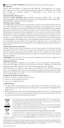
7 Troubleshooting
The table below shows typical errors and problems that occur when connecting,
configuring, and operating the device.
Table 5 – Typical Problems and Solutions
The toothbrush
does not turn on
The device battery is
discharged
Charge the device
(charging time – at least
4 hours)
The device is
connected to a
power supply but is
not charging (the
battery charge
indicator is not lit)
There is no power in the
socket that the device is
connected to
Check that the socket is
working correctly by
plugging in another
device. Connect the
device to a working
socket
The device has not been
used for a long time
Connect the device to a
power supply and wait
about 15 minutes. If the
battery charge indicator
does not light up, contact
an authorized service
center
Short operating
time of the device
after a full charge
The device has not been
used for more than 6
months and therefore does
not hold its charge
Contact an authorized
service center
ATTENTION!
If none of the suggested solutions resolved the problem, contact the supplier or
an authorized service center. Do not disassemble or attempt to repair the device
yourself.



 To Next Page