AENO™ Toothbrush Operation Manual
© ASBISC Enterprises PLC. All rights reserved Document version: 1.0.0, aeno.com
Page 27 of 42
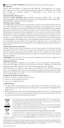
3. Point the metal end of the remover toward the tooth surface at an angle of about
45° (see Figure below).
Figure 12 – Using the Plaque Remover
4. Turn on the device by pressing the power button once. Set the mode, if
necessary, according to paragraph 2.2.1.
5. Clean problem areas using gentle vertical strokes.
ATTENTION!
Do not apply excessive force when using the plaque remover. Careless use of the
remover can cause oral trauma as well as damage tooth enamel.
If necessary, use the dental mirror included in the package for a better view of the
cleaning zone.
Every 30 seconds the device will notify you to change the cleaning zone by briefly
stopping the vibration. Change the cleaning zone after each notification.
After 2 minutes of operation, the device will turn off automatically. If you want to turn
off the device before 2 minutes have passed, press the power button once.



 To Next Page