It is important to note that moving the cursor to these fields takes
less than five key strokes. After entering the radio test screen, the
cursor will be in the upper left hand tile. With no more than three
keystrokes, using the left arrow, the cursor will be in the lower left
hand tile on the “Volume” field. Pressing the up arrow once moves
the cursor to the “Recall” field. Pressing the up arrow a
second time moves the cursor to the “Save” field. This operation
enables you to very quickly move to these fields and zoom into the
Save or Recall screen.
5.1 Saving Setups
Here are the step by step instructions for saving a setup.
1. Using the right or left arrow key, move the cursor to the lower left
tile.
2. Pressing the up arrow twice, move the cursor to the “Save” field.
3. Press the “Zoom” softkey.
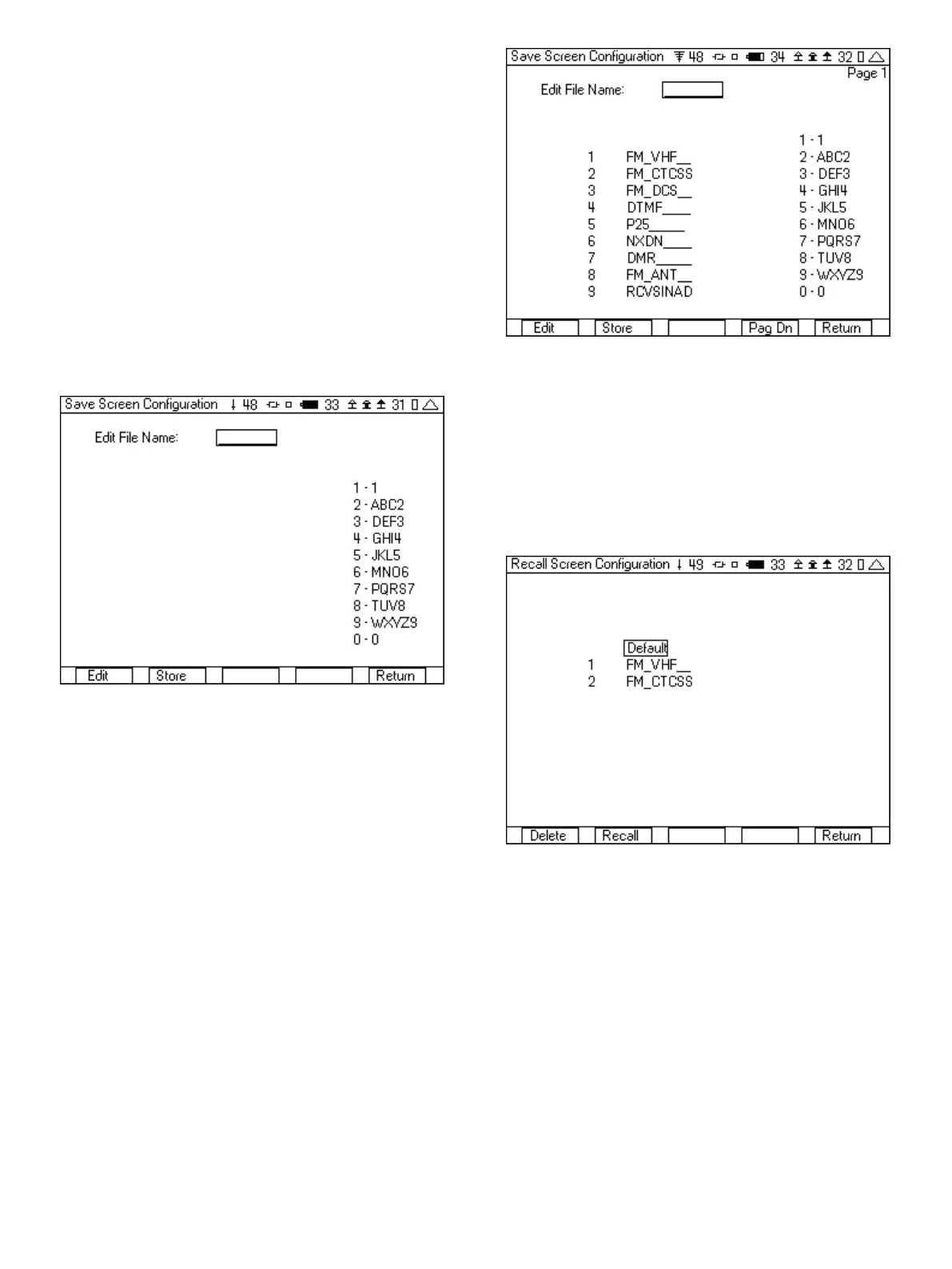
Figure 22 - Save screen
4. Press the “Edit” softkey and then use the numeric keypad; enter
the name that you would like to save this setup. The right/left
arrow keys move the cursor position in the edit file name.
5. Press the “Store” softkey and you will be automatically returned to
the radio test screen.
The 3500A is capable of saving many setups. There is not a fixed
number of setups that can be saved, but the 3500A will continue to
save setups until the save memory is full. When the number of saved
setups is greater than nine, a “Pag Up” or “Pag Dn” softkey is added.
Figure 23 shows the first page of a multiple save screen configura-
tion with a “Pag Dn” softkey added to move to the next page.
Figure 23 - Save screen page one
5.2 Recalling Setups
Here are the step by step instructions for Recalling a setup.
1. Using the right or left arrow key, move the cursor to the lower left
tile.
2. Using the up arrow, move the cursor to the “Recall” field.
3. Press the “Zoom” softkey.
Figure 24 - Recall screen
4. To select, press the number next to the desired setup and then
press the “Recall” softkey. You could also use the down arrow and
move the cursor to the desired setup.
5. The 3500A will return to the radio test screen.
You can also move the cursor to the desire setup and press delete
to remove unwanted setups. If there are more than nine setups, a
“Pag Up” or “Pag Dn” softkey enables moving to other pages of
setups. Figure 25 shows page 2 of a recall screen. By pressing the
“Pag Up” softkey, another nine setups in page 1 can be accessed.
14













 To Next Page