For the very latest specifications visit www.aeroflex.com
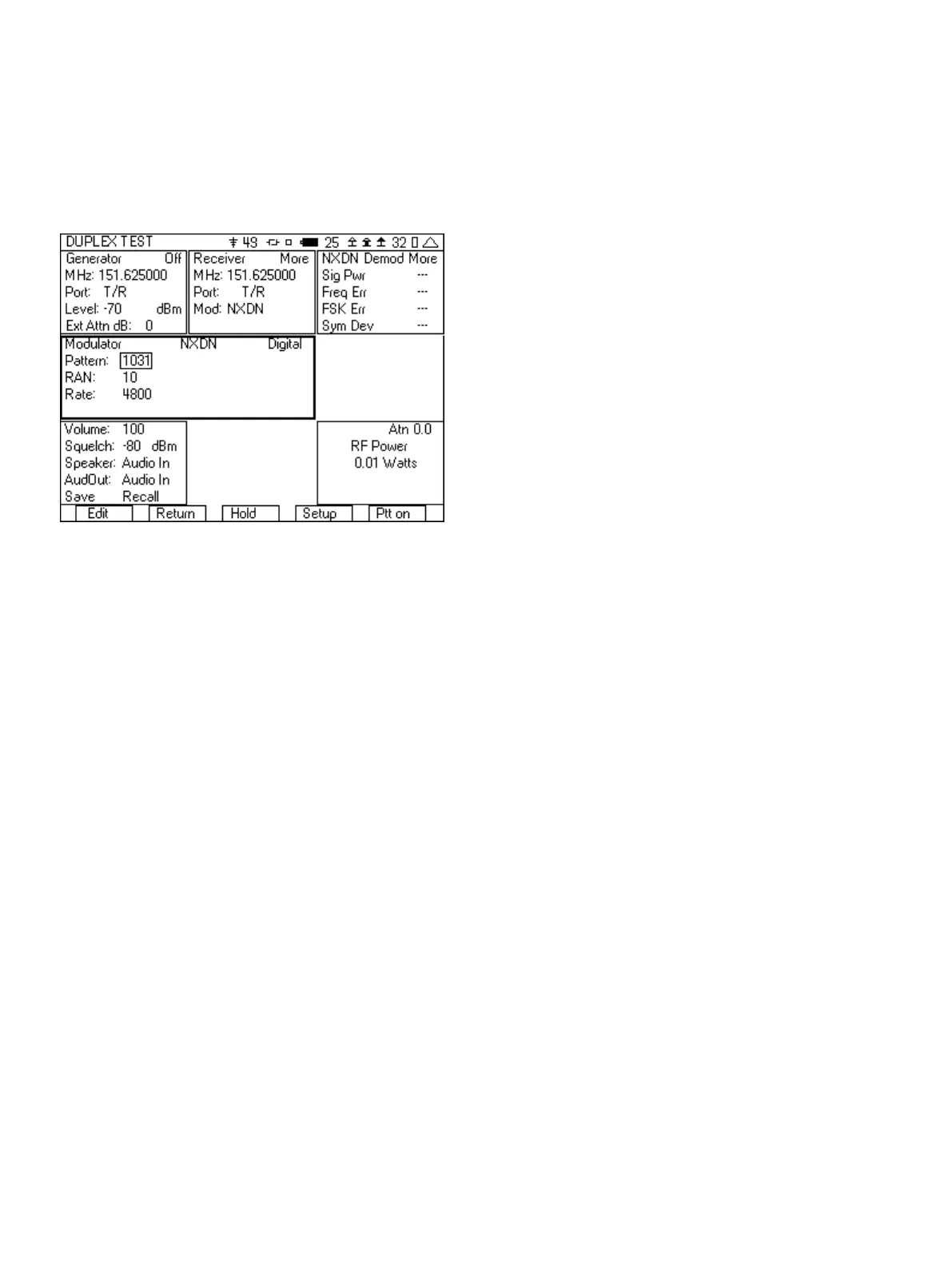
c. The Rate can be set to 4800 or 9600, but must match the
channel in the radio.
d. The RAN must be the same as the RAN (Radio Access
Number) in the radio that you are testing. The RAN is
programmed into the radio using the programming
software. If you don’t know the RAN of this radio, then we
will try to determine it in step 11.
e. For the pattern, select the 1031 test tone pattern.
Figure 15 - NXDN test setup
8. Connect an RF cable from the T/R port of the 3500A to the
Antenna of the radio.
9. Key up the radio. If you did not know the frequency of the radio
in step 6, then you can move the cursor to the receiver
frequency field, press the “Edit” softkey, and then press the “Find”
softkey.
10. The NXDN Demod tile should now display Sig Pwr, Freq Err, FSK
Err, and Sym Dev.
a. Sig Pwr is the power level of the radio, but when
directly connected to an NXDN radio the RF Power meter
is a more accurate measurement.
b. Freq Err, FSK Err and Sym Dev are measurements of the
modulation fidelity. For more information on
understanding these measurements see the section on
Understanding the modulation fidelity parameters.
11. If these are not displaying accurately, then the Rate may not be
set correctly. To set the rate, do the following.
a. Move cursor to the “More” field in the NXDN Demod tile.
b. Press the “Enter” softkey until you are in the NXDN Demod
tile with the Rate field.
c. Move the cursor to the “Rate” field, press the “Edit”
softkey. Edit will toggle between the two rates, 4800 and
9600. 4800 baud is the very narrow band selection for
NXDN of 6.25 kHz and 9600 is the narrow band selection
of 12.5 kHz. If you don’t know the rate then toggle
between the two rates and find out which one it is. When
you have selected the correct rate, you will start to see
accurate FSK Err and Sym Dev measurements.
12. Move the cursor to the “More” field in the NXDN Demod tile and
press the “Enter” softkey until you can view the RAN decode
field. This value should match the expected value for the RAN
from the radio under test. You can also use this value for the
RAN value in the Modulator tile assuming that the transmit and
receive RAN are the same value.
13. Press the “Ptt on” softkey.
14. You should now hear the test tone in the radio. If you don’t hear
a tone, check the following.
a. Make sure that the Generator is on by observing the
indication in the upper right hand corner of the Generator
tile.
b. Check that the Generator frequency is set to the receive
frequency of the radio and that the RF Level is greater than
the sensitivity of the radio.
c. The RAN and Rate must match the RAN and Rate of the
radio. If you are unsure of the RAN and Rate, then go back
to step 12.
15. If you have the capability and are able to use test software to
put the radio into test mode, you can also measure the BER of
the receiver and verify the sensitivity of the radio.
a. Put the radio into the test mode.
b. Select the O.153 pattern in the modulator tile of the
3500A.
c. Select the random data pattern in the test application.
d. The radio test software should now be able to display the
bit error rate, and by lowering the level of the
generator in the 3500A, you should be able to find the
sensitivity of the receiver of the radio.
3.3 DMR Radio Test
In this test, we will make the key measurements necessary to
verify the proper operation of a DMR radio, including the
modulation fidelity parameters and BER of the receiver. This test will
be done on a radio that is directly connected from the T/R port of
the 3500A to the antenna port of the radio. The radio tested is
assumed to be a Tier II subscriber unit programmed with a duplex
offset between the transmit and receive frequencies.
1. Enter DUPLEX TEST screen.
2. Select the “Setup” softkey.
3. Place a 3 next to Digital Receive. The other selections should
have a 0 next to them.
4. Press the “Return” softkey.
5. In the Generator tile
a. Set the frequency to be the same as the receive
frequency of the radio.
b. Set the Port to T/R.
c. Set RF level to a nominal level (-70 dBm is good).
d. Set the Ext Atten field to the loss of the cable or if an
attenuator is being used, the value of the attenuator.
11













 To Next Page