CHAPTER 5
16 17
SOLO 2
5.3 Display setup
5.3.1 Backlight
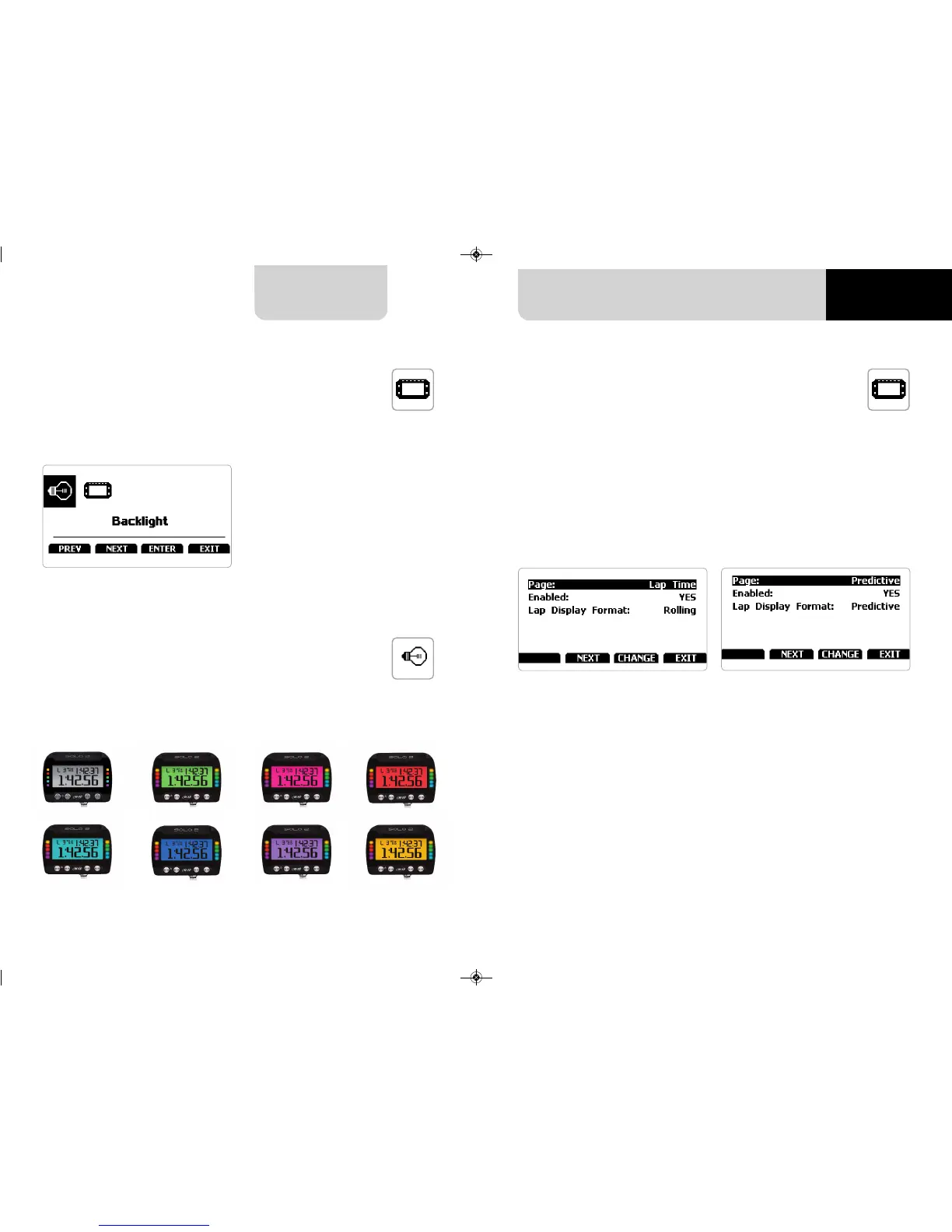
Selecting this icon the page shown below shows up.
Solo 2 can show from two up to five pages according to the type of race you set.
Some pages are enabled by default and need to be set while other – custom, available
only if you set type of race: speed – needs to be enabled before being set.
The Pages enabled by default are:
n
track page (see related paragraph)
n
lap time page (left image below)
n
predictive page (right image below – speed race only)
Lap time page: here you can set lap time format as:
n
rolling: dynamic is shown for 5 seconds when you cross start/finish line and then
starts rolling again
n
static: shown steady for the entire lap; changes when crossing start/finish line
Predictive page (“Type of race: speed” only): here you can set lap time format as:
n
predictive: shows the predicted time result
n
+/- best: shows time gap between current lap and reference lap you set in “Type
of race” menu
Here you can set the system backlight as well as its display pages.
You can set Solo 2 backlight as “ON” (default setting) or “OFF” as well as choose among
eight different colours:
5.3.2 Pages Setup


 To Next Page