SOLO 2
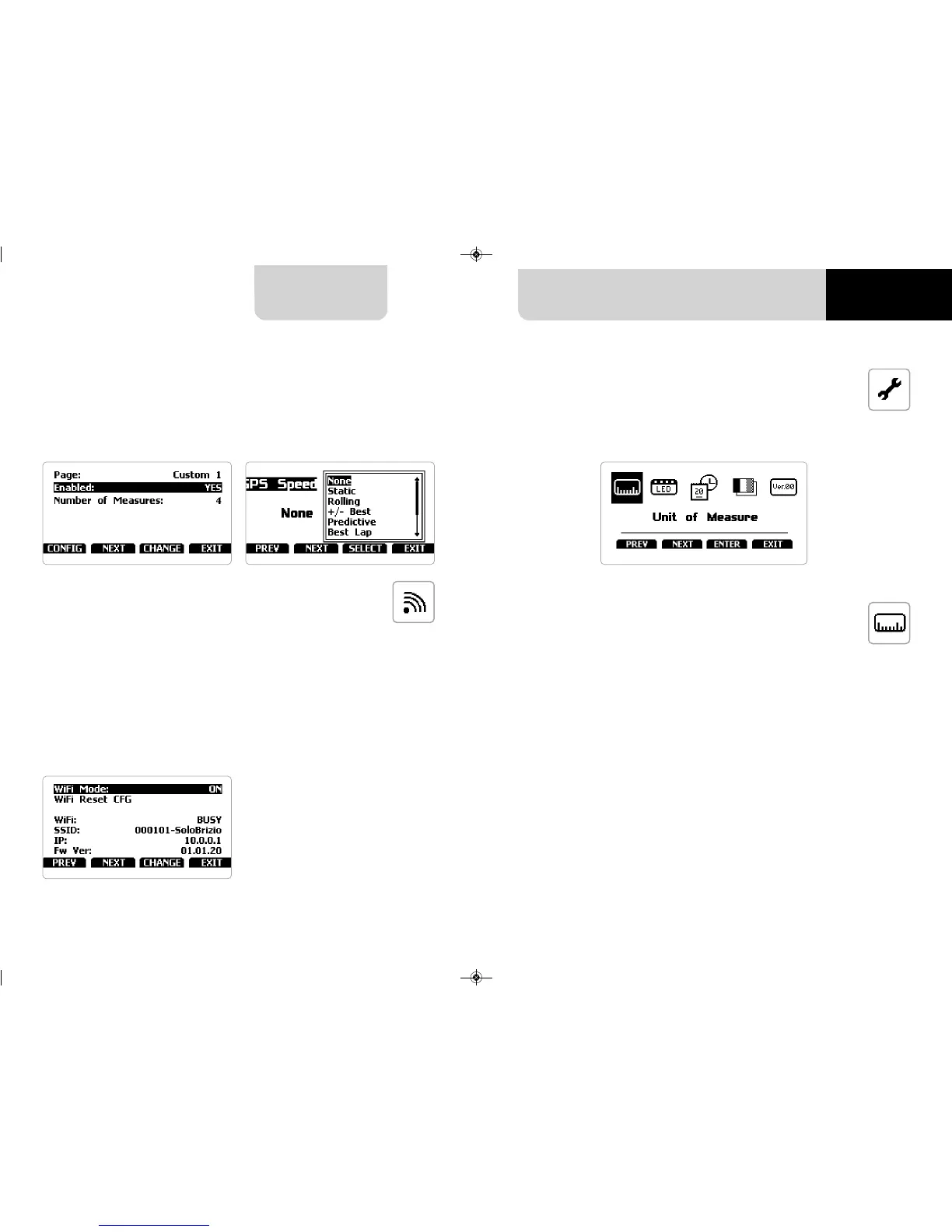
The two custom pages (speed race only) need to be enabled as shown here below.
This way “CONFIG” button appears (right image below). Press it to configure the page.
Each custom page can show up to four fields. All fields can show all available options
(left image below).
Selecting this icon you enter this page:
You can set the measure unit of:
n
speed: km/h or mph: please remember that according to the measure unit you set
here you will see different options in “Type of Race” menu if selecting “Performance”
type (refer to the related paragraph for further information)
Here you can manage Wi-Fi as well as reset its configuration. Wi-Fi modes are:
n
ON
n
Auto: switches Wi-Fi on when the vehicle is stopped and automatically switches it
off when Solo 2 starts recording (speed higher than 10 km/h for 3 seconds with a
good GPS signal)
n
OFF
“Wi-Fi Reset CFG” allows you to reset Wi-Fi configuration and is very useful if you do
not remember Wi-Fi password
5.5 – System settings
5.5.1 Unit of measure
5.4 Wi-Fi
18 19
CHAPTER 5


 To Next Page