CHAPTER 8
32 33
SOLO 2
This AP or SSID name is unique for your device.
An example of name is:” AiM-Solo2-00101” where:
n
“AiM” is the prefix of all AiM devices
n
“Solo 2” is the device identifier
n
“00101” is your device serial number assigned by the factory.
To make your device more recognizable you can add a name to the SSID. The limit is
of eight characters. Allowed characters are all letters, capital too, all digits and these
characters: ‘+ - _ () [] {}!. “Space” type can be used provided that it is not the first one
because it can cause incomprehension in some Windows
T
M
versions.
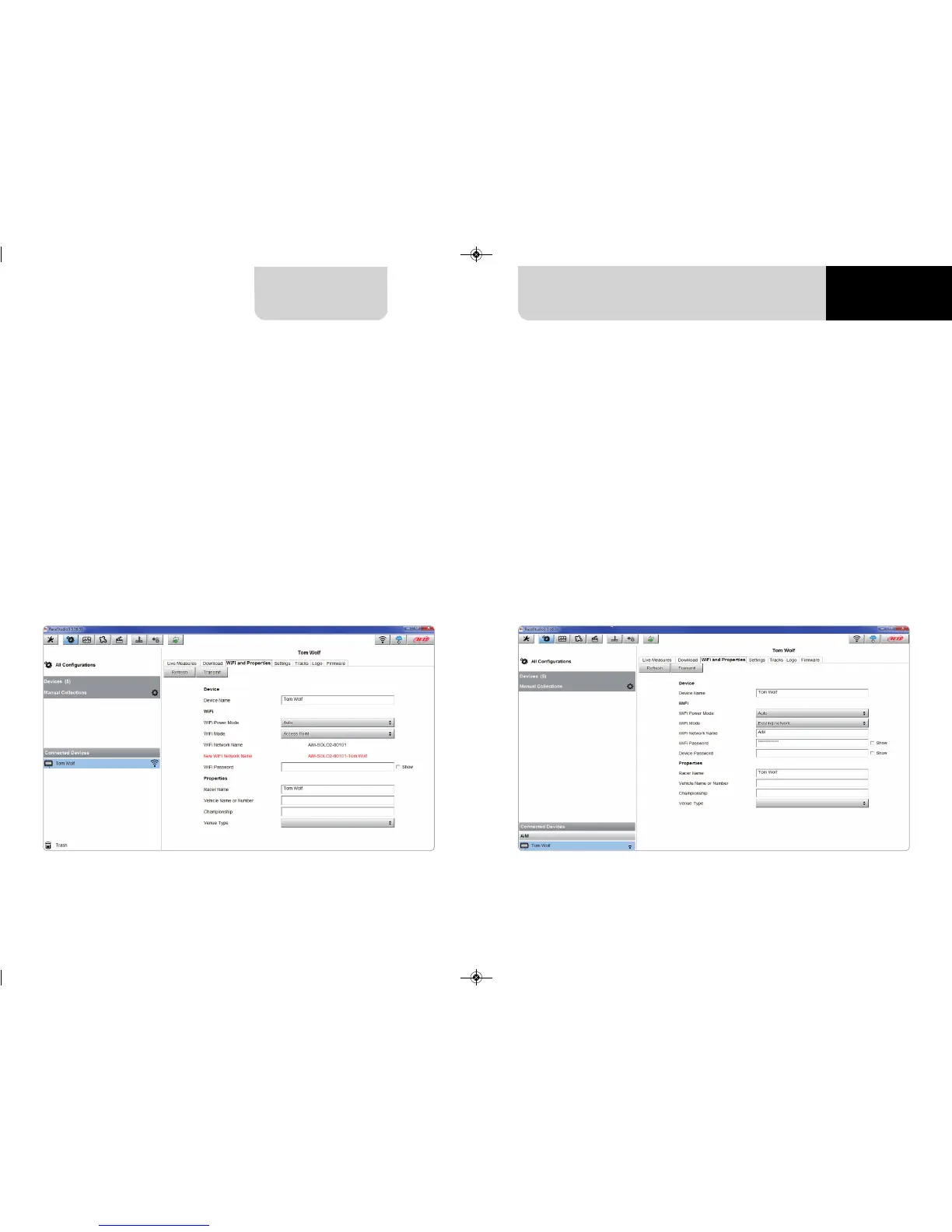
If, for example you add the driver’s name, Tom Wolf, the network name (SSID) becomes:
”AiM-Solo2-00101-TomWolf”
Once all parameters set click “Transmit”.
Solo 2 reboots and is configured with the new parameters.
If Solo 2 is protected by a password, as recommended, Race Studio 3 will ask that
password to authenticate.
This situation is ideal for a team with multiple drivers and staff members and is desired
to communicate with one or more AiM devices using the same PC network. Each Solo 2
can have its password that adds another security and privacy level to the network.
Race Studio 3 will show all Solo 2 connected to the same network under “Connected
devices” label, bottom left of the software page: click your device.
Enter “Wi-Fi and properties” tab and set it on “Existing Network”; fill in network name,
network password and device password.
Transmit the network settings to your device clicking “Transmit”: your device reboots
and joins that network.
Please note: the only admitted password are those following WPA2-PSK standard.
To complete this procedure use Race Studio 3 software as here explained.
Please Note: the same Wi-Fi connection can be created with the operative system tool.
Once the device has been authenticated in the Wi-Fi network you can communicate
with it using Race Studio 3.
Here above you see a device “Solo2-00101” that switched from AP to WLAN mode
(Existing Network). Network name is “AiM” and does not work with free access because
is protected by a password.
8.2 Adding Solo 2 to an existing network


 To Next Page