CHAPTER 9
42 43
SOLO 2
9. PC connection
Solo 2 can be connected to the PC only
via Wi-Fi. To do it:
n
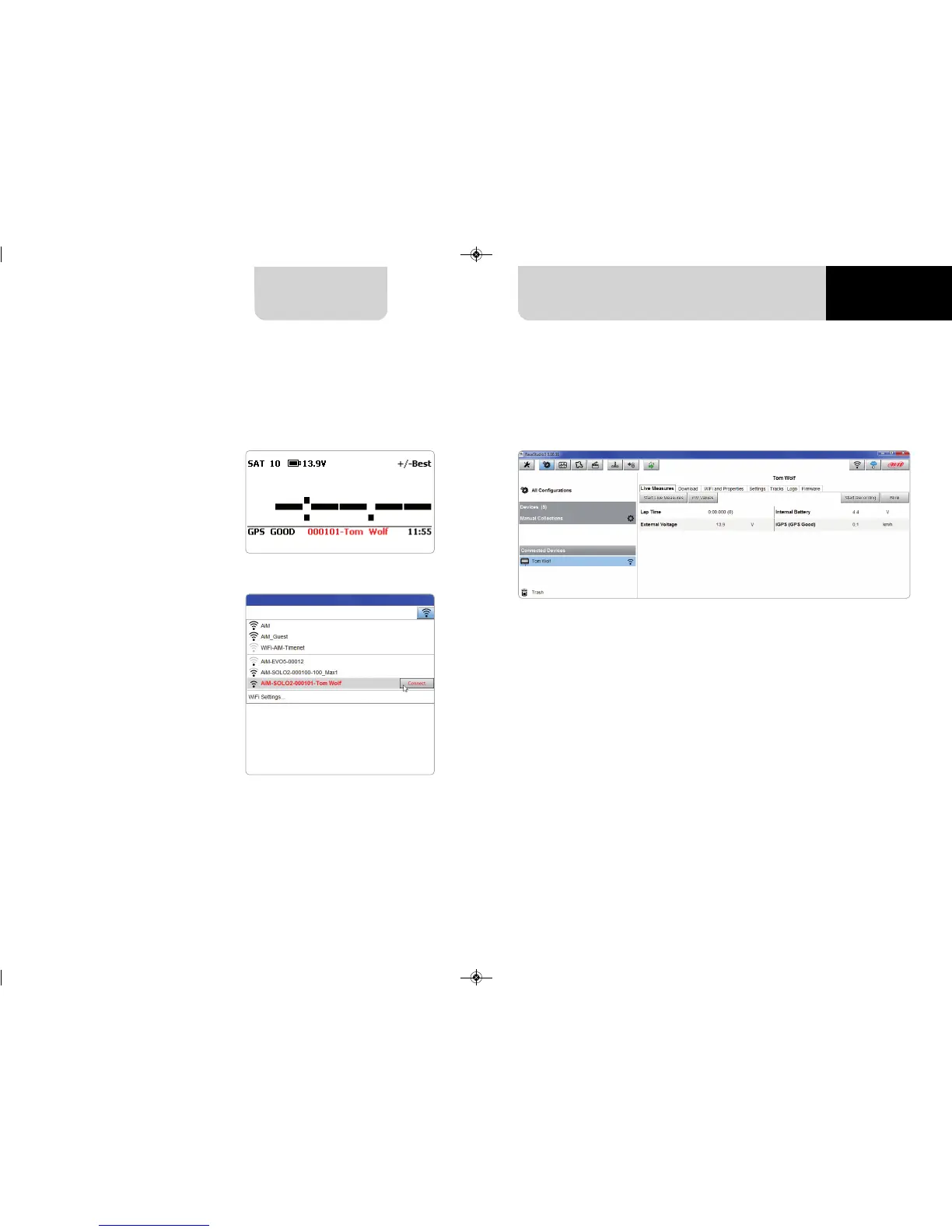
check that Solo 2 Wi-Fi is set on
“AUTO” or on “ON”
n
read your Solo 2 name – mid of
Solo 2 home page bottom line –
or look for it in “System Information”
page.
n
click Race Studio 3 Wi-Fi icon and
select your Solo 2.
Once the connection is established you have these options:
n
Live Measures: to check all Solo 2 channels;
n
Download: to download data, see the related chapter;
n
Wi-Fi and Properties: to manage the Wi-Fi configuration – see the related chapter;
n
Settings to:
n
set date format
n
enable/disable daylight time
n
set time format and time zone
n
set backlight colour
n
enable/disable night vision
n
Tracks: to manage the tracks stored in the device memory
n
Logo: transmit/receive the logo that shows up when switching Solo 2 on;
supported image format are JPEG or BMP; always use the most recent Windows
TM
versions (Windows8 or Windows10) whose graphic libraries are more updated
n
Firmware: to check or update your Solo 2 firmware version.


 To Next Page