CHAPTER 8
28 29
SOLO 2
8. Wi-Fi configuration
Solo 2 configuration can be made only using Race Studio 3 software. Two possible
Wi-Fi modes are available.
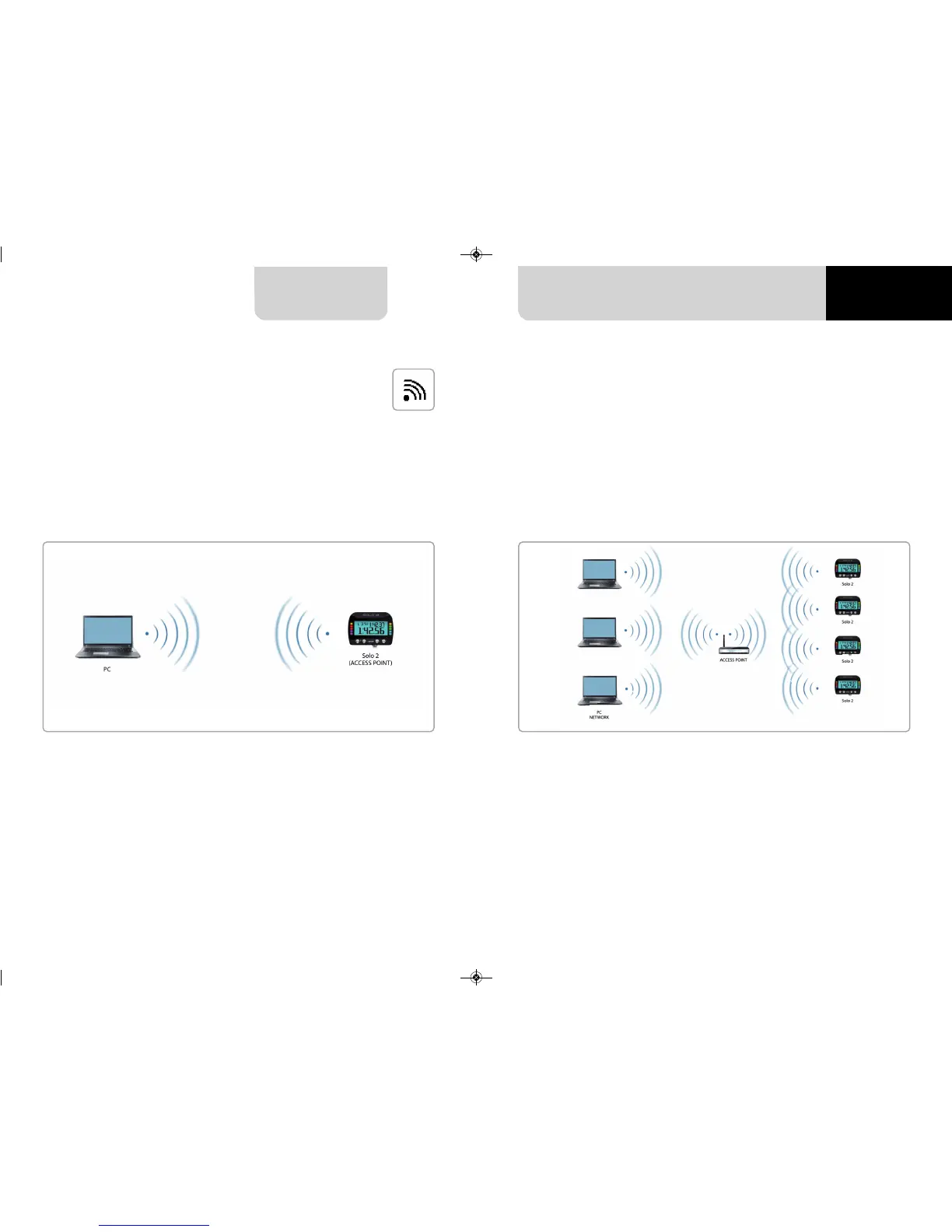
1 – As an Access Point (AP – default)
This is the ideal configuration if you have one only device and one only computer.
In this situation your Solo 2 creates a Wi-Fi network and works as an Access Point you
can connect your PC to.
When working in WLAN mode Solo 2 has two available security levels:
n
network authentication: network password
n
device authentication: Solo 2 password
Both levels allow you to use different strategies. A PC in WLAN, for example, can see
several AiM devices but can communicate only with those he knows the password of.
If you forget the password you can reset Wi-Fi configuration from Solo 2 menu as
explained before.
2 – Existing network (to connect to an existing Wi-Fi network – WLAN)
This mode is complex and implies an external access point (AP) but it is also more
flexible and powerful because allows you to communicate with more than one device
and with more than one computer in the same network. Solo 2 and the PC must
connect to an existing Wi-Fi network made by a device that works as an external
access point.


 To Next Page