Air Techniques, Inc.
Page
16
Equipment Setup
1
3
5.2 Control Unit Disassembly for Base Unit Access
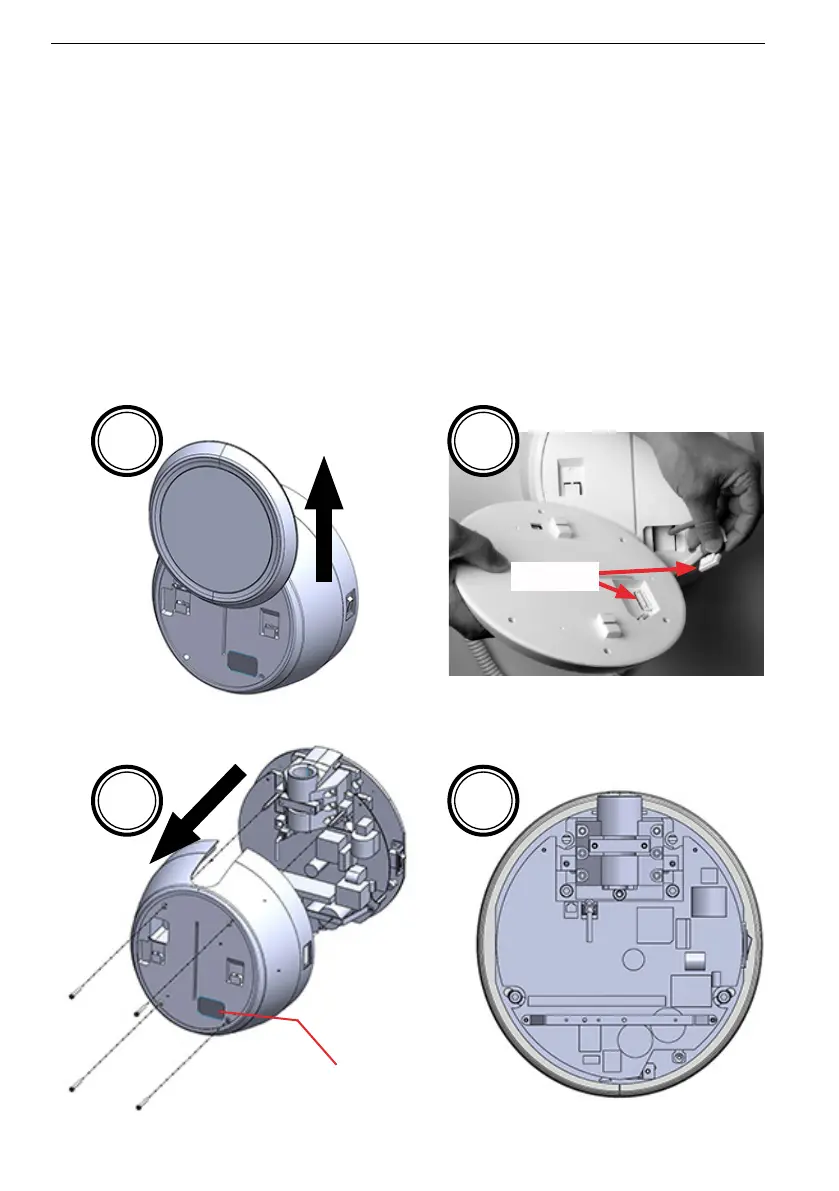
The Provecta HD control unit comprises the control panel, cover and base unit. In order access the base
unit to mount on the wall plate and make connections to the associated PCB, the control unit must
be disassembled. Refer to the illustrations below and disassemble the control unit by performing the
following steps.
1. Slide the control panel slightly horizontal up.
2. Disconnect the rear keypad connector and remove the control panel from the control unit.
3. Loosen the 4 screws securing the control unit cover and carefully thread the keypad
connector through the control unit cover while removing the cover.
4. Proceed to the lock slide setup for the base unit as necessary.
Disconnect
Connector
4
2
Thread keypad connector through
control unit cover.
(Cable is connected on internal PCB)


 To Next Page