Page
13
Air Techniques, Inc.
Equipment Setup
4.10 Remote Switch Configurations
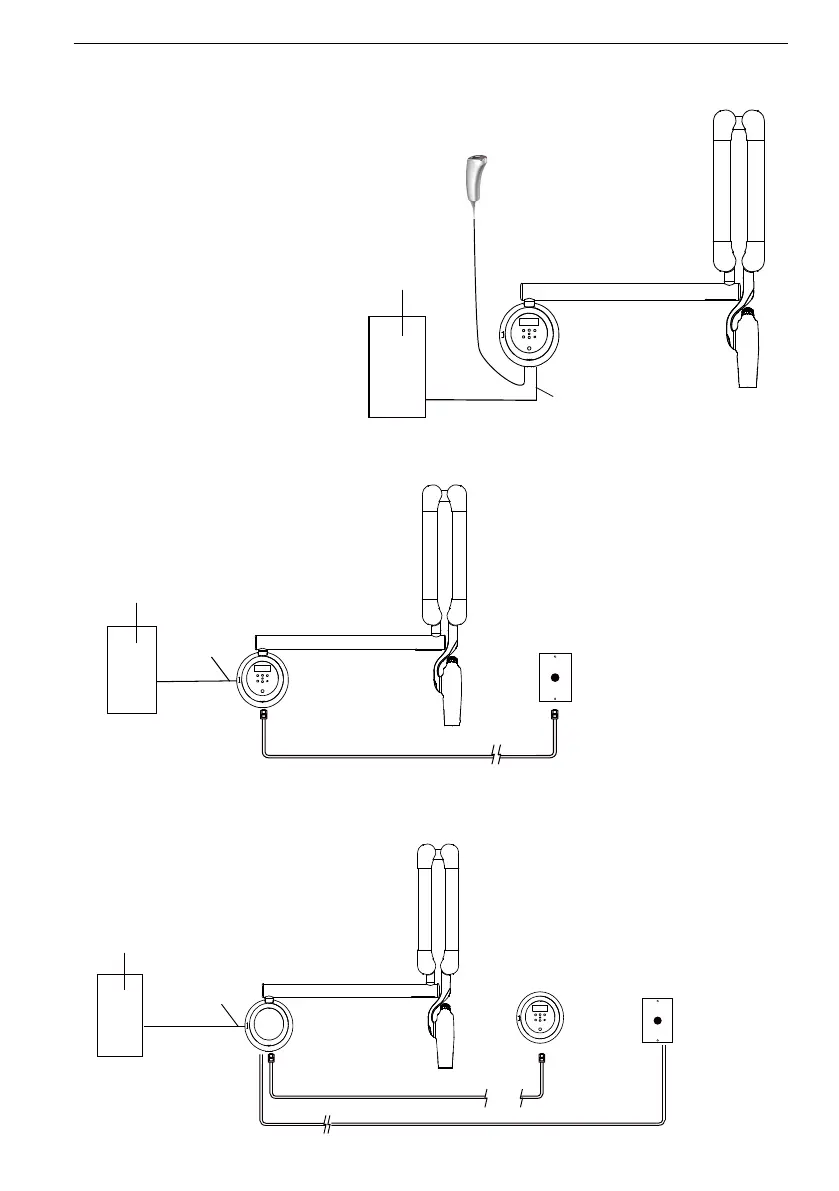
The six remote switch configurations available for Provecta HD are shown below.
Control Unit with
Control Panel
Handheld
Exposure Switch
(RJ11 Connector)
3-Wire Power
Connection
Power Source
Control Panel
or Outlet
Configuration No. 1 -
Corded Handheld Exposure
Switch and Control Keypad
Console mounted to base unit.
Configuration No. 3 -
Wall Mounted Remote Keypad Console using Control Panel Remote Mounting Kit (A6400) and
ATI Remote Wall Plate Push Button Exposure Switch Kit (A6320)
Control Unit without
Control Panel
Remote
Control
Panel
Remote Wallplate
Pushbutton
Exposure Switch
Internal Wiring
(CAT 6 with RJ45 Connectors)
Power Source
Control Panel
or Outlet
3-Wire Power
Connection
50 ft
(15 m)
Max
(RJ11 Connectors)
Configuration No. 2 -
1 ATI Remote Wall Plate Pushbutton Exposure Switch Kit (A6320) (RJ11)
Remote Wallplate
Pushbutton
Exposure Switch
Control Unit with
Control Panel
Power Source
Control Panel
or Outlet
3-Wire Power
Connection
Internal Wiring
( RJ11 Connectors)


 To Next Page