Air Techniques, Inc.
Page
22
Equipment Setup
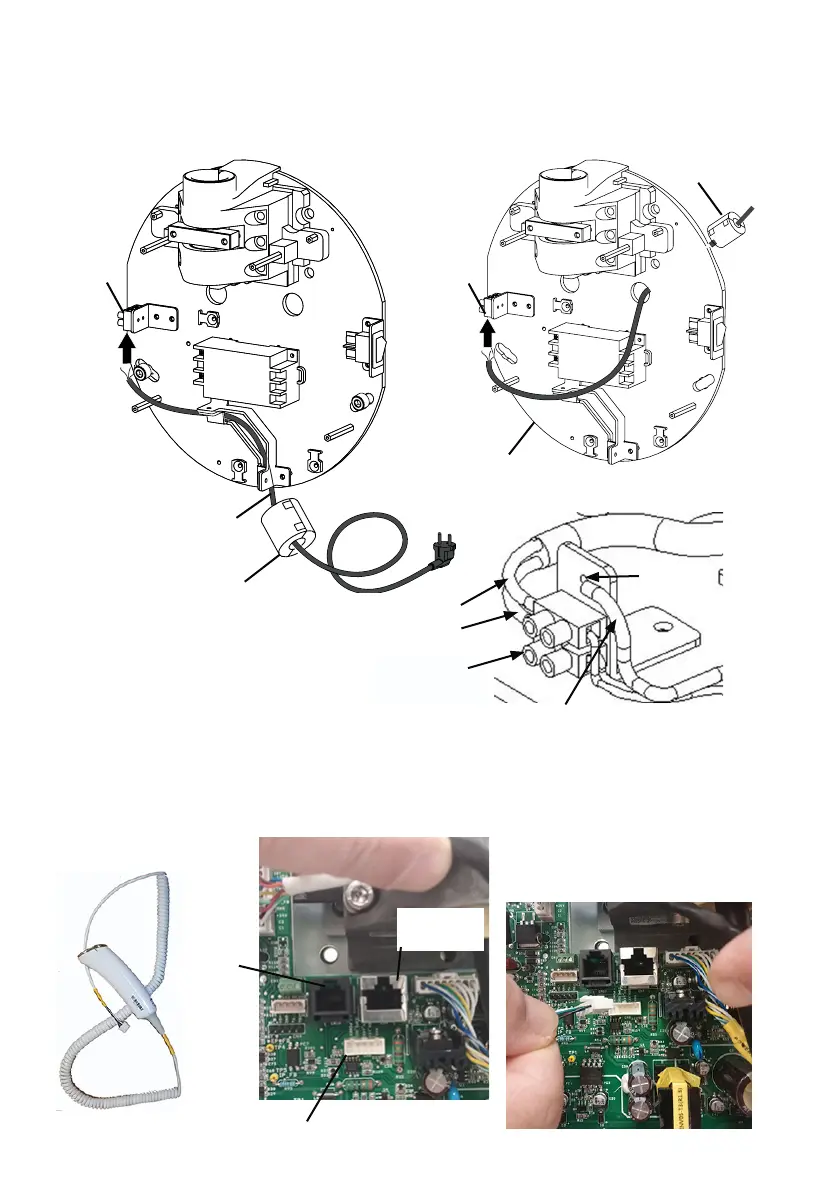
5.8 Connecting the Mains Power
Connection of the mains power supply can be made using the supplied mains cable or direct power
connection via fixed facility wiring. Either option is made by performing the same three wire connection.
Matching by color, connect the blue and brown wires of the mains power to the corresponding terminal
block connections as shown below. Connect the green with yellow stripe wire to the ground terminal.
Fixed
Connection
(optional)
Power
Terminal
Block
Mains Cable
(supplied)
Power
Terminal
Block
5.9 Connecting the Handheld Exposure Button
Connection of the handheld exposure button to the PCB connector is made by simply inserting the as-
sociated wire connector into the mating connector on the bottom of the PCB.
Handheld Exposure
Button
RJ45
Connector
RJ11
Connector
Handheld Exposure Button Connector
Handheld Exposure Button
Cable Connection
Power
Terminal Block
Connections
Ground
Terminal
Green with Yellow
Stripe Wire
Brown Wire
Blue Wire
Ferrite Core
Ferrite Core


 To Next Page