Page
27
Air Techniques, Inc.
Equipment Commissioning
6.5 Service menu settings via the control panel
All settings are saved after the first triggering.
• While pressing the button
and the button a little longer in order to switch to the Service menu.
Use
or browse in the menu.
Use to select the respective menu option.
• In menu option Cone Type use
to scroll and then use to confirm.
Use
to go back to the Service menu.
• In menu option DAP Setting use
to scroll and then use to confirm.
Use
to go back to the Service menu.
• In menu option Default Value Reset, press
to confirm.
• In menu option kV Option use
to scroll and then use to confirm, 50-70kV are permissible
in countries with no X-ray limit regulations.
• In menu option X-ray Count use
to scroll and then use to confirm.
• In the menu option Expo S/W Set use
to make the respective selection and use to confirm.
• Under menu option Version the current firmware version can be called up. Use
to acknowledge.
• Under menu option Demo the demo version can be started by pressing the
button.
• After entering all required values, press the
button to exit the Service menu.
2
4
3
7
5
6
1
8
9
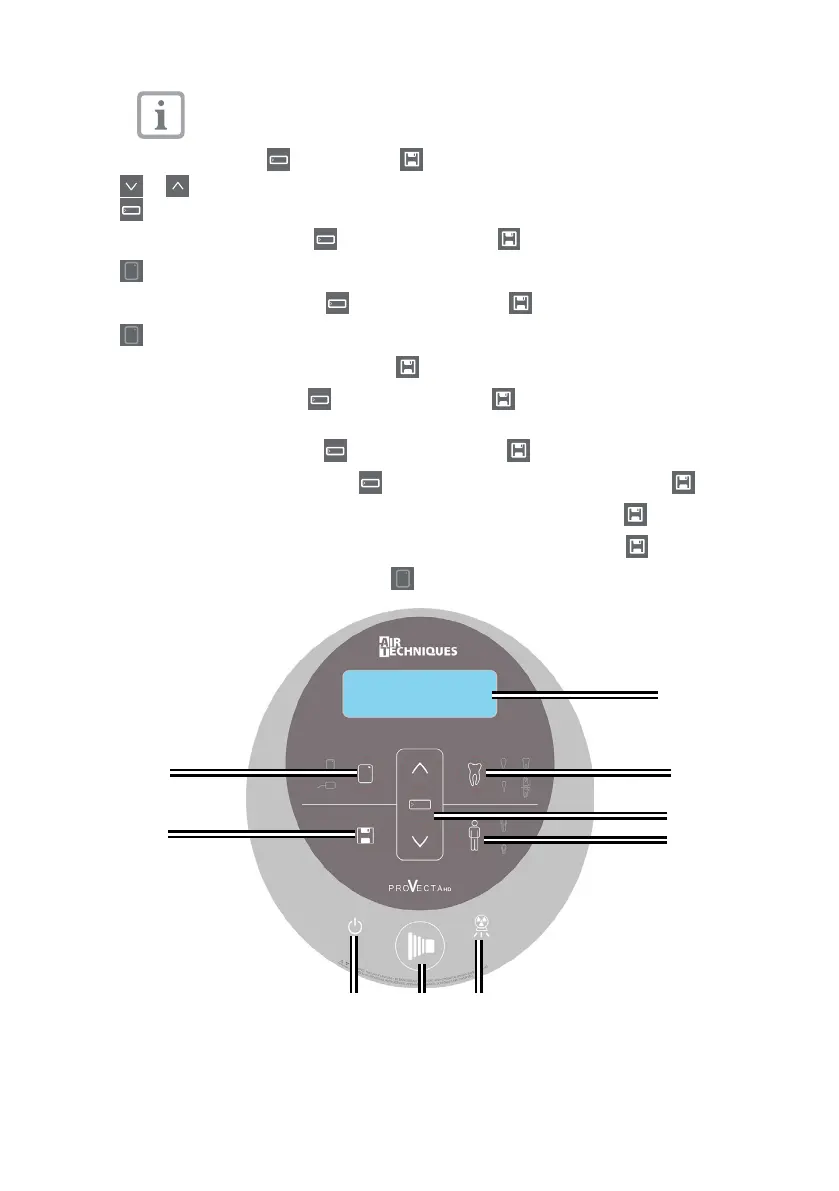
1 LED Display 4 Adult/Child selector 7 Stand-by/Power indicator
2 Anatomical selector 5 X-ray emission indicator 8 Save key
3 Parameter adjustment key 6 Exposure button 9 Image plate/sensor selector


 To Next Page