5
Calibrating Heavy Weights
1. Turn the vehicle on and wait for the scale to power up.
2. Place the heavy bin on the forks.
3. Follow the instructions below on the display menu:
• From the weight display, press ESC to reach the main
menu.
• Press▼untilSETUPisashing.PressOK.
• Press▼untilCALIBRATIONisashing.PressOK.
• Press▼untilHEAVYWEIGHTisashing.PressOK.
4. In a few seconds, the screen should read USE FILLED
AIR-WEIGH CAL WEIGHT. Wait a few seconds longer. The
display will then show RAISE WEIGHT UNTIL DISPLAY
FLASHES.
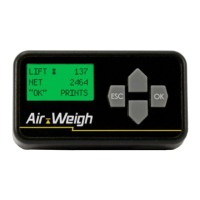
5. Begin lifting the bin. During the lift, the display will show LIFT
#1.Lifttheheavybinuntilthedisplayashes.
6. WaituntilthedisplaystopsashingandreadsLOWER
WEIGHT UNTIL DISPLAY FLASHES. Lower the calibration
weight again in one slow, smooth motion. While lowering the
weight, the display will show DROP #1.
7. When you reach the height of the low-proximity sensor
location,thedisplaywillash.Immediatelystoploweringthe
weight, being careful not to touch the ground.
8. If you stop or pause at any time while raising or lowering
thebinbeforethedisplayashes,youmayreceiveaLIFT
ERROR. The error message will instruct you to restart the
calibration process.
Calibrating Your Scale | Calibrating Heavy Weights


 To Next Page