12
Resetting and Erasing Lift Data
Resetting Lift Data
As noted in the previous section, BinMaxx is set to display the
Reset Lift prompt by factory default. The following instructions are
for manual reset.
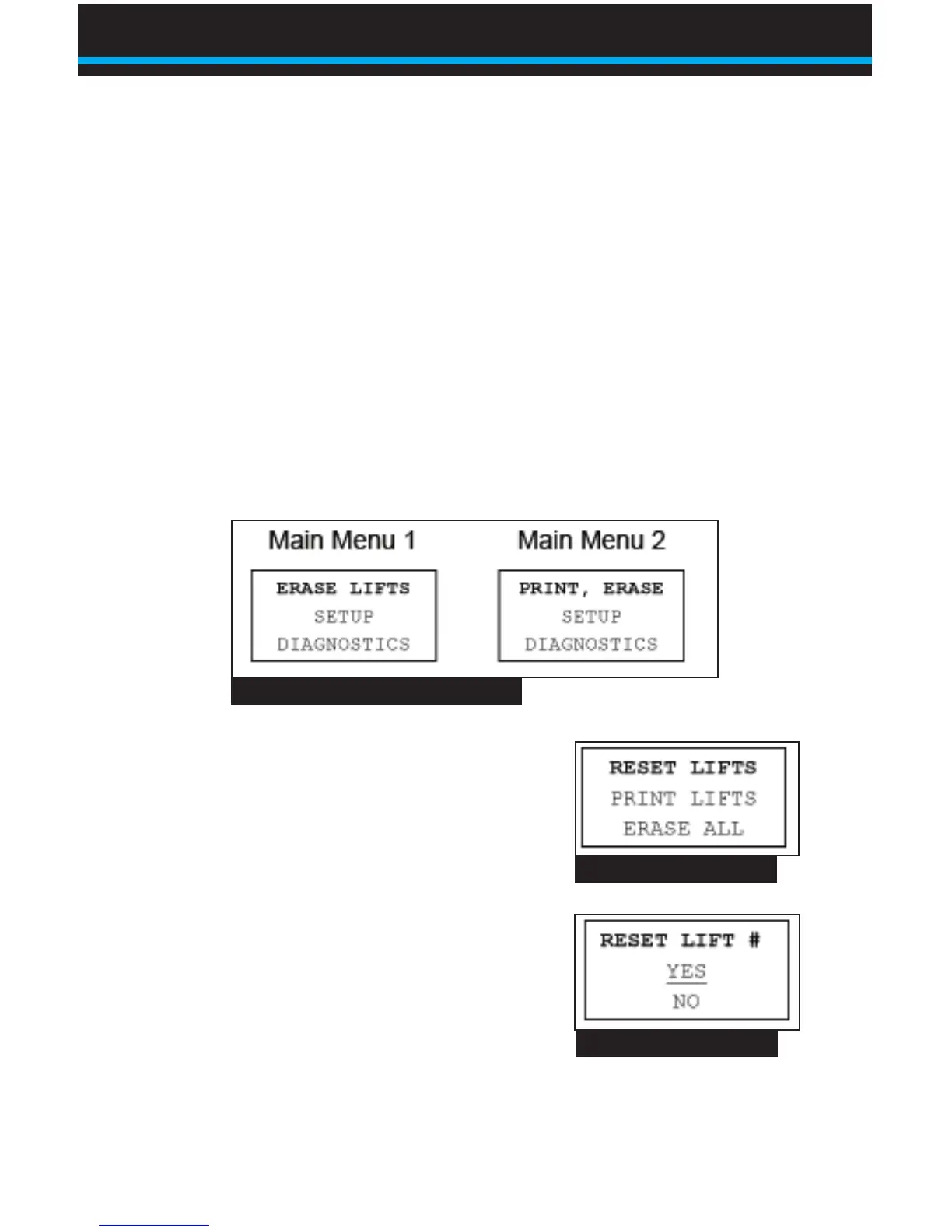
1. From the weight display, press ESC to reach the main menu
(Fig.2).ERASELIFTSorPRINT,ERASEwillash.Main
Menu 2 will display if you have installed that date/time printer
and it is turned on.
2. Press OK to select ERASE. The
menu shown in Fig. 3 will appear.
RESETLIFTSwillash.Notethat
the option PRINT LIFTS will not
appear if a printer is not installed and
turned on.
3. Press OK to select RESET LIFTS.
The screen shown in Fig. 4 will
appear.YESwillash.
4. Press OK to reset lift number. The
screen will read ACCEPTED, then switch to the screen
showninFig.5.YESwillash.
Fig. 2 BinMaxx Main Menu Screens
Fig. 3 Erase/Reset Menu
Fig. 4 Reset Lift Number
Using BinMaxx | Resetting and Erasing Lift Data


 To Next Page