10
Navigating the Weight Display
Reset Lifts Prompt
The default factory setting for BinMaxx is to display the Reset Lifts/
Weight prompt before allowing you to view the weight display. This
screen gives you the option to reset the number of lifts and/or the
weight of the last bin displayed on the main screen so it will show
only the current day’s totals. Resetting the lifts or weight does NOT
delete lift information from the ComLink - it only clears it from the
display. To erase lift data, see Resetting and Erasing Lift Data, p.
12. If you would rather reset lifts manually instead of seeing this
screen before the weight display, see Turning the Default Reset Lifts
Prompt Off or On, p. 16.
Weight Display
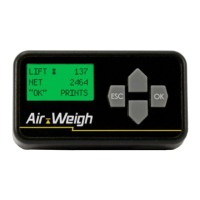
When BinMaxx is on and the truck is in use, BinMaxx will show
the weight display. This is the screen that provides information on
lift number and bin net weight. The weight display shows the most
recent lift number and bin net weight. The weight display will appear
as in Fig. 1.
Note: If your scale displays a warning message stating
CALIBRATION REQUIRED BEFORE USE instead of the weight
display, see the p. 4 for calibration instructions.
Using BinMaxx | Navigating the Weight Display


 To Next Page