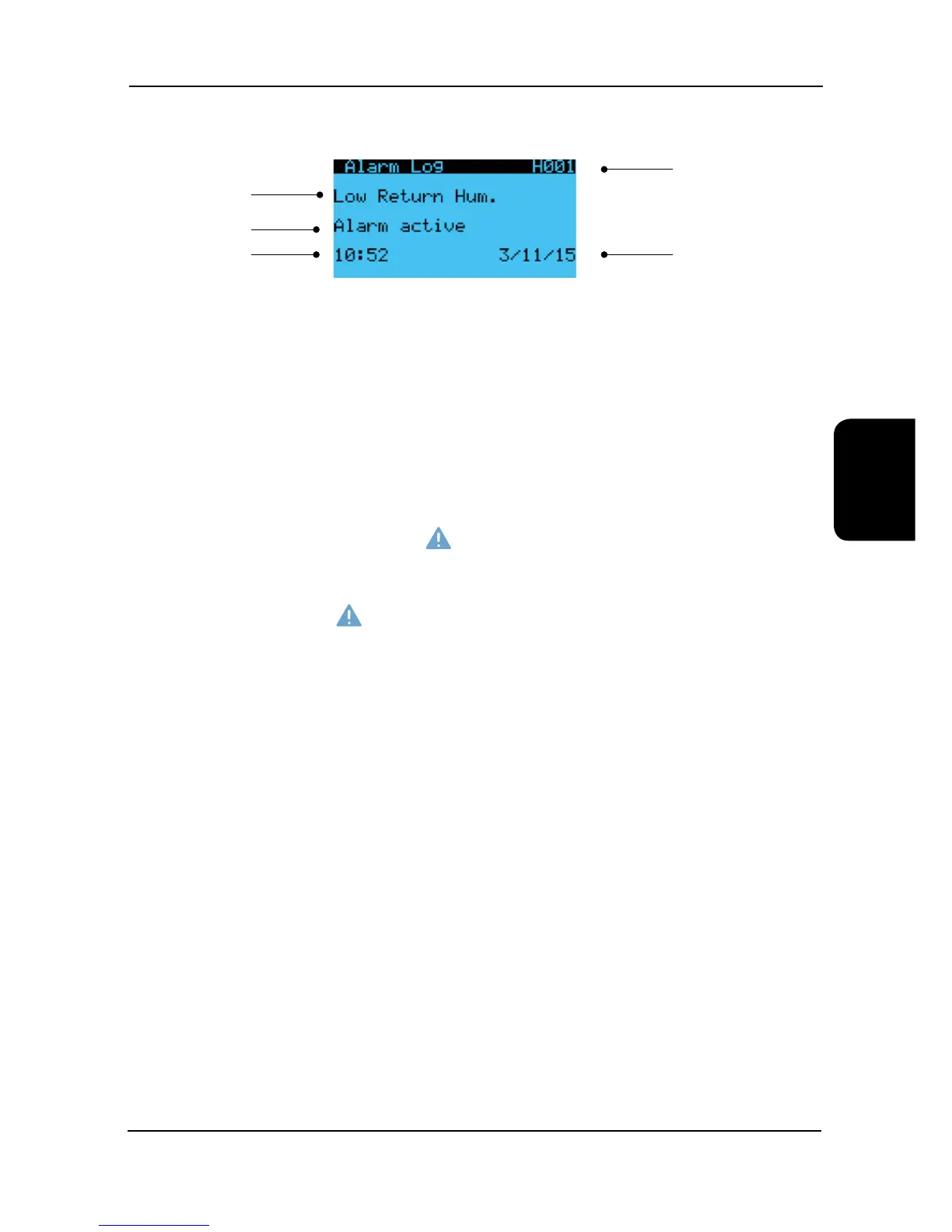
Alarm Log
The alarm page offers a log of the last 150 alarm messages in a scrolling log, pressing the alarm button will enter the
alarm page.
Consequently the most recent alarm has the lowest log number (001) and will be displayed upon entering the alarm
page. As another alarm occurs, the alarm number increases until 150 alarms have occurred. From this point on, alarm
001 moves to 002 and any new alarm will reside in position 001.
As new alarms are generated and cleared, the highest number logs (150) in the scroll will be lost.
Viewing the Alarm Log
By using the arrow keys, the last 150 alarms generated can be reviewed in chronological order. The display provides the
alarm type information and the time and date of each alarm occurrence.
Alarm Detection
When the controller detects an alarm an output is generated to the relevant alarm relay which in turn illuminates the
button. To see which alarm has accrued press the
button and the most recent alarm will be displayed.
If the alarm light is on, the alarm page can be interrogated to identify which alarm is active.
Resetting the Alarm
The auto reset alarms will automatically reset once the conditions are within the set parameters.
To clear a manual alarm press the
button twice and the red LED will disappear.
Alarm number
Alarm name
Date
Alarm Status
Time
Alarms
Alarm Menu Display


 To Next Page