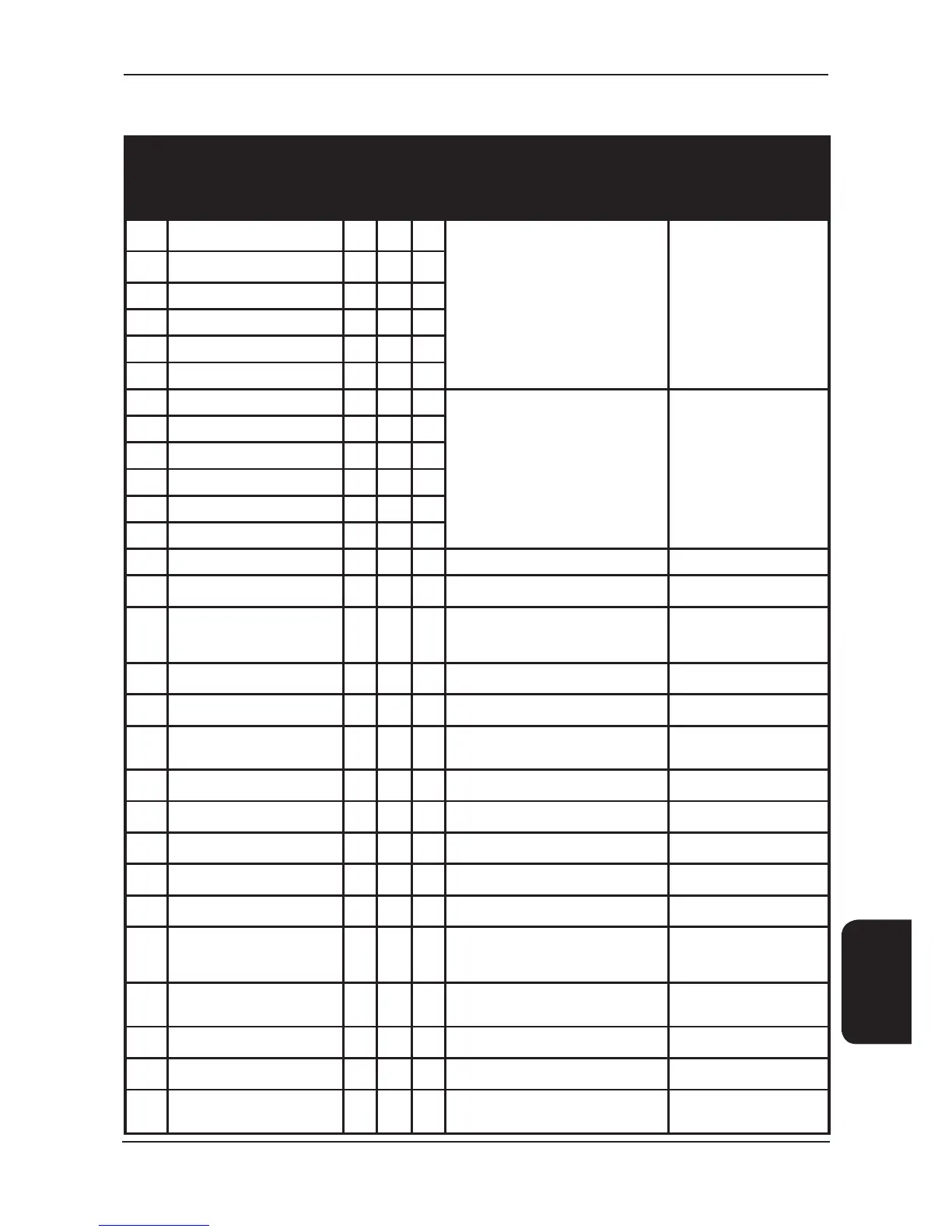
Alarms
Code Description
Auto Reset
Unit
Disabled
Component
Disabled
Cause Action
AL44
Inverter compressor maintenance
alarm
•
Indicates that the run hours for the particular
component has exceeded the limit set for its
maintenance alarm.
Once maintenance has been
performed, the hours run for the
component can be reset, which
will reset the alarm.
AL45
Fixed speed compressor
maintenance alarm
•
AL46 Condenser fan maintenance alarm
•
AL47 Evaporator fan maintenance alarm
•
AL48 Filter maintenance alarm
•
AL49 Humidier maintenance alarm
•
AL50 High humidity alarm
•
Indicates that the particular value has exceeded
the high / low limit. This alarm is delayed for 2
minutes on start-up to prevent nuisance alarms.
The cooling or heat demand is disabled
Once the value returns below
the high/low limit the alarm is
automatically reset
AL51 Low humidity alarm
•
AL52 High return air temperature alarm
• • •
AL53 Low return air temperature alarm
• • •
AL54 High supply air temperature alarm
• • •
AL55 Low supply air temperature alarm
• • •
AL56 Air Flow Calculation Internal Error
• •
The airow calculation has gone out of bounds Constant air volume disabled
AL60 Conguration wizard not completed
• •
Indicates that the unit conguration wizard has
not been completed
Unit conguration must be nished
and the controller must be reset
AL61 Inverter compressor start failure
• •
The inverter compressor may fail to start due to
wrong settings or wrong pressure differences
during start-up
The compressor will attempt to
restart every 30s up to a maximum
of 5 times and then it will need to
be manually reset
AL62 Inverter compressor envelope alarm
•
The inverter compressor has gone out of the
operating envelope for more than 60s
The alarm must be manually reset
AL63
High discharge gas temperature
alarm
• •
The discharge temperature is over the inverter
compressor threshold.
Alarm will reset once the
temperature is below threshold
AL64 Low pressure differential on inverter
• •
Pressure difference is lower than minimum
alarm (required for lubrication) for more than
60s. Compressor is turned off.
Alarm will reset once the pressure
has increased
AL65 Power plus inverter ofine
• •
Indicates communication between the controller
and Power+ inverter has failed
Alarm will reset once
communication is resumed
AL66 Inverter alarm
• •
General inverter alarm. Specic alarm will be
stated on the alarm screen
Alarm will reset once the condition
clears
AL67 Low pressure on inverter
• •
Low pressure on inverter compressor.
Compressor will turn off
Alarm will reset once pressure
increases
AL68 High pressure on inverter
• •
High pressure on inverter compressor.
Compressor will turn off
Alarm will reset once pressure
reduces
AL69
Pressure differential across inverter
drive too high to start
• •
Inverter compressor cannot start if the pressure
differential is too high
Alarm will reset once pressure
differential reduces
AL70 Inlet water temperature probe alarm
• •
Indicates a fault with the probe, possible causes
are the sensor going open circuit or there is a
wiring fault. All sensor alarms are auto reset
once the fault has been rectied.
Alarm is generated
AL73 Inlet water temperature alarm
•
Indicates the water temperature is too high or
below the dew point
Alarm is generated. Unit will keep
running but can be set to shut the
valves if required
AL75 Airow fail alarm
• • •
Indicates the air ow has dropped below the limit
and the fans are switched on
The alarm will auto reset 3 times
and lock out to a manual reset
AL76 Airow trip count critical
• •
Indicates airow fail alarm has tripped 3 times
in 24 hours
Unit is disabled. Alarm must be
manually reset
AL77
Filter change alarm – high pressure
drop
•
Indicates that the lters on the unit possibly
need changing.
Alarm will need to be manually
reset once the lter has been
changed.





 To Next Page