
EasyManua.ls Logo

Airflow Instruments ProHood PH731 - User Manual

Airflow Instruments ProHood PH731
81 pages
Print Icon
To Next Page IconTo Next Page
Loading...
AIRFLOW™ INSTRUMENTS
PROHOOD™
CAPTURE HOOD
MODELS PH730/PH731
OWNER’S MANUAL
P/N 6005724, REVISION D
OCTOBER 2014
Model PH731  Model PH730 Micromanometer
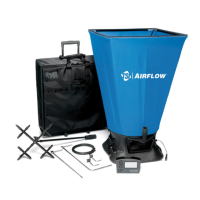
Capture Hood (shown with standard and optional accessories)

Table of Contents

Questions and Answers

  • K
    Kelly PowellAug 6, 2025
    How to troubleshoot no display on Airflow Instruments Measuring Instruments?
    • N
      Nicole SantiagoAug 6, 2025
      If your Airflow Instruments Measuring Instruments unit's display is blank, there are several potential causes. First, ensure the unit is turned on by pressing the I/O key. If that doesn't work, check the batteries; they may be low, dead, or have dirty contacts. Replace or clean them as needed. Finally, verify that the AC adapter is properly connected.
  • L
    Laura YoderAug 14, 2025
    What to do if I see flashing blank on Airflow Instruments ProHood PH731 display?
    • A
      Adam KnightAug 14, 2025
      If you see the “ ” symbol flashing on the display of your Airflow Instruments Measuring Instruments, this typically indicates a low battery charge or dirty battery contacts. Try replacing or recharging the batteries first. If the problem persists, clean the battery contacts.
  • V
    Vincent GonzalezAug 21, 2025
    Why does Airflow Instruments ProHood PH731 Measuring Instruments display dashes for velocity or volume?
    • B
      Bryan SparksAug 21, 2025
      If you see '------' on the display of your Airflow Instruments Measuring Instruments for velocity or volume, it means a valid temperature reading is required for standard or actual velocity/volume correction. Ensure a temperature probe is connected to the meter. Alternatively, you can manually input the temperature by setting “Temp Source” to “Entered” in the Actual/Std menu.
  • R
    Riley McdanielAug 29, 2025
    What does flashing 888888 mean on Airflow Instruments ProHood PH731 Measuring Instruments?
    • M
      Michelle SchmidtAug 29, 2025
      If “888888” is flashing on the display of your Airflow Instruments Measuring Instruments, it indicates that the pressure is too high to measure. This can also occur when measuring velocity or flow if the pressure at that velocity is too high. Refer to the specifications page for the maximum pressure limits.

Summary

Introduction to Airflow Instruments PH730;PH731

Instrument Description and Components

Overview of the micromanometer, capture hood, and standard/optional tools.

Unpacking and Initial Setup

Guides on unpacking, checking parts, and initial instrument preparation.

Micromanometer Operation and Navigation

Keypad Functions and Controls

Explanation of each button on the micromanometer's keypad.

Menu Navigation and Setup Options

How to navigate menus for instrument setup and parameter selection.

Advanced Measurement Configuration

Flow Setup and Duct Sizing

Setting up flow measurements for different duct types and K-factors.

Data Logging and Management

Procedures for recording, storing, and managing measurement data.

Calibration and Correction Factors

How to calibrate the instrument and apply correction factors for accuracy.

Capture Hood Measurement Procedures

Performing Flow Measurements

Methods for taking single flow readings and running averages.

Backpressure Compensated Flow Measurement

Steps for performing flow measurements with backpressure compensation.

Maintenance, Troubleshooting, and Appendices

Component Care and Troubleshooting

Guidelines for cleaning components and resolving common instrument issues.

Duct Traversing Techniques

Methods for traversing ducts to determine average air velocity or volume.

Swirl X Flow Conditioner

Information on the Swirl X Flow Conditioner for improved accuracy.

Technical Specifications

Performance Ranges and Accuracy

Detailed specifications of measurement ranges, accuracy, and operating conditions.

Airflow Instruments ProHood PH731 Specifications

General IconGeneral
Temperature Range32 to 122°F (0 to 50°C)
Storage Temperature-4 to 140°F (-20 to 60°C)
Data LoggingYes
Wireless CommunicationBluetooth
Warranty2 years
Humidity Range5% to 95% RH
DisplayDigital LCD
Measurement Range30 to 2000 ft/min

Related product manuals