11
1
6 8
3
7
4
5
2
9
“Selectable”
“Selected”.
“Increase” value.
“Reduce” value.
“Holiday mode” symbol shows for holiday mode
instead of fan symbol (pos. 7.), see page 24.
Padlock shows when operated with active
automatic operating lock and active screen lock.
"auto"
“Automatic operation” text o when manual
override or underride activated for air ow.
Touch screen
The Airlinq Orbit control panel is tted with a touch screen
operated in the same way as a smartphone. The control
surface is 52 x 52 mm. To change the display view, scroll on
either the left or right side of the control surface.
Screen displays and symbols adapt menus and functions
automatically.
In sect. “4.2. Operation” from page 11 to page 23 only the
most important content is shown on a white background
is shown on all screens.
4.2. Operation
4.2.1. Automatic Operating Lock
The control panel is tted with an automatic operation lock
to prevent accidental operation, e.g. caused by cleaning.
The lock activates automatically after 120 seconds of
no operation. The screen shows a padlock symbol with a
directional arrow at the bottom if operated.
Activate operation:
Press padlock and drag in direction of arrow.
To lock the screen against accidental operation, see sect.
”Lock Screen” on page 20.
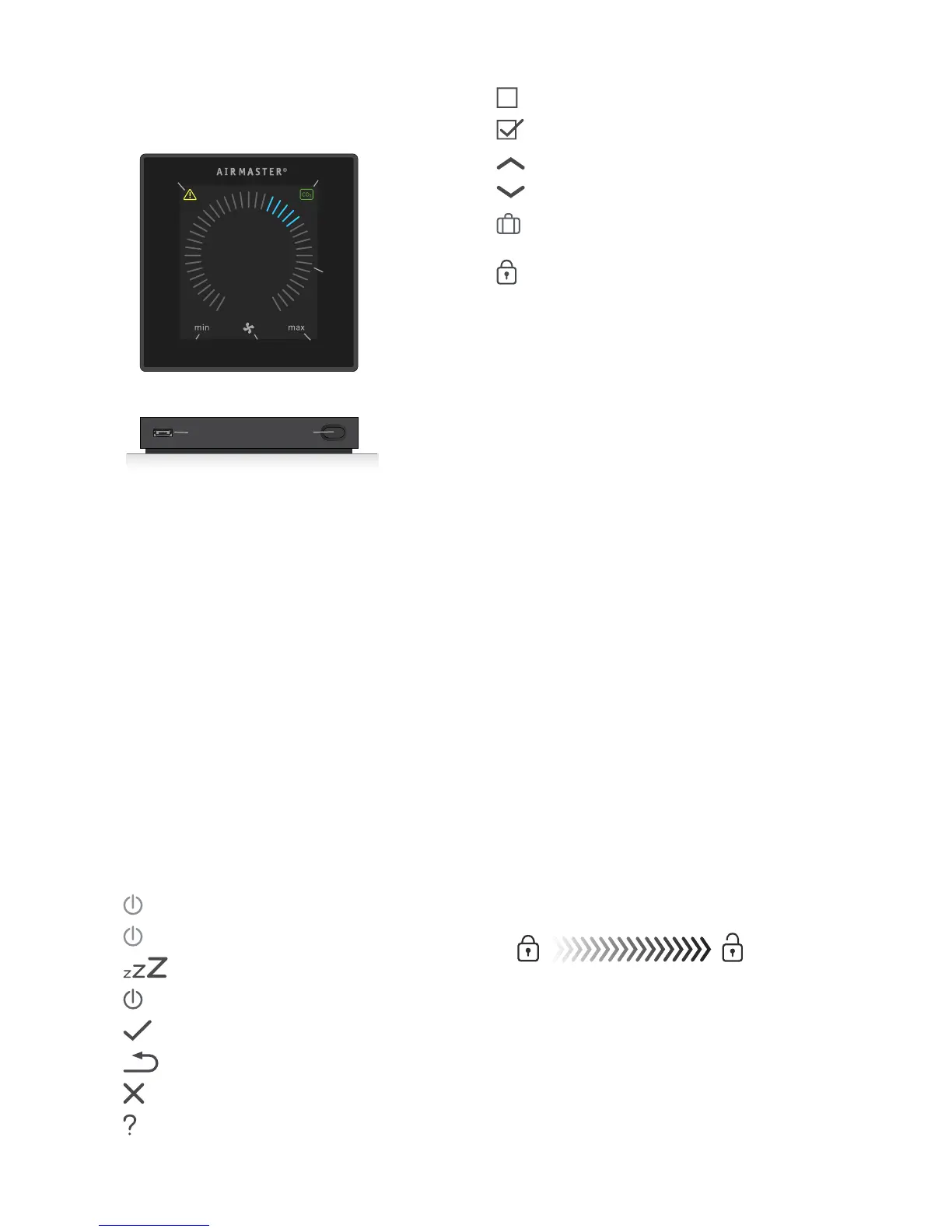
4. Airlinq Orbit (Black Control
Panel)
4.1. Control Elements
1. Air ow setting (blue stripes), see page 12.
2. Function button (activate control menu, switch o
unit), see page 13.
3.
USB mini-B port. Connection to PC using “Airlinq
Service Tool”, to program the air handling unit.
Download “Airlinq Service Tool” at:
www.airlinq.eu
4.
Symbol for warnings (yellow) and alarms (red),
see page 23.
5. CO2 symbol, see ”CO2 status” on page 23.
6. Text “min” for minimal air ow.
7. Fan symbol.
8. Text “max” for maximum air ow.
9. Touch screen, see page 11.
Other symbols
“Auto”.
“Start”.
“Standby”.
“Switch o”.
“Conrm”.
“Back”.
“Cancel”.
“Help”.



 To Next Page