25
0 A A+10% B
min
max
min+x
0
0
A
min
max
0
B
5.6. Control Using a CO
2
Sensor
A CO
2
sensor is used to control the air handling unit inde-
pendent of the room’s CO
2
level. The air ow can either be
(1) controlled by the CO
2
sensor, or let the unit’s complete
operation be (2) controlled by the CO
2
sensor.
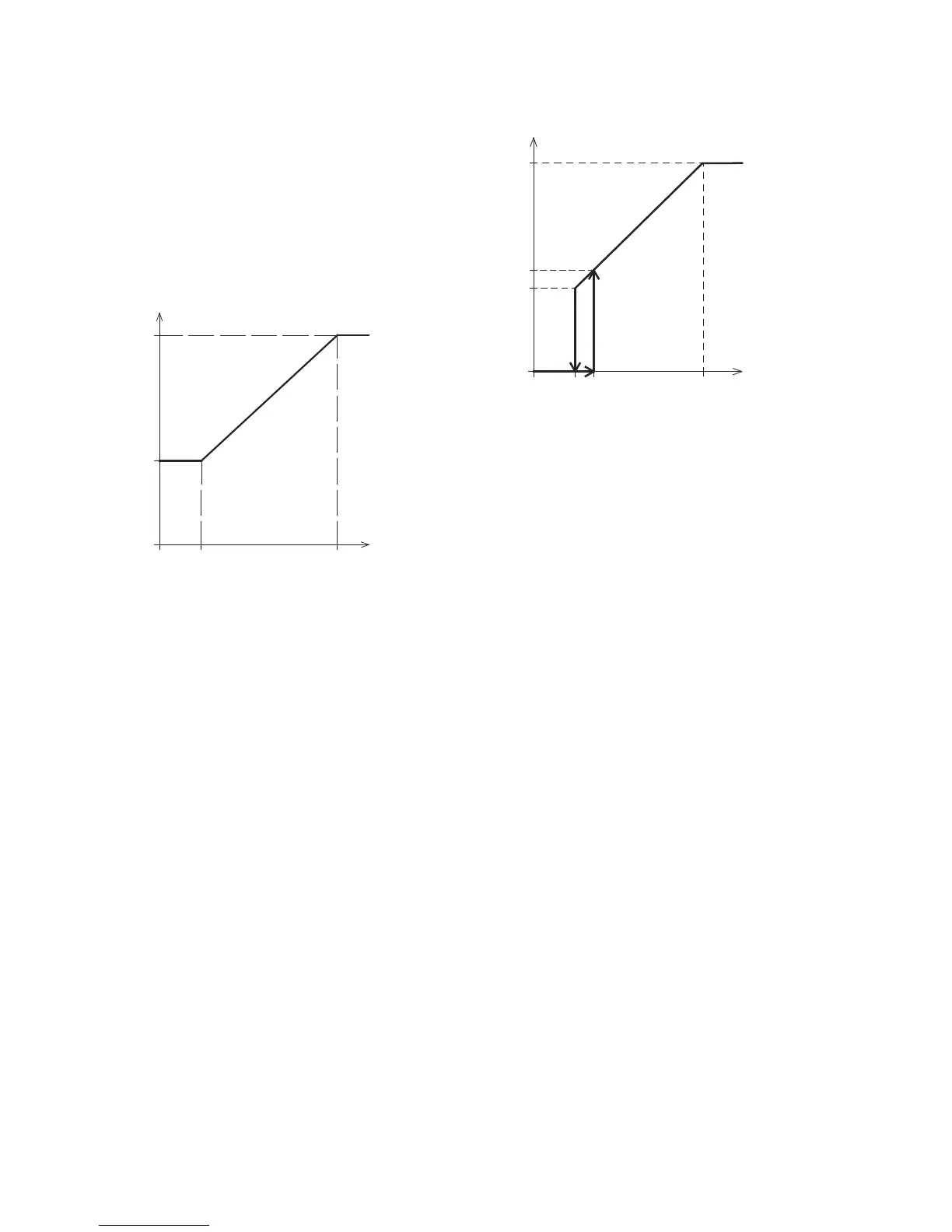
1. Air Flow Control
Air ow in [%]
[ppm]
CO
2
level
The unit can be set to run with a reduced basic air volume
(min.) for basic ventilation.
If the CO
2
level in the room exceeds the programmed lower
limit (A), the CO
2
sensor will increase the air ow. If CO
2
levels
continue to rise, the air ow will be increased linearly up
to the maximum volume (max.) at the upper CO
2
limit (B)
and above.
Between the CO
2
level upper and lower limits, the air ow
is increased and reduced fully automatically between basic
and maximum air ow.
If the CO
2
level falls to the programmed lower limit (A) or
below, the unit will run with the standard air ow again.
To use this function, the timer ow or the default ow has
to be reduced. See “Timers” on page 17 or “Default ow”
on page 19.
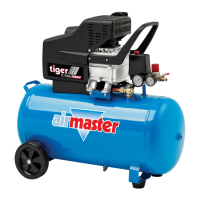
2. Start, Stop and Air Flow Control
Air ow [%]
[ppm]
CO
2
level
If the unit is completely controlled by the CO
2
sensor, it will
start with a little more than the standard air ow (min. +x)
when the CO
2
level exceeds the programmed lower limit
plus 10 % (A + +10%).
If CO
2
levels continue to rise, the air ow will be increased
linearly up to the maximum air ow (max.) at the upper CO
2
limit (B) and above.
Between the CO
2
level upper and lower limits, the air ow is
increased and reduced fully automatically between standard
and maximum air ow.
If the CO
2
level falls below the programmed lower limit (A),
the unit will stop again.
To use this function, the CO
2
sensor has to be programmed
as a start parameter using the “Startup guide”, Airlinq User
Tool or Airlinq Service Tool.
Factory settings:
Lower limit A: 500 ppm (Min CO
2
PPM).
Upper limit B: 900 ppm (Max CO
2
PPM).
min: 30% (Min air ow)
max: 100% (Max air ow).
Start pri. 7 CO2.
Settings can be made using the control panel menu points
“Default air ow” (see page 19) and “Startup guide” (see
page 20), Airlinq User Tool or Airlinq Service Tool.



 To Next Page