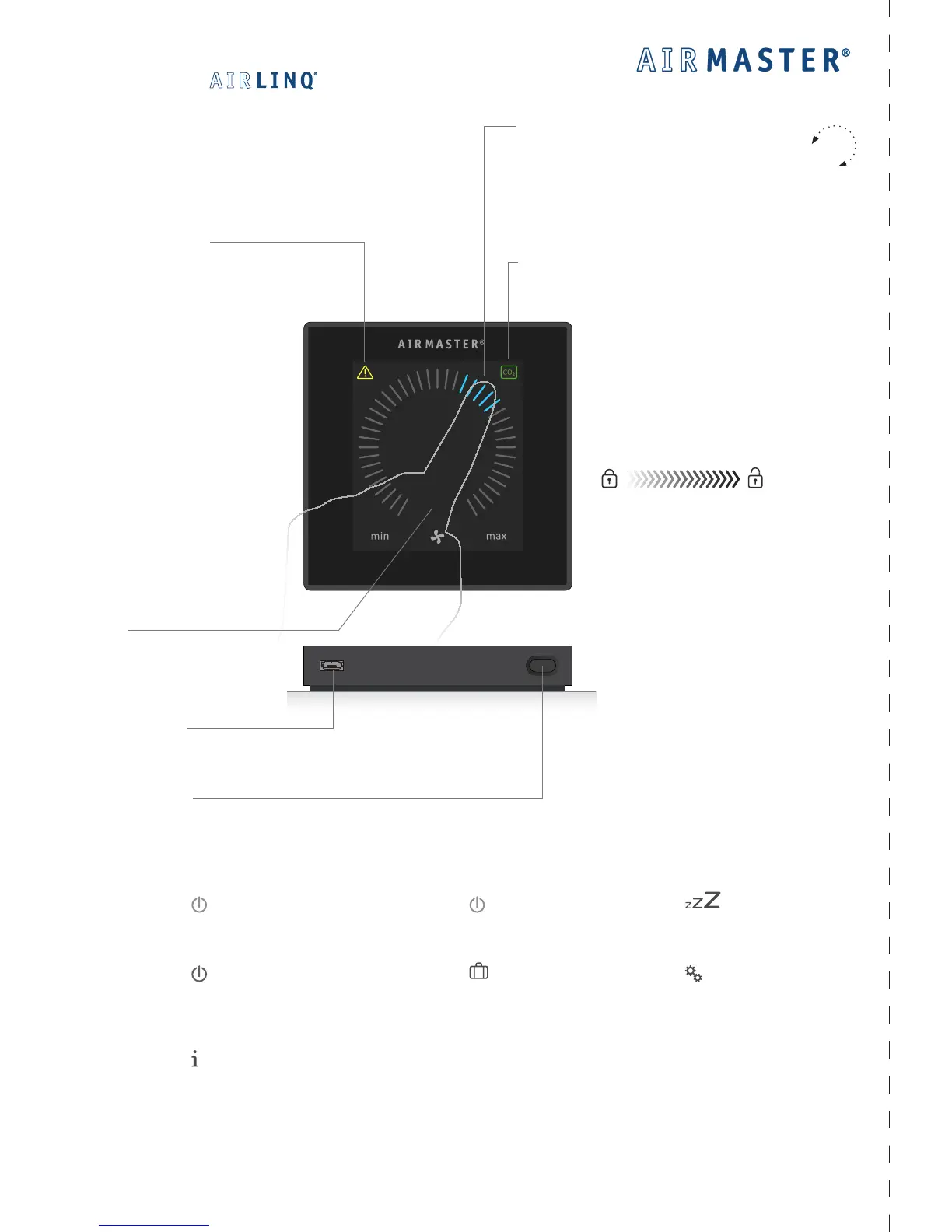
Warning and Alarm.
Yellow for warnings and red for alarms.
See Operator’s Manual page 22.
Set air ow.
Press current air ow and drag with nger to
desired air ow.
Or
Press direct on the desired air ow.
CO
2
level symbol (shows with active CO
2
sensor).
Press symbol to see current CO
2
level.
Mini-B USB port.
See Operator’s Manual page 11.
- Cancel Screen lock.
See Operator’s Manual page 19.
Cancel automatic operating lock.
Press padlock and drag in direction of
arrow.
Function button:
Start control menu.
Press.
Switch o.
Press for min. 2 seconds. Afterwards
the unit has to be started manually.
”auto”.
Shows when unit is in
automatic operation.
- Start or restart automatic operation.
Press ”
AUTO”.
- Start operation manual.
Press ”
START”.
- Standby.
Press “ STANDBY”.
- Switch O.
Press “
OFF”. Afterwards the unit has
to be started manually.
- Activate Holiday mode.
Press ”
HOLIDAY MODE”.
- Status menus.
Press “
STATUS”.
- Setup.
Press ”
SETUP”. (See Operator’s
Manual page 16 to 19.)



 To Next Page