31
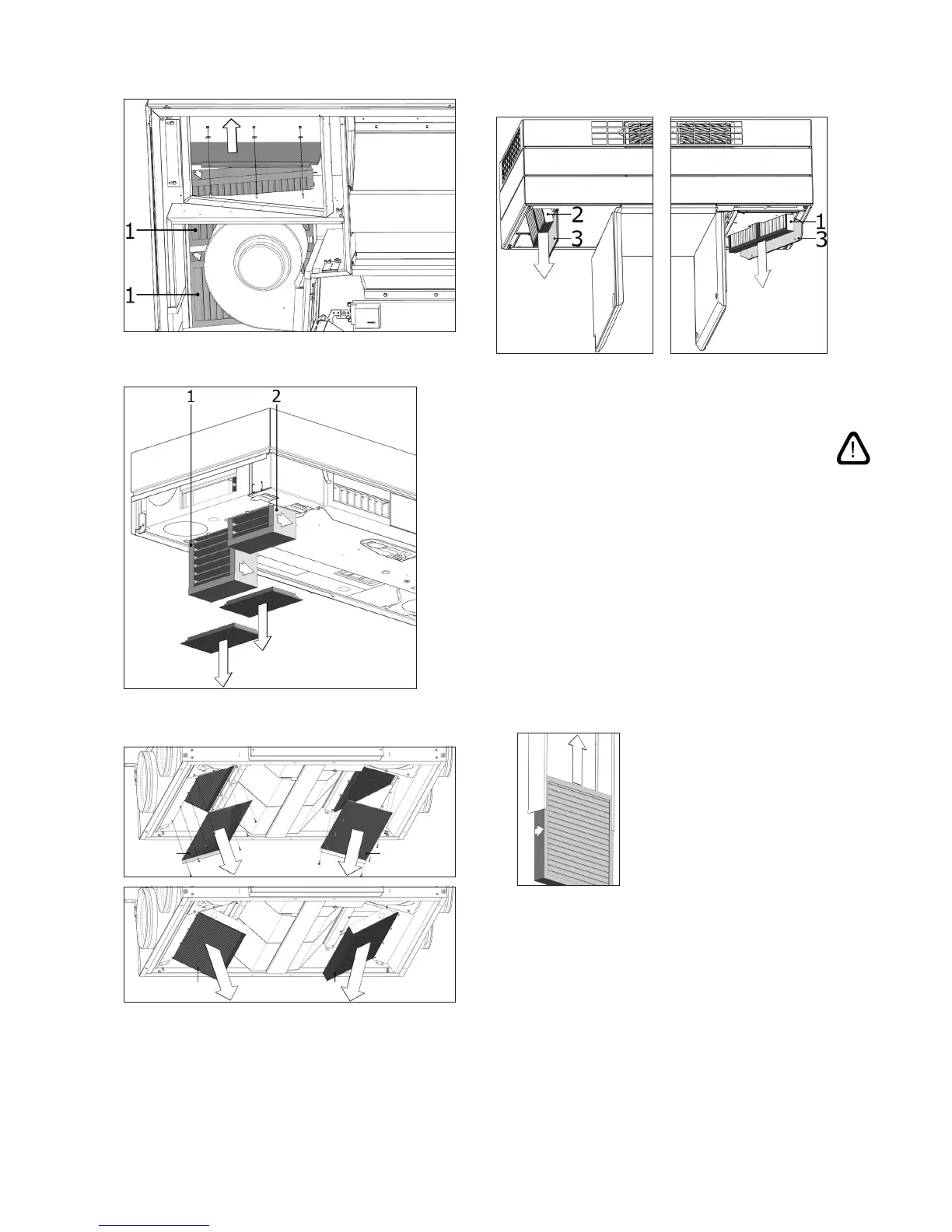
Retaining plate for fresh air lters (1) under exhaust air lter.
AM 100, CV 80, CV 200: Supply air lter (1) and exhaust
air lter (2) under EPP covers.
DV 1000: Supply air lter (1) and exhaust air lter (2)
under a cover (3).
1 2
33
7.4.4. Filter Change AM 900 and AM 1200
NB! When changing lters, the unit must be switched
o (press function button for at least 2 seconds),
disconnected from the mains and prevented from
being switched on.
• Open the unit front cover (AM 900) / remove side
panels and extraction panel (AM 1200).
•
Remove the lter retaining plate and pull the old
lters out of their frames.
•
Clean the inside of the unit and supply air duct,
check component condition and cleanliness as far
as possible. Clean the components if necessary.
• Insert new lters with the correct direction of ow
in the lter frames. (The arrow on the side of new
lters shows ow direction. The arrow must point
into the unit).
• Fit the retaining panels and service cover/panels.
•
Close the front cover (AM 900) / mount side panels
and extraction panel (AM 1200).
• Reconnect to the mains and start the unit.
• Reset service. See “Reset Service” on page 29.
AM 1000: Supply air lter (1) and exhaust air lter (2)
under a cover (3).



 To Next Page