BRIDGE LIVE Video I/O and Streaming Appliance v1.12 57 www.aja.com
Selecting the Input Stream Source
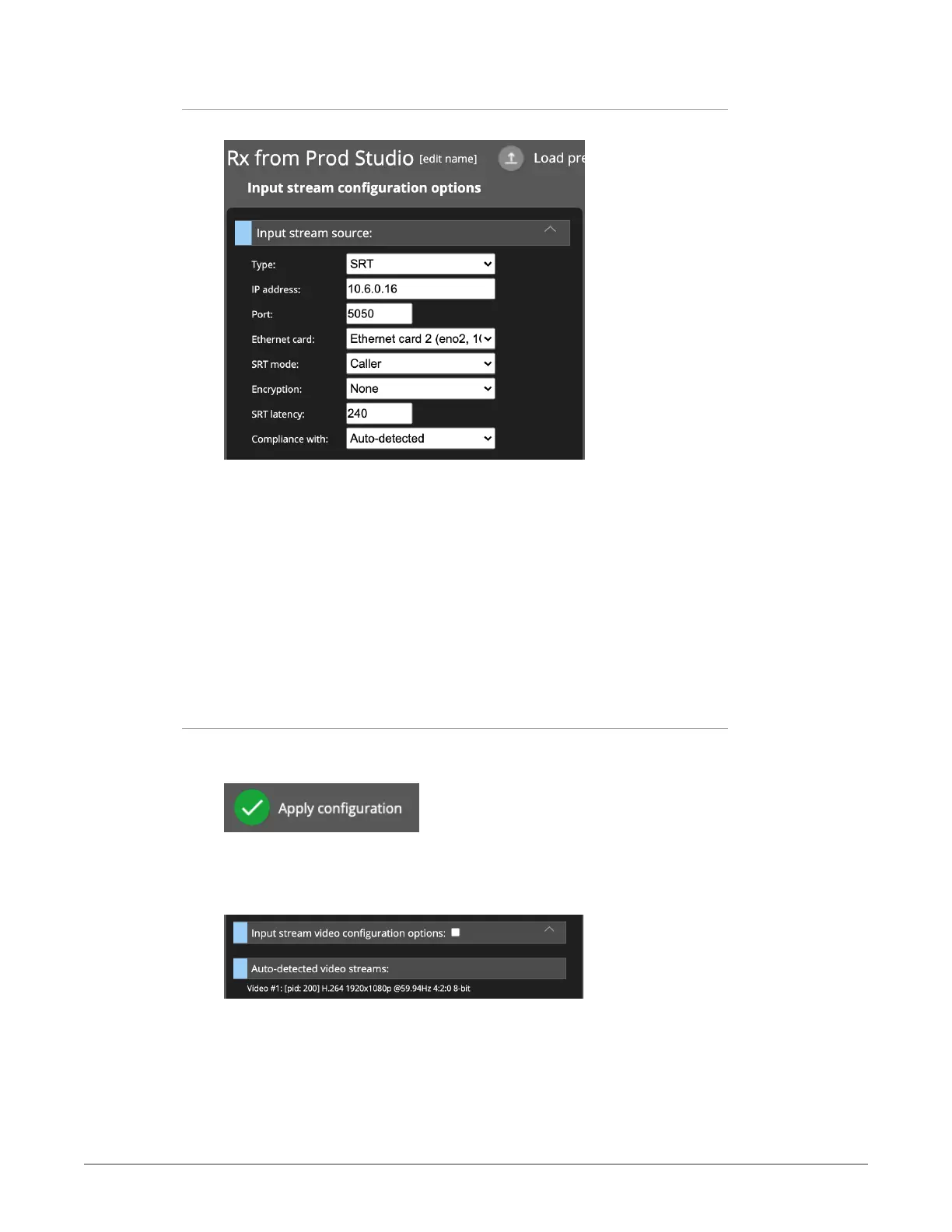
Figure 77. Input stream source selection
For the Input stream configuration options, make selections for Type, IP address,
Port, Ethernet card. In this example, the following selections were made:
• Type: SRT
• IP address: enter the IP address for the Ethernet card of the BRIDGE LIVE
device that is sending the signal. In this example, it is the IP address of the
BRIDGE LIVE device located in the Production Studio.
• Port: 5050
• Ethernet card: Ethernet card 2
• SRT mode: Caller
• Compliance with: Auto-detected
Auto-Detecting Video Streams
In the lower-right area, click Apply configuration.
Figure 78. Apply configuration button
The Input stream configuration options column updates to show a new heading
called "Auto-detected video streams."
Figure 79. New heading displays called "Auto-detected video streams"
Beneath the heading, what is shown is "Video #1: H.264 1920x1080p @59.94Hz
4:2:0 8-bit."
NOTE: Auto-detect can detect the signal only if it is actually present to the device.
Click the signal that is listed. The Input stream video configuration options
section expands and is auto-populated with the auto-detected video stream
properties.



 To Next Page