HELO H.264 Streaming and Recording Encoder v1.1r1 19 www.aja.com
Mac Startup
To run eMini-Setup on a Mac, open the Applications folder and locate the AJA
eMini-Setup application. Double-click the application to launch it.
Operating eMini-Setup
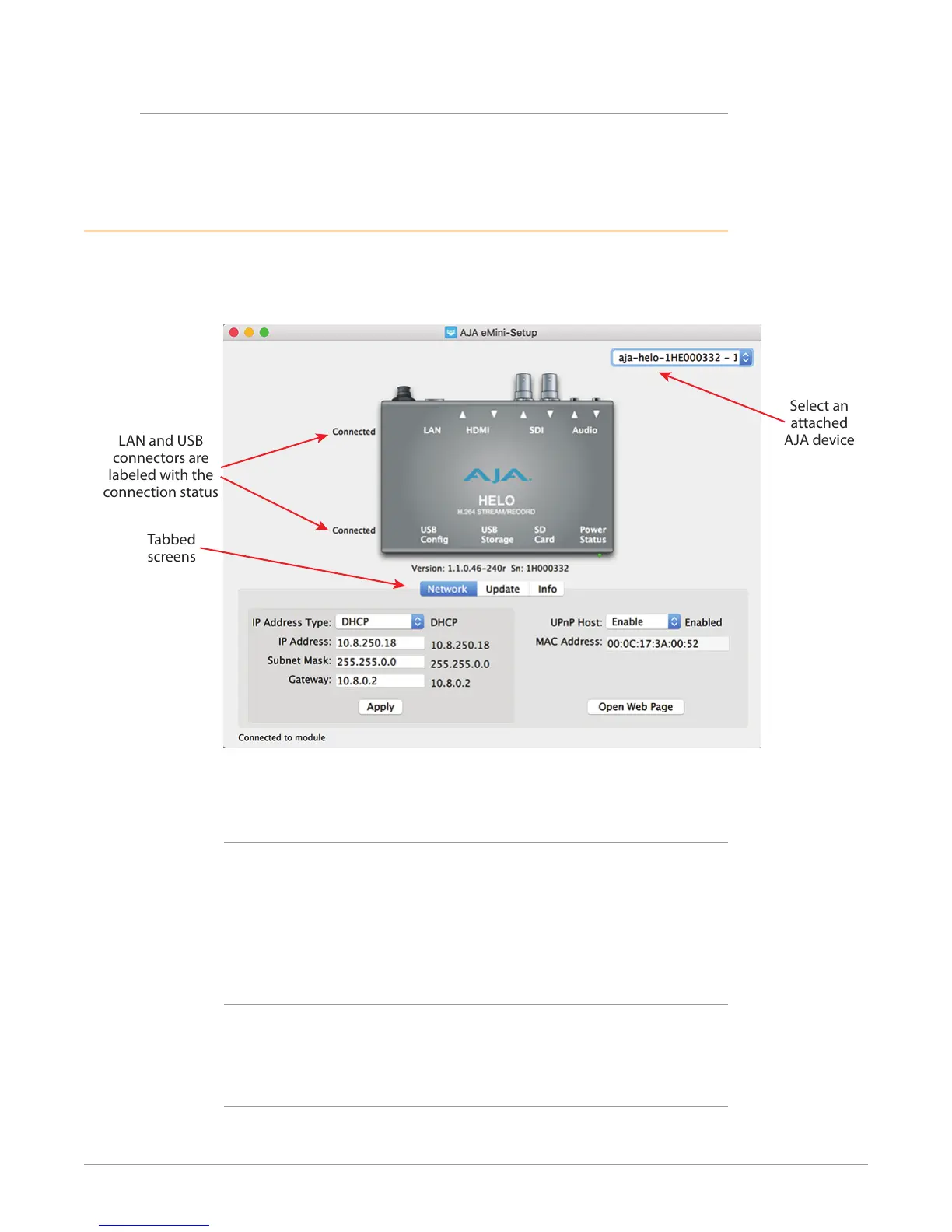
The eMini-Setup application provides a graphic interface for viewing settings and
updating software.
Figure 7. Example eMini-Setup Screen
Tabbed
screens
Select an
attached
AJA device
LAN and USB
connectors are
labeled with the
connection status
Selecting an AJA device with the pull down menu on the upper right causes
eMini-Setup to connect to the selected AJA device.
Mini-Converter Identification
• Version - The version of rmware installed in the AJA device is displayed below
the graphic.
• Sn - This is the factory set unique serial number of your AJA device. If you ever
call AJA Support for service, you may be asked for this number.
A status field at the bottom of the screen shows if the eMini-Setup application is
connected and communicating with an AJA device.
File Menu
The File drop-down menu on the eMini-Setup application bar has a Revert to
Factory Settings menu item that allows you to change the settings back to the
AJA device’s factory defaults.
Edit Menu
The Edit drop-down menu has standard Cut, Copy and Paste functions for editing
text.


 To Next Page