HELO H.264 Streaming and Recording Encoder v1.1r1 20 www.aja.com
Help Menu
The Help drop-down menu has a link to the AJA device’s manual.
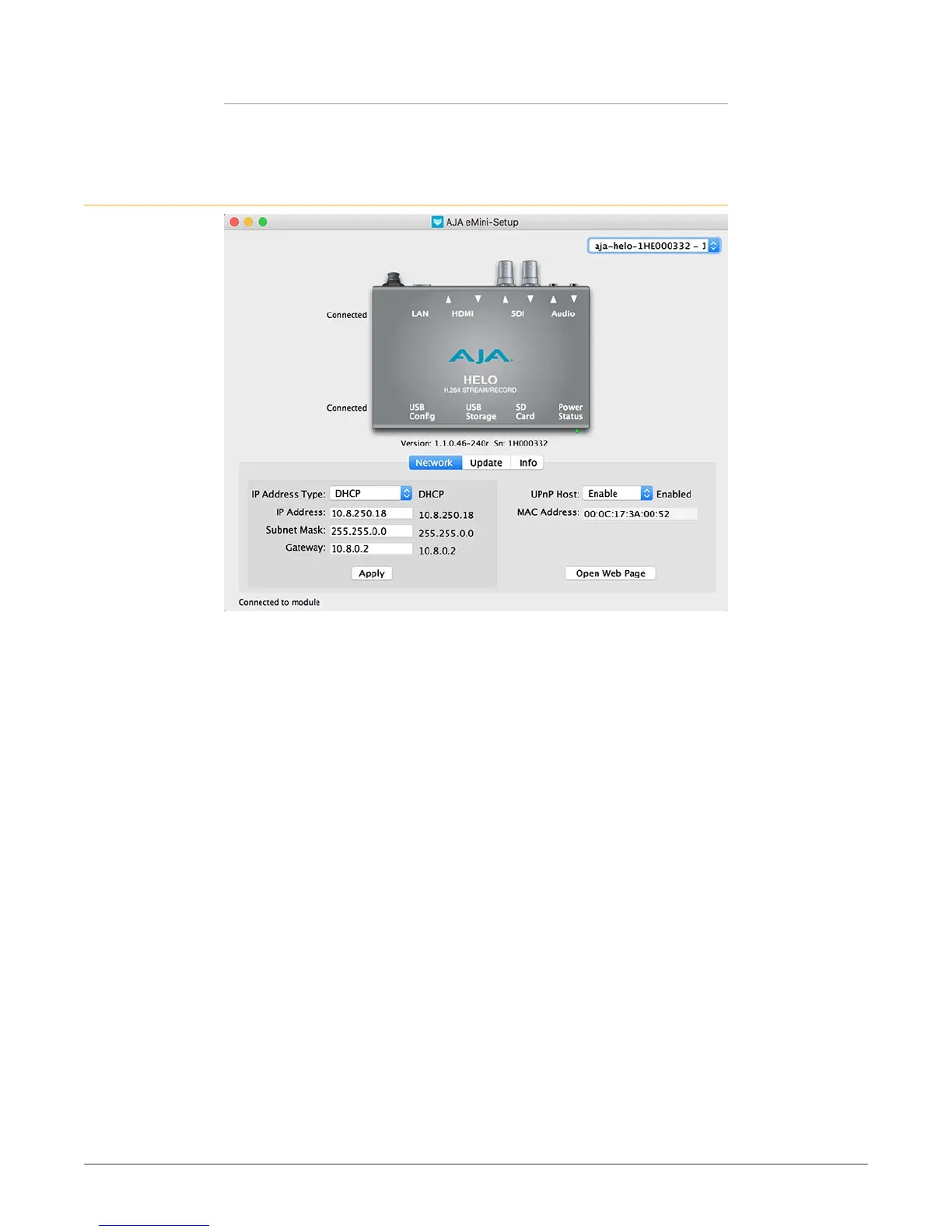
Network Tab Screen
This tab lets you change the network setup on the connected AJA device. You
must click the Apply button to initiate any IP address changes.
• IP Address Type - Choose from DHCP or Static IP Address.
• IP Address - The current IP address is displayed. A dierent IP address can be
entered.
• Subnet Mask - The current Subnet Mask is displayed. A dierent netmask can
be entered.
• Gateway - The current Gateway address is displayed. A dierent IP address can
be entered.
• UPnP Host - Choose from Enable or Disable to control whether the AJA device
makes itself visible for Windows network browsing.
• MAC Address - This is the permanent MAC address of the AJA device.
• Open Web Page - When connected to a HELO, clicking on this button opens
its web page, allowing complete remote control.


 To Next Page