HELO H.264 Streaming and Recording Encoder v1.1r1 43 www.aja.com
Presets Screen
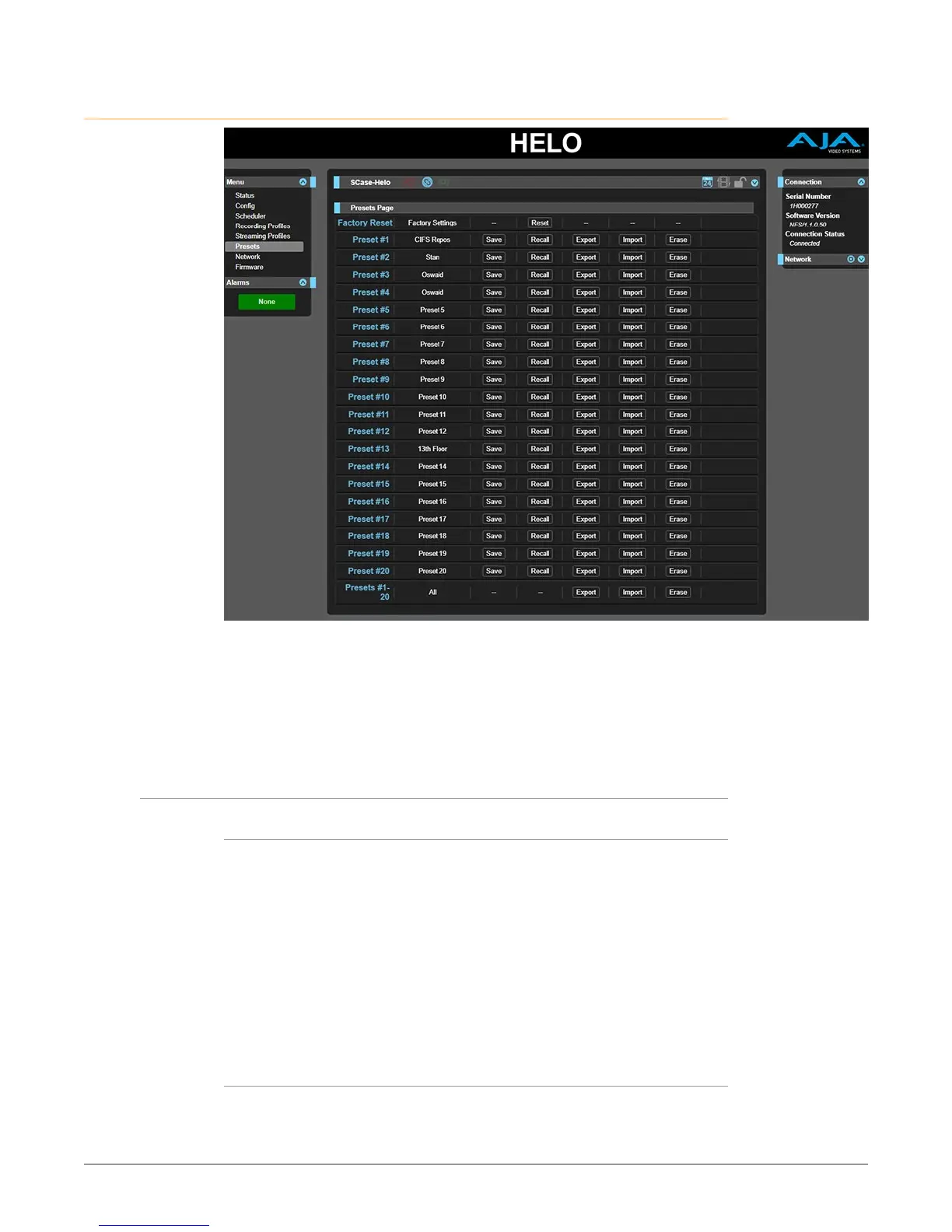
The Presets screen allows you to save HELO Preset Configurations into 20
separate memory registers and recall the presets whenever needed.
The Presets screen also includes Export and Import functions that allow exporting
one or all presets to your computer as files and importing exported preset files
from your computer. A displayed message indicates successful or failed saves,
recalls, exports, and imports.
Presets Screen Controls
Factory Reset (Web UI)
The Factory Reset button does a soft reset, which resets most functional (A and V)
parameters, but leaves basic system configuration, like the network setup, intact.
This allows the user to get HELO into a known good state without losing the web
connection settings or their saved profiles.
NOTE: A soft reset will erase saved profiles and calendars; be sure to export them before
doing a reset if you want to save their contents.
NOTE: A recessed hardware Factory Reset button is also available on HELO’s front
panel, between the USB ports, but different parameters are reset using the
hardware button. See "Factory Reset Button (Hardware)" on page 10 for more
information.
Recall
The Recall buttons recalls the saved preset configurations.


 To Next Page