HELO H.264 Streaming and Recording Encoder v1.1r1 9 www.aja.com
Chapter 2 – Product at a Glance
Front Panel
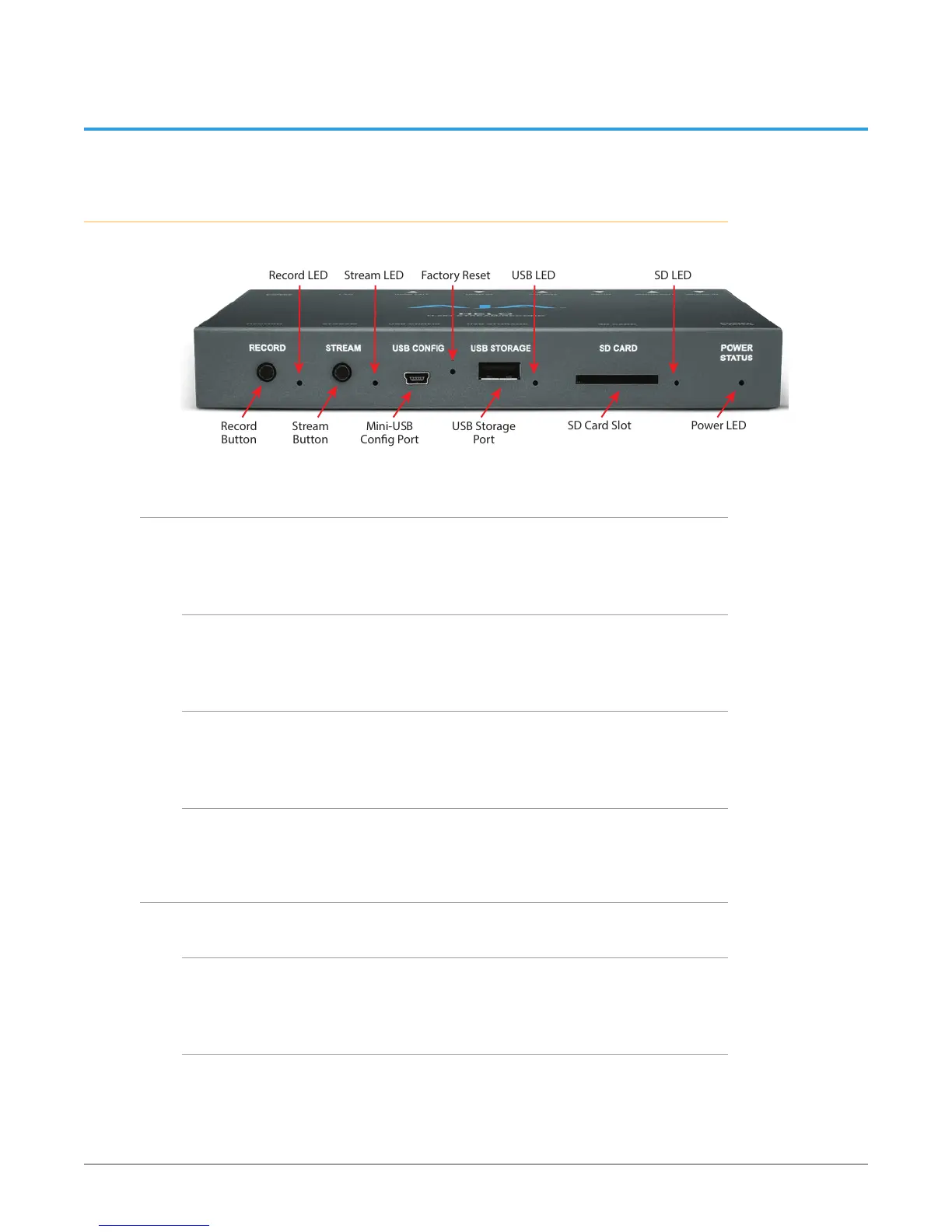
Figure 2. HELO Front Panel
Record
Button
Record LED
Stream LED Factory Reset USB LED SD LED
Stream
Button
Mini-USB
Cong Port
USB Storage
Port
SD Card Slot Power LED
Buttons
Once HELO is powered up, configured, and properly connected, the two buttons
on the front panel are used to start and stop recording and streaming.
Record Button
Pressing the Record button initiates recording to the configured media type (SD
card or USB) or record path (Network Share), or stops a recording in progress.
Stream Button
Pressing the Stream button initiates streaming output, or stops a stream in
progress.
Linking the Buttons
Using the HELO web server screen these two buttons can be linked. When linked,
pressing either button will start and stop both recording and streaming.
Ports/Slots
Mini-USB Config Port
USB connection for use with eMini-Setup for initial configuration and firmware
update.
USB 2.0 Storage Port
USB port for connecting a flash drive for recording.



 To Next Page