HELO H.264 Streaming and Recording Encoder v1.1r1 24 www.aja.com
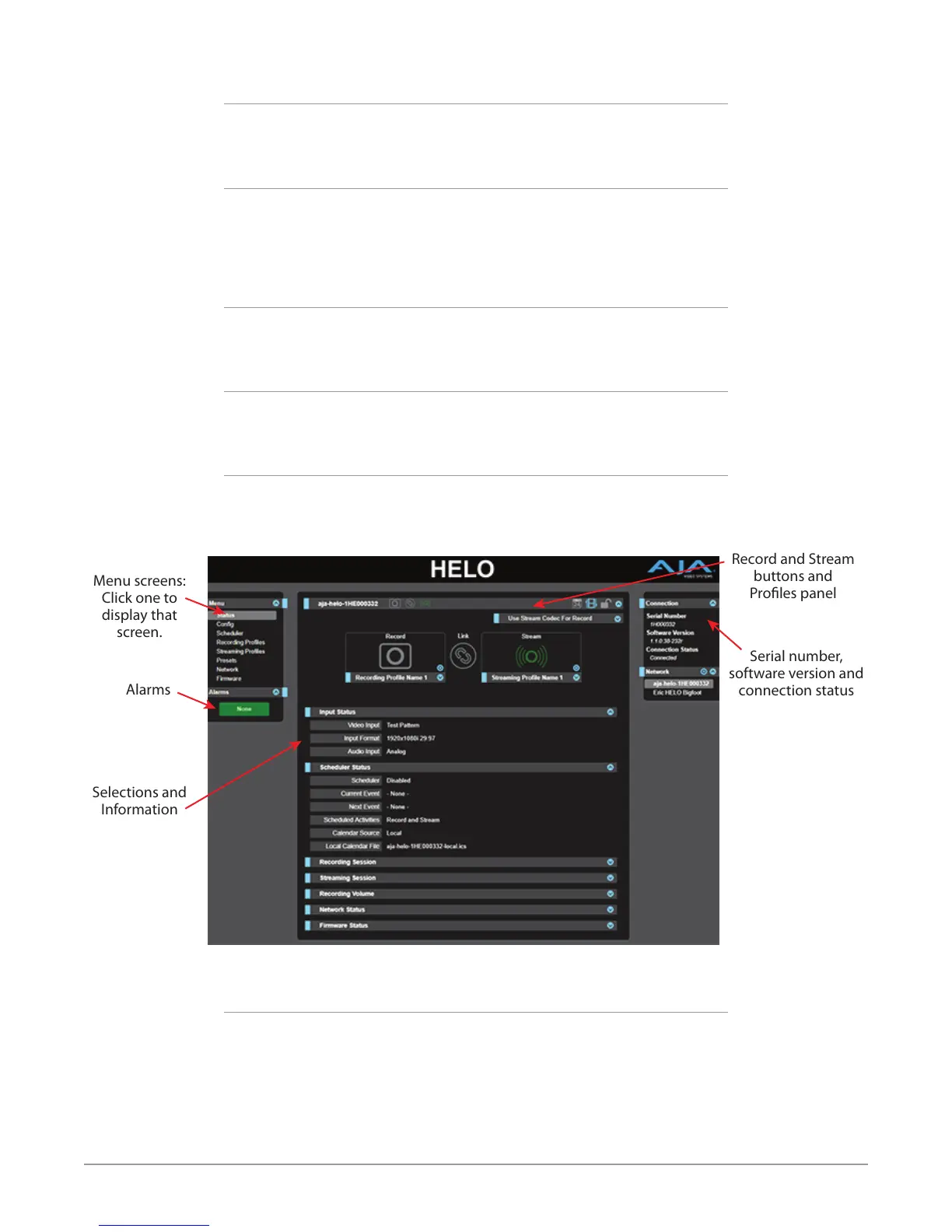
Connections Panel
On the right side of every screen is a Connection panel listing information for the
connected HELO.
Network Panel
Also on the right is a Network pane that lists other HELOs on the network. The
gear icon opens the Network Screen, same as selecting Network from the Menu
Panel. Right clicking on the name of a HELO in this list allows you turn on the
Identify feature, which will blink the power LED of that device.
Record and Stream Panel
At the top of each screen is a panel labeled with the HELO system name that
contains buttons and menus for recording and streaming.
Independent Codecs Menu
A drop-down menu on the upper right lets you either choose Independent
Codecs, or use the same Stream Codec for both streaming and recording.
Parameters and Information
The rest of the screen displays all the parameter selections and information
available for the selected HELO screen.
Figure 8. HELO Web Browser Screen Areas
Serial number,
software version and
connection status
Menu screens:
Click one to
display that
screen.
Alarms
Selections and
Information
Record and Stream
buttons and
Proles panel
Dynamic Controls
• Hovering the mouse on a parameter name displays a brief description of its
function.
• Right clicking on the parameter name resets just that parameter to its factory
default.
• For values with sliders, ne control is achieved using the arrow keys on the
keyboard to move the slider the minimum amount. The numeric value can
also be clicked on to enter a specic value.


 To Next Page