1
35
Ki Pro Installation and Operation Manual — Remote Network Control
Using DC Power
To run Ki Pro on DC power, simply plug a 3rd-party industry standard 12 volt battery
pack with a 4-pin female XLR connector into the side power connector on Ki Pro. The
battery should be capable of supplying a sustained 3.3 A (just like the supplied AC
Adapter provides). Such battery packs are available from a variety of sources.
Notes: To operate Ki Pro properly, batteries must produce no less than 12 volts and no more
than 18 volts. Ki Pro consumes only approximately 30 watts of power, so many batteries can
power Ki Pro for several hours at a time. In the event of sudden power loss, recordings in
progress will not be written properly to the media. Therefore, note when the "Low Battery"
warning appears and stop recording as soon as possible. If the battery stops providing
sufficient power, Ki Pro may or may not have time to close the file, depending on the nature
of the battery and the duration of the recording. To prevent power loss, use batteries with
metering or remaining charge indicators and stop recording while sufficient power remains.
For very long recordings, use the supplied AC power supply instead of battery power.
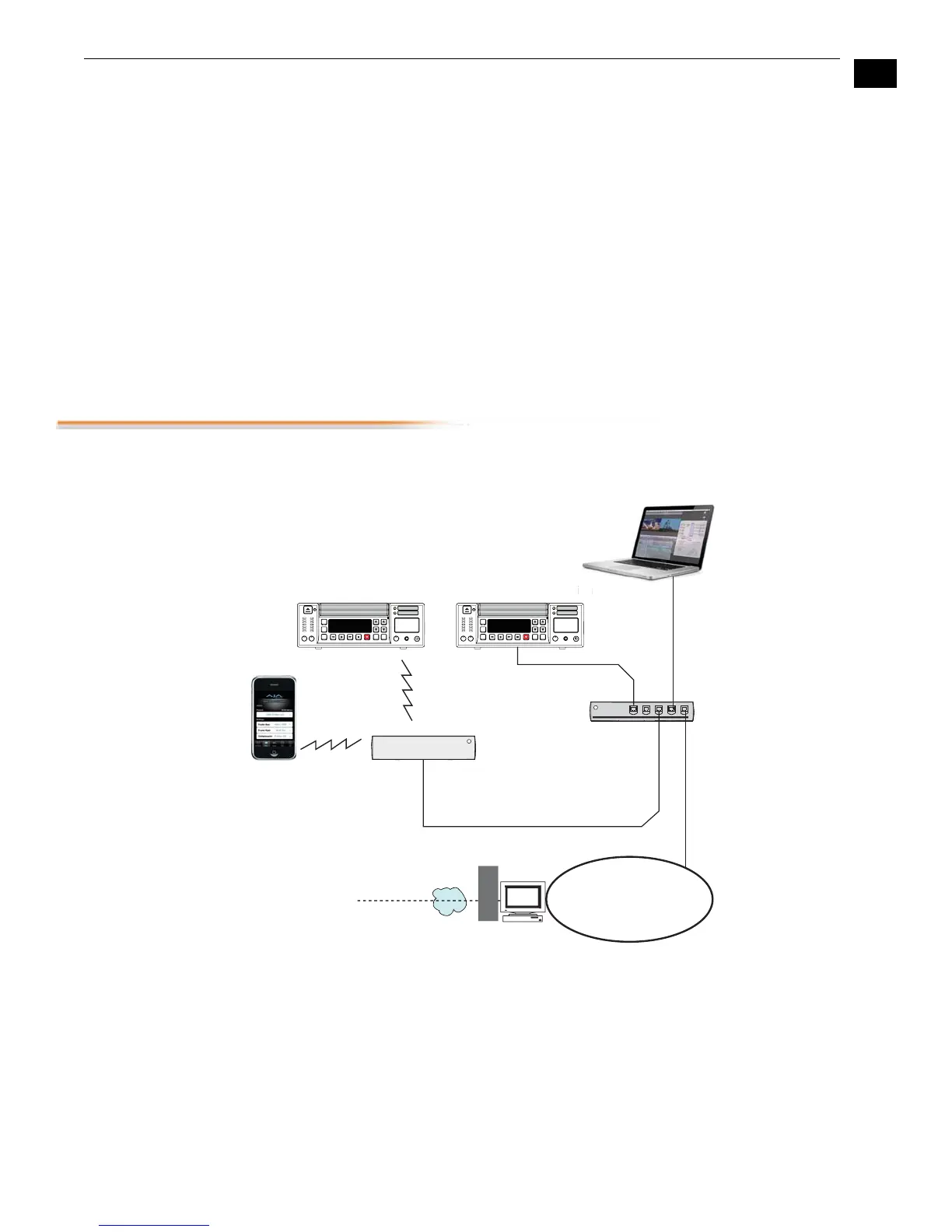
Remote Network Control
The following diagram and text explain how to interface to Ki Pro using an Ethernet
direct connection, LAN, or wireless network.
Ki Pro Networking Example
10/100/1000 Base-T
Firewall
& Router
WAN/ISP
Hub
Airport
Wireless
Router
iPhone
Ki Pro Wireless Connection Ki Pro Wired Connectionion
802.11b/g
wireless
10/100/1000 Base-T
LAN
STATUS
DELETE
CLIP
SLOT
ADJUSTSELECT
CONFIG
MEDIA
CLIP xxxxxxxx
REEL xxx
1 4% S
00:01:21:13
STATUS
DELETE
CLIP
SLOT
ADJUSTSELECT
CONFIG
MEDIA
CLIP xxxxxxxx
REEL xxx
1 4% S
00:01:21:13
Laptop
w/Web Browser
for Remote
Control



 To Next Page