86
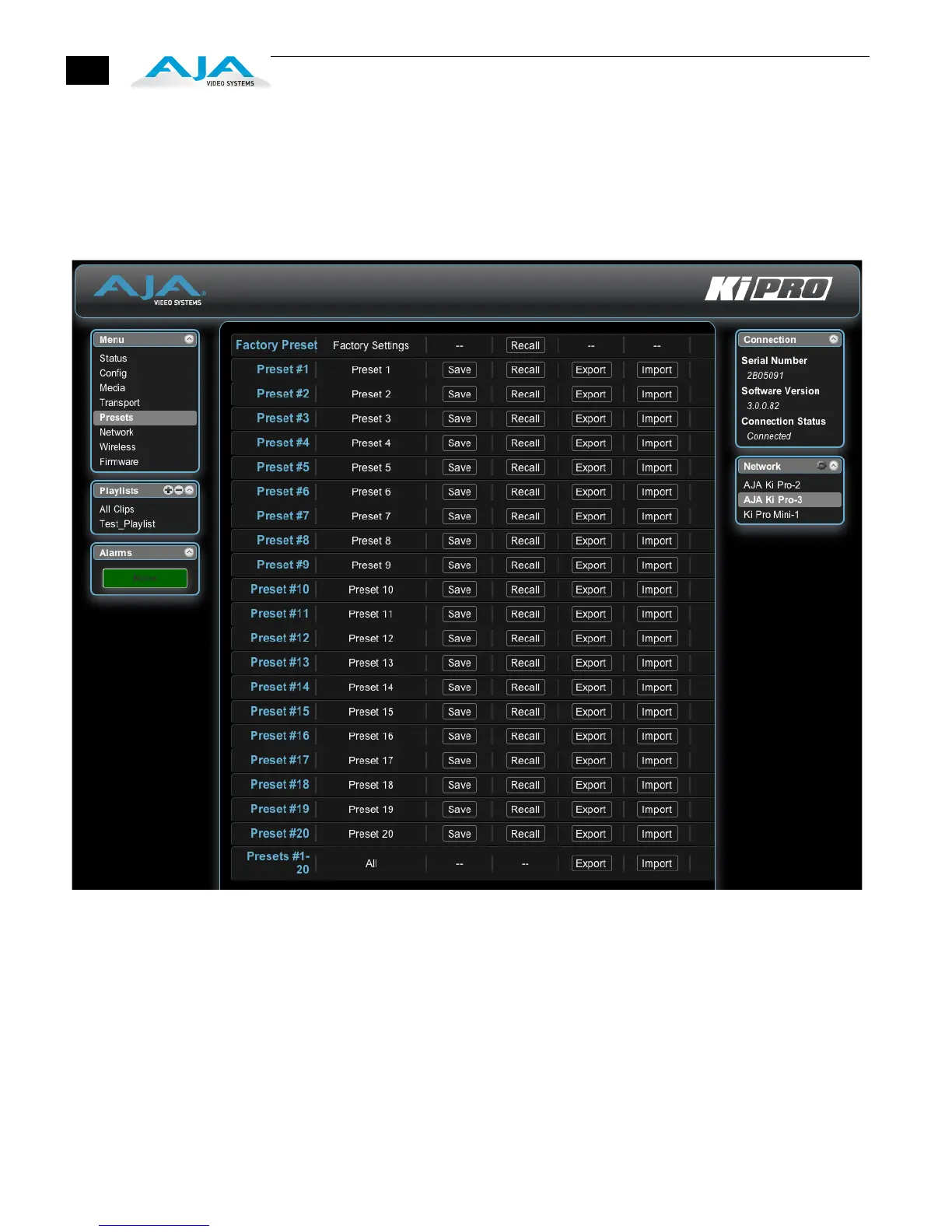
Presets Screen
The Presets screen allows you to save Preset Configurations into 20 separate memory
registers and recall the presets whenever needed. This screen also includes Export
and Import functions that allow exporting one or all presets to your computer as files
and importing exported preset files from your computer. A displayed message
indicates successful or failed saves, recalls, exports, and imports.
Ki Pro Web Interface, Presets Screen
Recall (91.1): The Recall buttons recall saved preset configurations.
When you recall a Preset Configuration, the recalled preset immediately replaces the
system’s existing configuration. All previous settings are lost unless you have
previously stored them in another preset configuration or an exported file.
Store: The Store buttons let you save the current configuration into the preset register
with the associated name and number. A preset is a set of system parameters as they
were set at the time the preset was stored. Only editable parameters are saved in the
presets. Non-editable parameters are not saved.


 To Next Page