EasyManua.ls Logo

AJA Ki Pro - Networking Ki Pro Using a Static IP Address

AJA Ki Pro
137 pages
Print Icon
To Next Page IconTo Next Page
To Previous Page IconTo Previous Page
Loading...
38
Networking Ki Pro
using a Static IP
Address
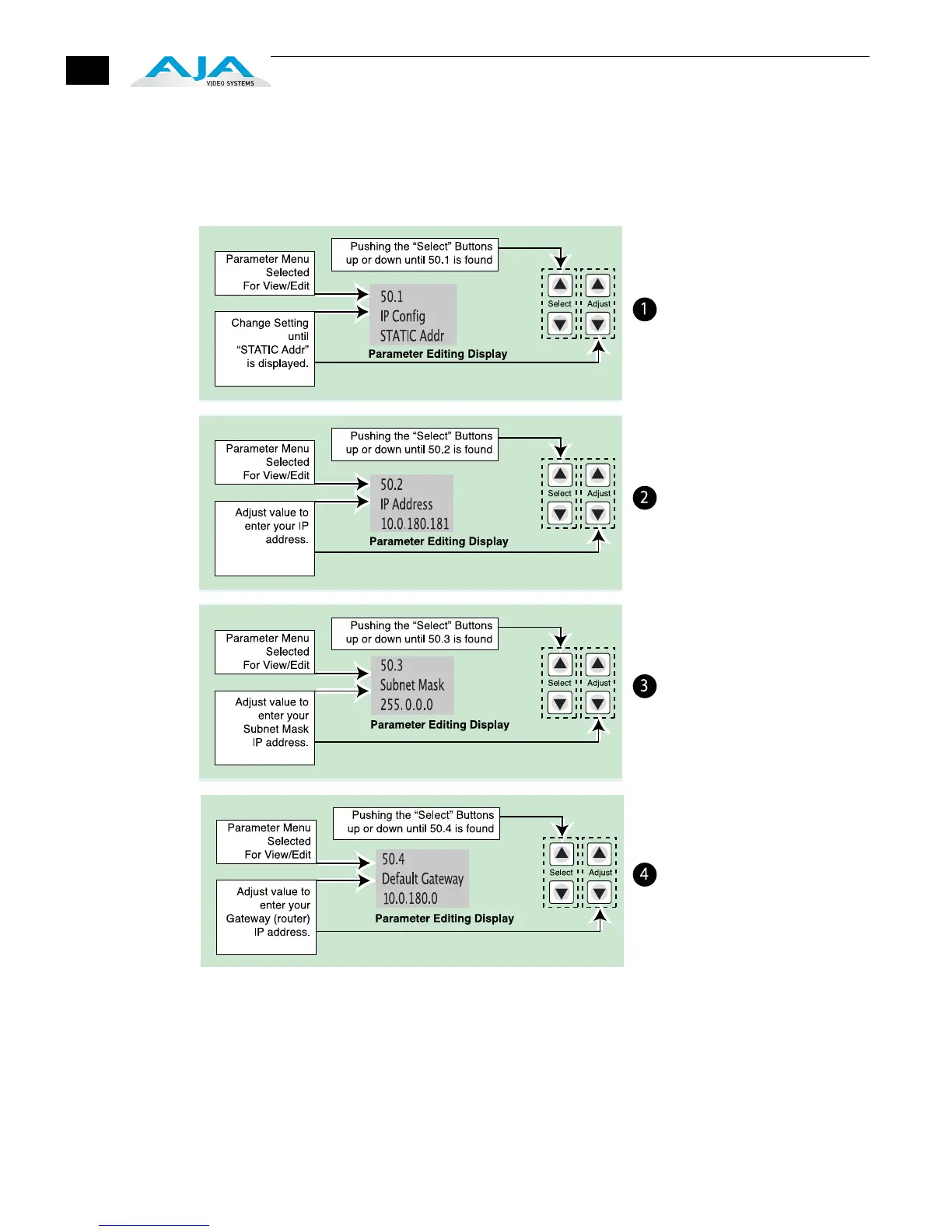
To set a static IP address for Ki Pro, you’ll have to make some simple Parameter menu
selections. The illustration below shows the four menu selections you need to make,
while entering the information provided to you by your IT administrator (as discussed
earlier).
Configuring Ki Pro with a Static IP Address
Note: for parameters 50.2,
50.3, and 50.4, you will be
setting IP addresses that
consist of “octets” separated
by a period (i.e., 10.0.180.0).
For these parameters, the
Select button selects the
octet and then the Adjust
buttons select the desired
number. Pressing Select
again advances to the next
octet. At the final octet, the
address will flash—pressing
Select at that point confirms
the setting.


Table of Contents

Other manuals for AJA Ki Pro

Related product manuals