DVD Recorder
29
Manual Recording
Setting the Recording Quality
This DVD Recorder can record in 5 different quality settings, they are
1. Press the RECORD/DISC button to enter the Record/Disc menu.
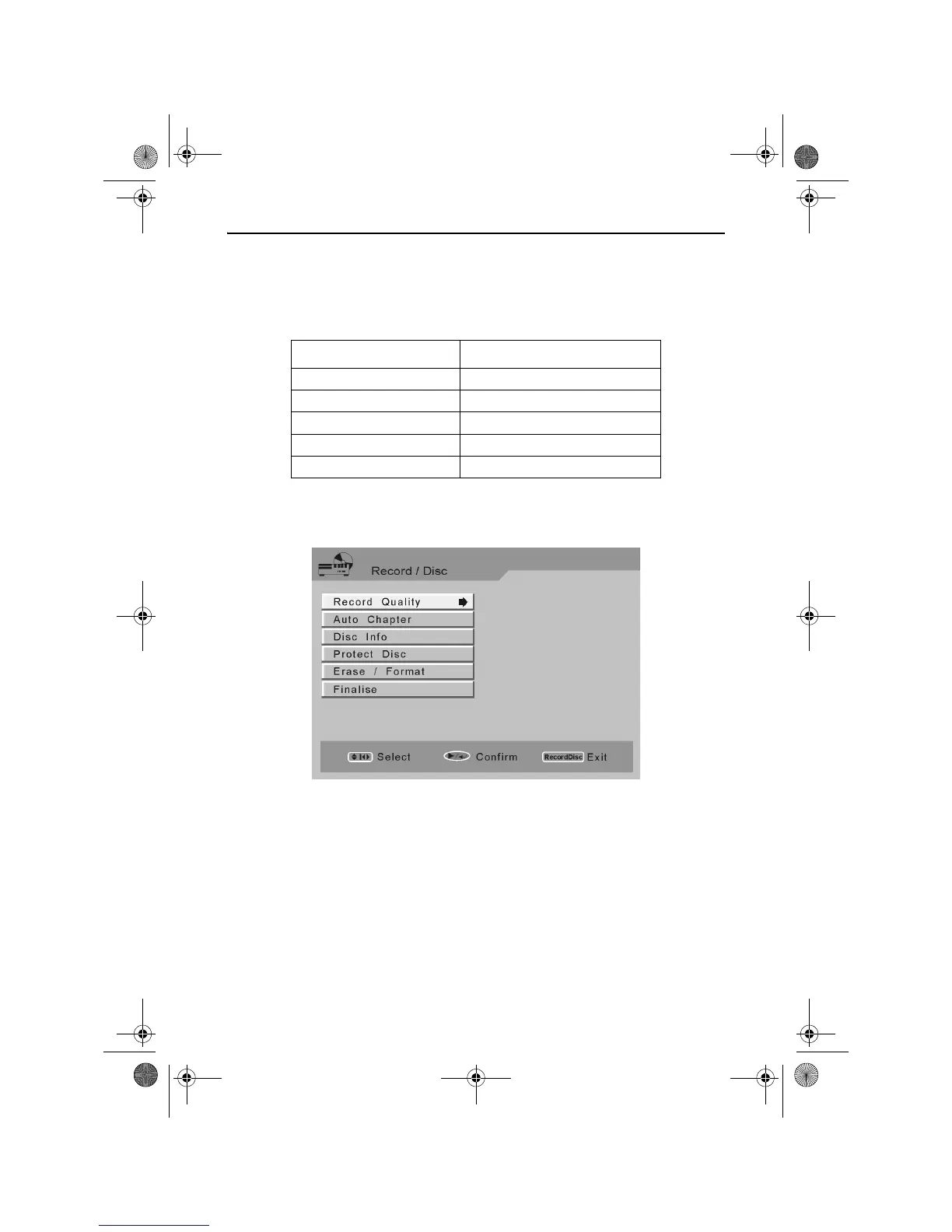
The following Record/Disc menu is displayed.
Use the UP or DOWN ARROW buttons to highlight Record Quality.
Press the RIGHT ARROW button to highlight the currently selected
Recording Quality.
Use the UP or DOWN ARROW buttons to highlight the Record Quality
you want.
Press the PLAY/ ENTER button to select the Record Quality.
Press the RECORD/DISC button to exit the Record/Disc menu.
Quality Setting Maximum Recording Time
HQ (High Quality) Approximately 60 Minutes
SP (Standard Play) Approximately 120 Minutes
LP (Long Play) Approximately 180 Minutes
EP (Extended Play) Approximately 240 Minutes
SLP (Standard Long Play) Approximately 360 Minutes
RDVD1002.book Page 29 Tuesday, January 24, 2006 12:25 PM



 To Next Page