DVD Recorder
37
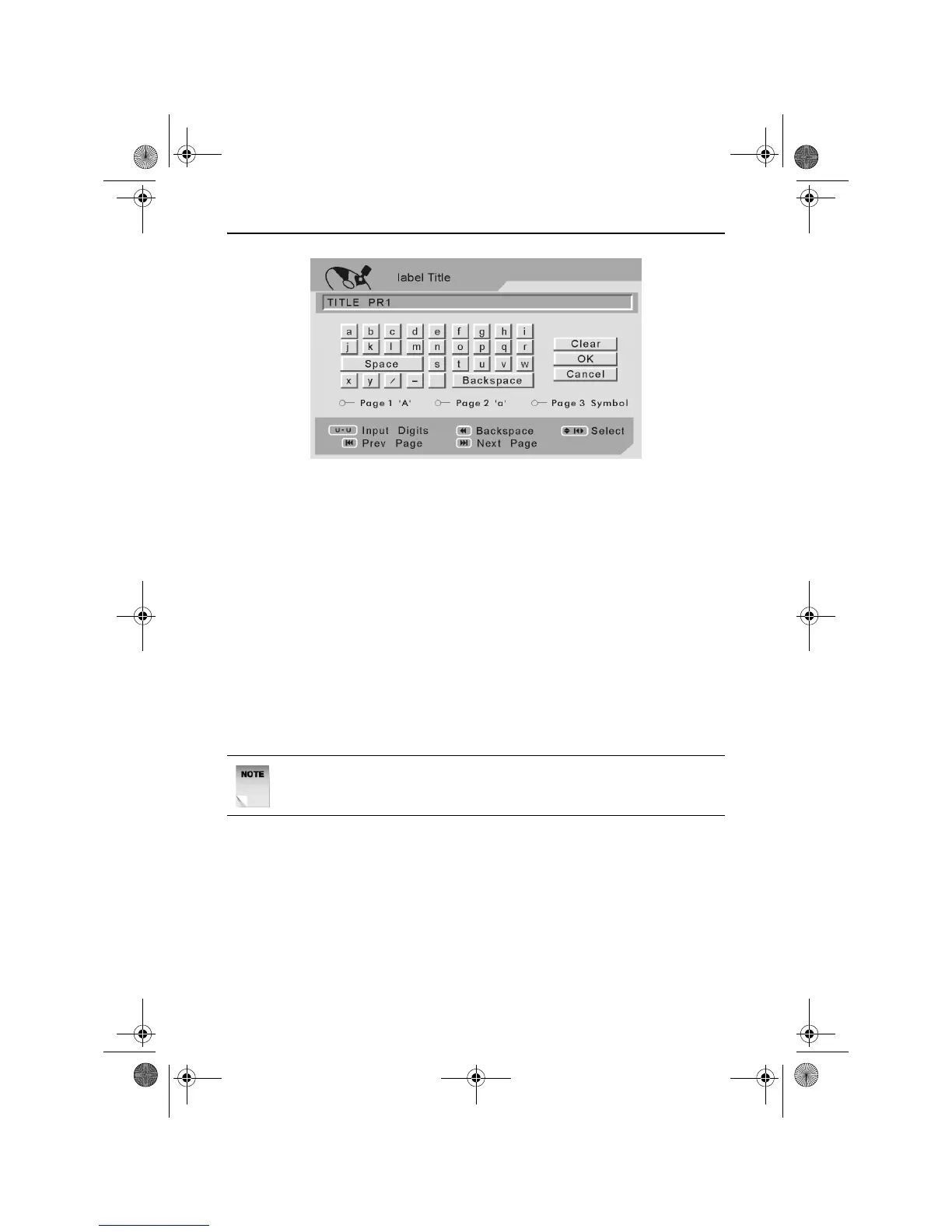
Use the LEFT, RIGHT, UP and DOWN ARROW buttons to navigate the
on screen keyboard.
Press the PLAY/ENTER button to select a character or function.
Press the NEXT or PREV buttons to view the alternative on screen
keyboards.
Once the desired label title has been entered, use the LEFT, RIGHT,
UP and DOWN ARROW buttons to highlight OK.
Press the PLAY/ENTER button to exit the Label Title screen.
Press the PLAY/ENTER button a second time to complete the timer
event recording.
To exit the Timer Recording menu and begin the timer recording, press
the PLAY/ENTER button.
To Check/change a Timer Recording
Switch on the DVD Recorder by pressing the STANDBY button.
Press the TIMER button. The Timer menu will be displayed on screen.
Use the UP and DOWN ARROW buttons to highlight Timer Event
Settings.
Press the RIGHT ARROW button to access the Timer Recording menu.
NOTE: The DVD Recorder will start a timer event recording as long
as writable media is loaded in the disc drawer.
RDVD1002.book Page 37 Tuesday, January 24, 2006 12:25 PM



 To Next Page