841
B - Intuitive attendant control
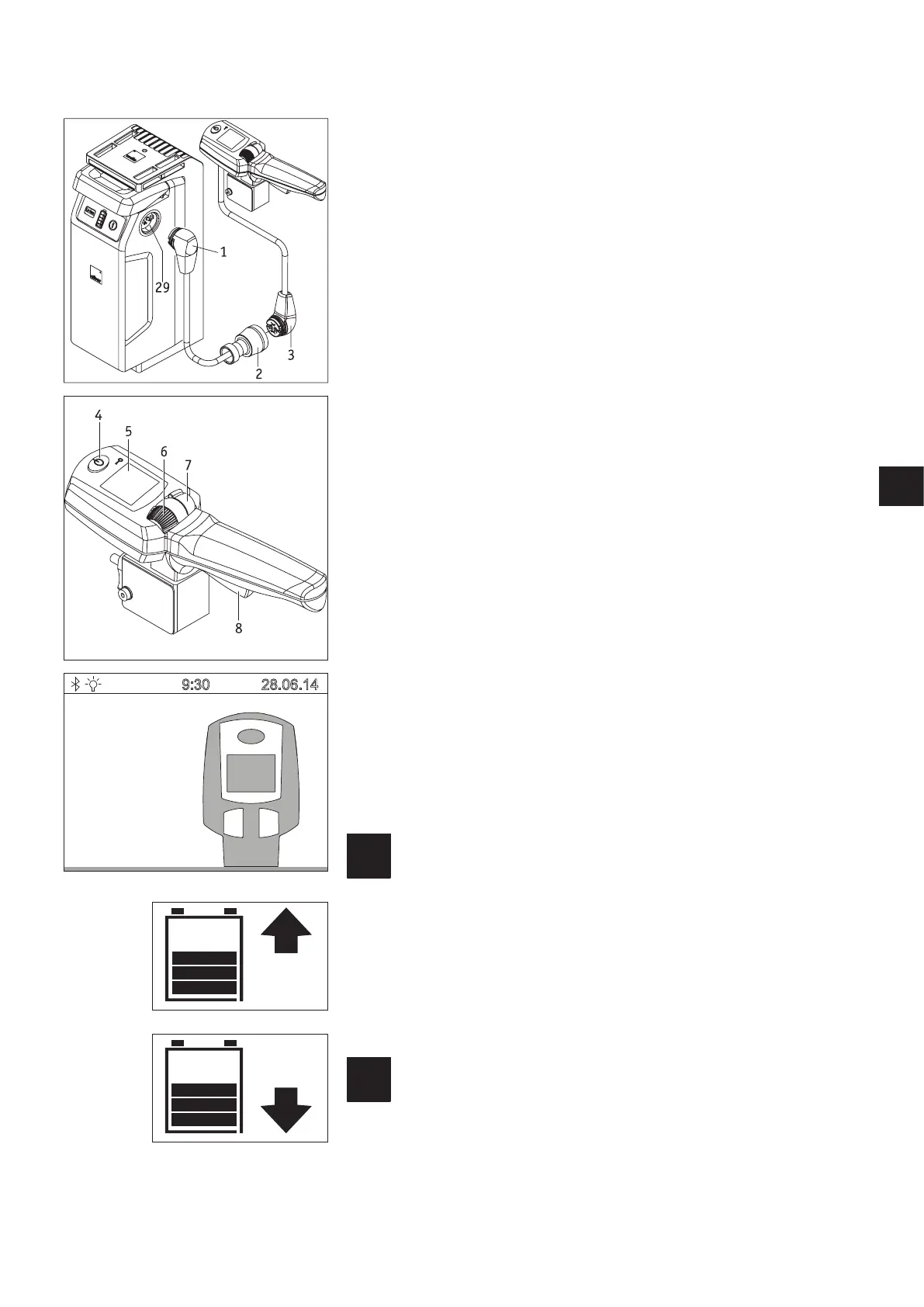
The intuitive attendant control (hereinafter called attendant control) takes full control of
the e-fix and may only be used by someone accompanying the wheelchair user. Under no
circumstances may the wheelchair user themselves operate attendant control. The indi-
vidual components are installed by Alber or by the authorised specialist dealer.
1. Connecting the attendant control
• Switch off the wheelchair user‘s control unit (see chapter 5.2.2).
• Connect the plug [3] of the intuitive attendant control to the adapter cable socket
[2].
• If this is not already inserted: Insert the plug [1] of the battery charger into one of
the sockets [29] on the battery pack.
• The attendant control is now connected to the e-fix.
2. Starting up attendant control
• Switch on the e-fix and wait until the start screen is displayed.
Under no circumstances touch the attendant control, the control unit joystick or the
individual operating elements during start-up. If you do, you will get an error mes-
sage.
• Press button [4] on the attendant control. This switches the system on and brings up
the following status displays:
– in the wheelchair user’s control unit display:
text “attendant control active” with the attendant control symbol (see diagram).
– in the attendant‘s control unit display [5]:
Battery symbol (indication of battery capacity), to the right of this the currently
selected travel direction (arrow symbol) – see diagrams to the bottom left.
• The attendant control is now active, the control unit inactive. The wheelchair can now
only be moved by an attendant.
3. Driving mode with attendant control
• Specify the direction of travel you require by pressing switch [7] forwards (forwards
travel) or backwards (reverse travel). The selected travel direction is shown in the dis-
play by an arrow symbol.
• Using the adjustment wheel [6], select the maximum final speed you require. When
setting your speed, this will be displayed as a percentage below the battery symbol.
• Pull the driving lever [8] to start moving.
The maximum final speed can be stored in the e-fix software. Con-
tact your specialist dealer in this regard.
4. Turning off the attendant control
Press button [4] of the attendant control to switch it off.
If the control unit is still switched on when you do this it will immediately take control
of the e-fix. To fully shut down the e-fix you need to switch it off using the control unit
(see chapter 5.2.2).
If the e-fix is switched off using the control unit when attendant
control is still active, attendant control is automatically activated
when you next start up the system.
9:30
28.06.14
ATTENDANT
CONTROL ACTIVE



 To Next Page