Getting to know your telephone
8AL90627ENAA ed02 9 /45
1.1.2.4.1 Install the add-on to the desk phone
Power Boost must be activated if the desk phone is supplied via Power over Ethernet (PoE). Contact
your administrator for more information.
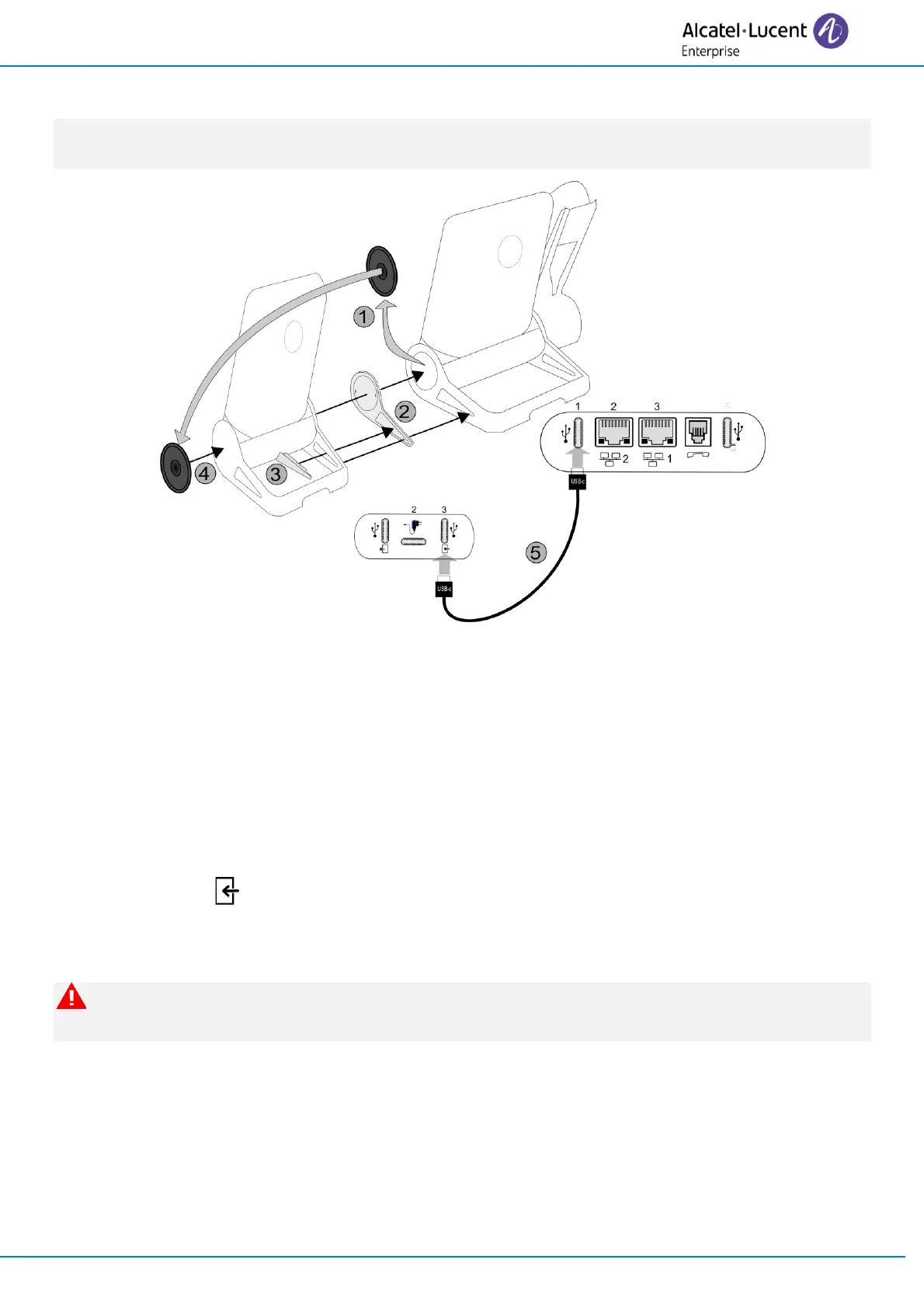
• Fix the add-on to the desk phone by using the provided foot clip.
o Remove the cover on the foot of the desk phone on the side where you want to
attach the add-on module.
o First, place the provided foot clip on the add-on module and clip the second side to
the foot of the desk phone.
o To secure in place, insert the lock clip into the installed foot clip.
o Place the cover previously removed from the desk phone on the outside of the add-
on module.
• Plug the provided cord into the dedicated sockets behind your set and the add-on (USB-c to
USB-c cable, ; as described in the picture).
• Restart the desk phone (unplug and plug in the power jack if you are using an external
power adapter or the Ethernet connector – LAN).
When uninstalling the add-on module, first remove the lock clip. Otherwise there is a risk of
damaging the foot clip.



 To Next Page