8028 SIP Doorphone (G2) FW 3.2
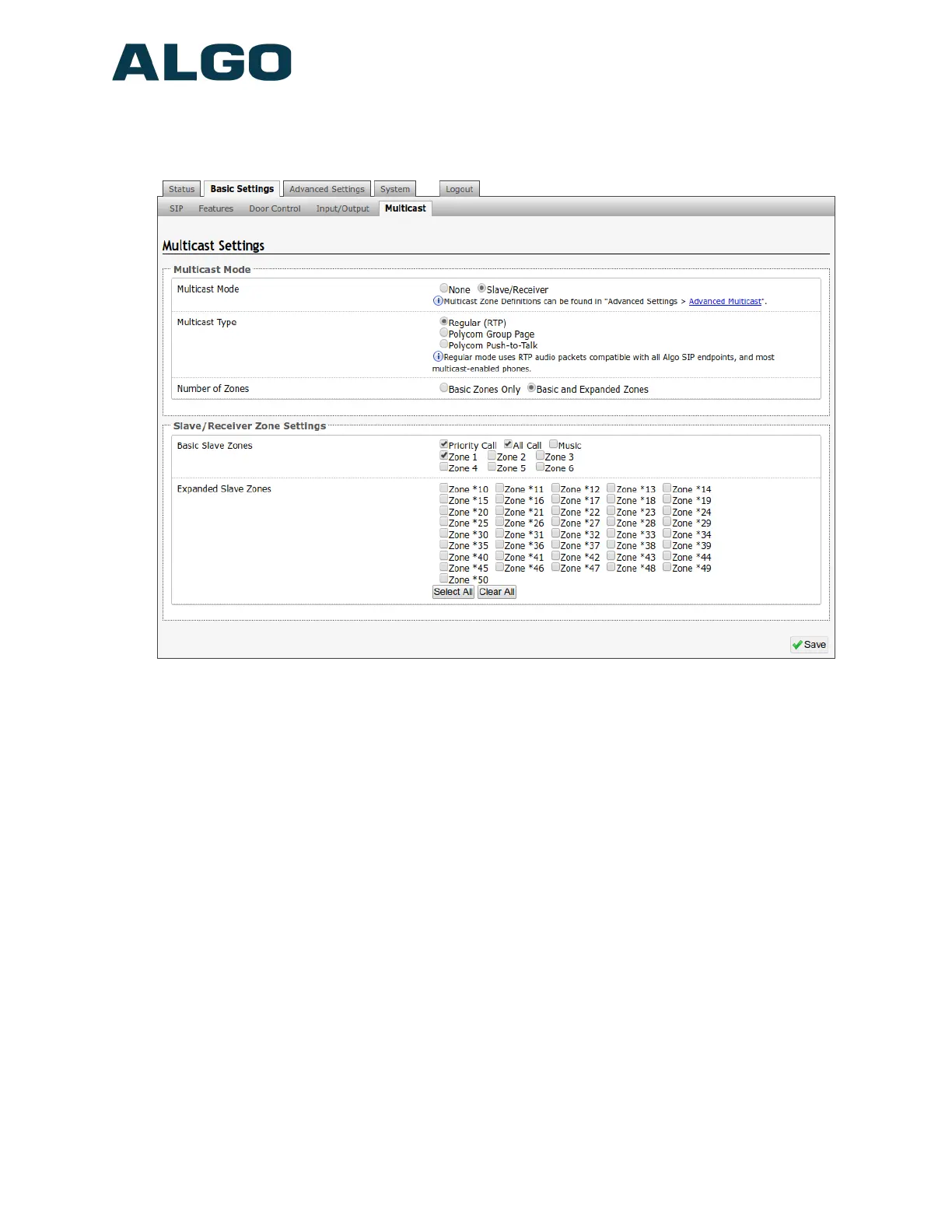
“Expanded” zones can also be enabled, in the Basic Settings > Multicast tab, allowing
up to 50 zones in total. These have the same behaviors as the basic zones, but are
hidden by default to simplify the interface.
Multicast Mode (Slave Selected)
If Slave mode is enabled the Door Station’s speaker will activate when receiving a
multicast message.
Multicast Type - Regular
Select “Regular” if receiving multicast from other Algo SIP endpoint(s) and/or multicast-
enabled phone(s) that use RTP audio packets.
Number of Zones
Select “basic” zones if configuring nine or fewer multicast zones or “expanded” to
configure up to 50 zones. The expanded zones have the same behaviour as the basic
slave zones, but are hidden by default to simplify the interface.
Slave Zones
Select one or more multicast zones for the 8028 SIP Doorphone to monitor. Note that
multicast zone priority is based on the zone definition list order (top to bottom) available
under Advanced Settings > Advanced Multicast tab.
Document 90-00104
05/21/2020
Page 32
Algo Communication Products Ltd
4500 Beedie St Burnaby BC Canada V5J 5L2
www.algosolutions.com
(604) 454-3792
support@algosolutions.com



 To Next Page