8028 SIP Doorphone (G2) FW 3.2
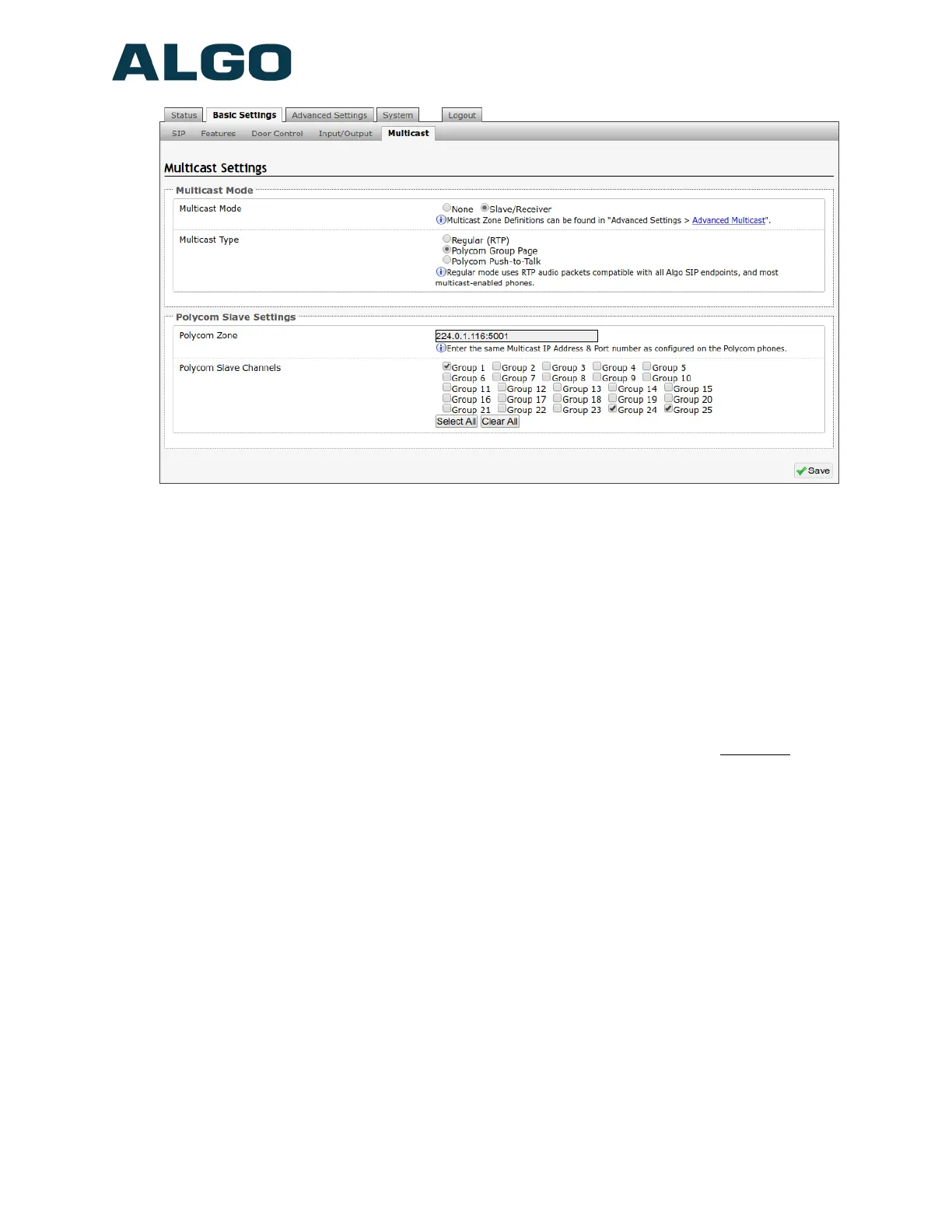
Multicast Type – Polycom Group Paging/Push-to-Talk
The 8028 SIP Doorphone may receive multicast paging compatible with Polycom “on
premise group paging” protocol.
To configure the 8028 as a slave to play Polycom page announcements, select “Group
Page” or “Push-to-Talk”. Then enter the Polycom Zone (IP Address and Port) that
matches the configuration of the Polycom phones and Channels. The “Default Channel” is
the target group in a Polycom paging environment.
The Polycom phone used as page audio source for the 8028(s), must be configured to
use either G.711 or G.722 audio codec. The Polycom phone(s) must also be
configured with the “Compatibility” setting (“ptt.compatibilityMode”) disabled in
order for this codec setting to be applied.
If using a Polycom phone as the Multicast master, a tone may be set for any of the 25
Polycom Groups configured on the Algo device. If an Algo device is used as a Multicast
master, a tone does not have to be set as the Algo master will provide its own tone.
Polycom Group Tones can be set in Advanced Settings > Advanced Multicast tab.
Document 90-00104
05/21/2020
Page 33
Algo Communication Products Ltd
4500 Beedie St Burnaby BC Canada V5J 5L2
www.algosolutions.com
(604) 454-3792
support@algosolutions.com



 To Next Page